> ## Documentation Index
> Fetch the complete documentation index at: https://docs.fanfare.io/llms.txt
> Use this file to discover all available pages before exploring further.
# Audiences
> Creating consumer groups for targeted access and exclusive experiences
An **Audience** is a group of consumers you want to target with specific access or experiences. Audiences let you create VIP early access, invite-only launches, and targeted promotions.
## Why Use Audiences?
Audiences help you:
* **Reward loyalty** — Give your best consumers early access
* **Create exclusivity** — Run invite-only launches
* **Target segments** — Different experiences for different consumer groups
* **Sync with your tools** — Import audiences from your marketing platforms
## Audience Types
### Dynamic Audiences
Membership is calculated automatically based on rules you define. As consumer attributes change, membership updates automatically.
**Example:** VIP consumers with high loyalty scores
```
Audience: "VIP Consumers"
Rule: Loyalty score greater than 100
Result: Consumers automatically join/leave as their score changes
```
**Best for:**
* Loyalty tiers (high-value consumers)
* Engagement segments (active users)
* Geographic targeting (consumers in specific regions)
### Static Lists
Membership is manually curated. Consumers don't automatically join or leave.
**Example:** Beta testers for a new feature
```
Audience: "Beta Testers"
Members: Manually added list of consumer emails
Result: Fixed membership until you change it
```
**Best for:**
* Invite lists for exclusive launches
* Contest winners
* Manually curated VIP lists
### Synced Lists
Membership is imported and maintained from external systems like your email platform or e-commerce store.
**Example:** Newsletter subscribers from Klaviyo
```
Audience: "Newsletter Subscribers"
Source: Synced from Klaviyo segment
Result: Keeps in sync as your Klaviyo segment changes
```
**Best for:**
* Using existing marketing segments
* E-commerce consumer data
* Maintaining consistency across platforms
## Creating Rules for Dynamic Audiences
Dynamic audiences use rules to determine who qualifies. You define conditions based on consumer attributes.
### Available Attributes
| Attribute | Description | Example |
| -------------- | ----------------------------- | --------------------- |
| Loyalty score | Consumer value score (0-200+) | Score > 100 |
| Total orders | Number of purchases | Orders > 5 |
| Lifetime value | Total amount spent | LTV > \$500 |
| Activity level | Recent engagement | Activity > 50 |
| Status | Account status | Status = Active |
| Location | Country, region, city | Country = US |
| Email domain | Consumer's email domain | Contains @company.com |
### Rule Operators
| Operator | Meaning | Example |
| ------------ | --------------------- | ---------------------------- |
| Equals | Exact match | Country equals "US" |
| Greater than | Above value | Loyalty score > 100 |
| Less than | Below value | Orders \< 3 |
| Between | Within range | LTV between $100-$500 |
| Contains | Text includes | Email contains "@vip" |
| In list | One of several values | Country is US, Canada, or UK |
| Exists | Has a value | Phone exists |
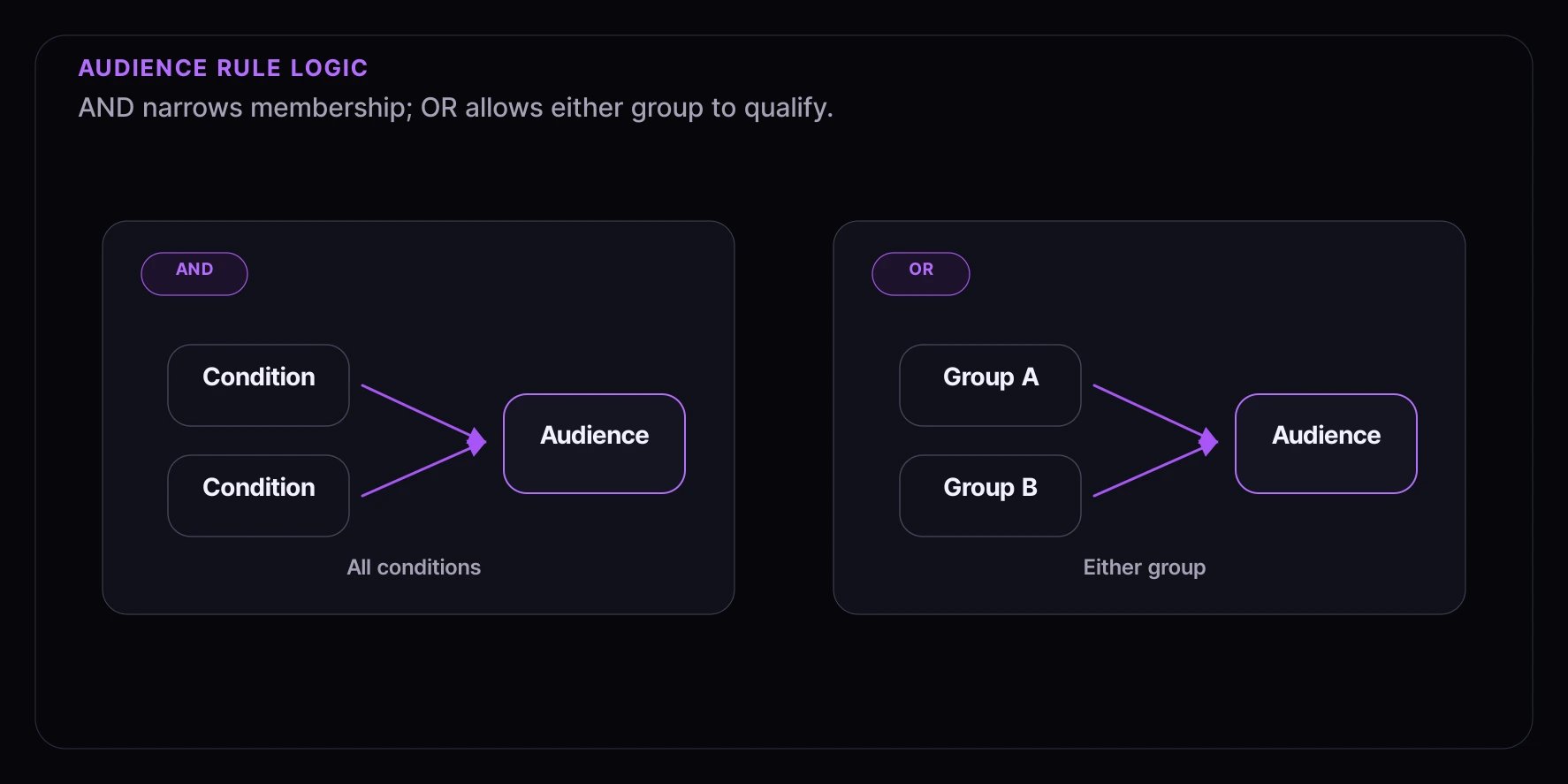
### Combining Rules
**AND logic:** All conditions must be true
**OR logic:** Any condition can be true
 ## Using Audiences with Experiences
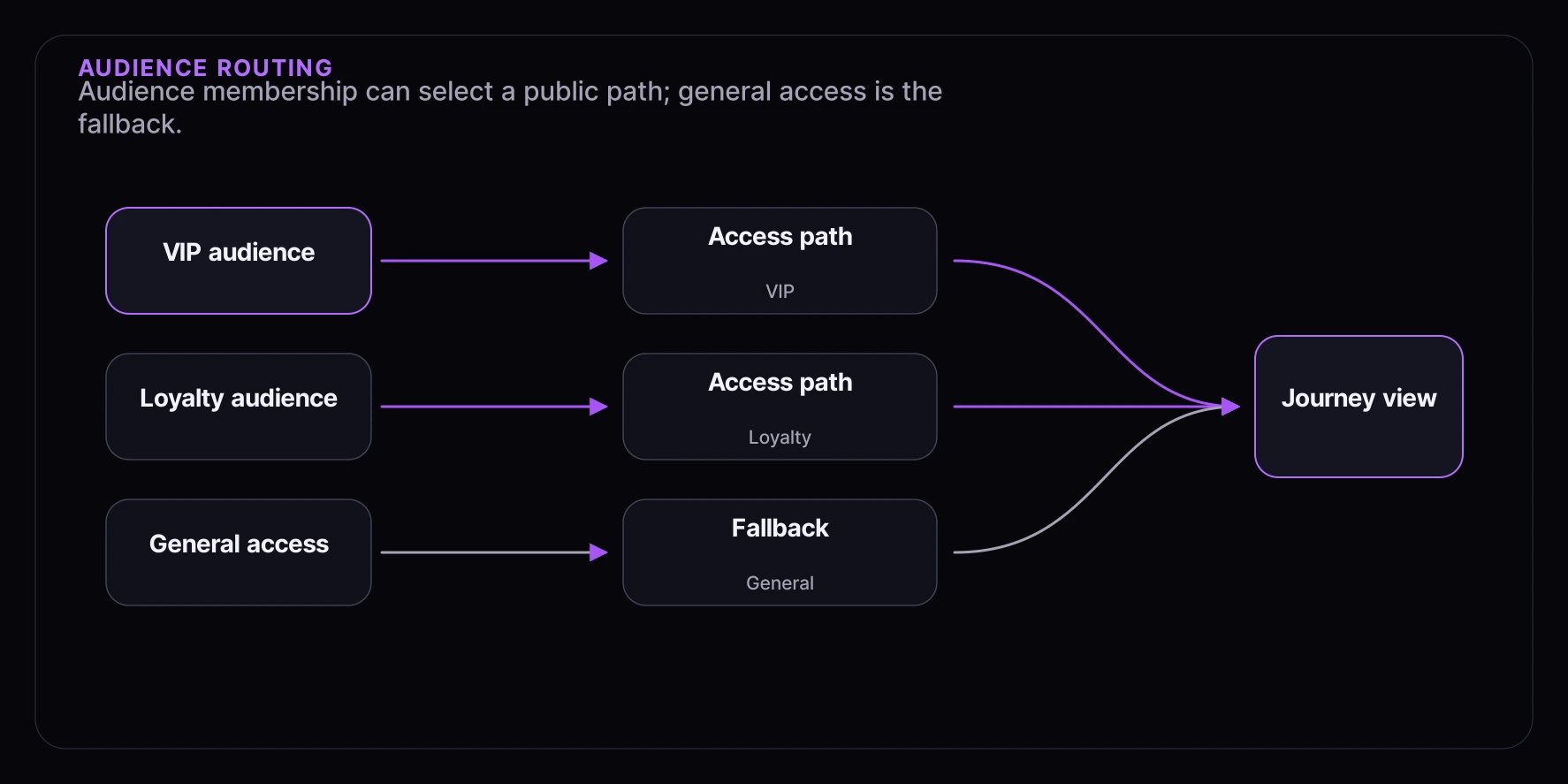
Audiences control which consumers can access specific parts of your experience:
## Using Audiences with Experiences
Audiences control which consumers can access specific parts of your experience:
 ### How Routing Works
1. Consumer enters your experience
2. System checks access paths by sequence priority
3. For each path, checks if the consumer satisfies the audience or access-code requirements
4. Consumer gets the first path they qualify for
## Common Audience Examples
### VIP Consumers
Reward your most valuable consumers with early access:
```
Audience: "VIP Consumers"
Type: Dynamic
Rules:
├── Loyalty score > 100
└── Total orders > 5
```
### Local Consumers
Target consumers near your store for in-person events:
```
Audience: "NYC Area Consumers"
Type: Dynamic
Rules:
├── Region = New York
└── Status = Active
```
### High Spenders
Create exclusive offers for big spenders:
```
Audience: "High Value Consumers"
Type: Dynamic
Rules:
└── Lifetime value > $1,000
```
### Newsletter Subscribers
Use your existing email list for early access:
```
Audience: "Newsletter Subscribers"
Type: Synced
Source: Klaviyo "Active Subscribers" segment
```
### Invite List
Hand-pick consumers for exclusive launches:
```
Audience: "Product Launch Invites"
Type: Static List
Members: [imported CSV of email addresses]
```
## Keeping Audiences Fresh
### Dynamic Audiences
Set how often membership should be recalculated:
| Refresh Rate | Best For |
| ---------------- | -------------------------- |
| Every 15 minutes | Real-time access decisions |
| Every hour | Most use cases |
| Every 24 hours | Stable segments |
### Synced Lists
Syncing happens automatically based on your integration:
* **Klaviyo**: Near real-time
* **Shopify**: Periodic sync
* **CSV import**: Manual refresh
## Best Practices
### Start Simple
Begin with basic rules and refine over time:
1. Start with one or two conditions
2. Test with a small launch
3. Add complexity based on results
### Use Descriptive Names
Name audiences clearly so your team understands them:
* **Good:** "VIP Consumers - Loyalty Score > 100"
* **Good:** "NYC Metro Area - Active"
* **Avoid:** "Audience 1" or "Test"
### Monitor Audience Sizes
Keep an eye on how many consumers qualify:
* **Too small?** Rules might be too restrictive
* **Too large?** Rules might be too broad
* **Unexpected changes?** Something in your data changed
### Test Before Launch
Verify the right consumers are included before a big launch:
1. Preview audience membership
2. Spot-check specific consumers
3. Test the full experience flow
## Next Steps
* [Consumers](/concepts/consumers) — Consumer attributes used in rules
* [Experiences](/concepts/experiences) — Using audiences with access paths
* [Dashboard: Audiences](/dashboard/audiences/overview) — Creating audiences in the dashboard
### How Routing Works
1. Consumer enters your experience
2. System checks access paths by sequence priority
3. For each path, checks if the consumer satisfies the audience or access-code requirements
4. Consumer gets the first path they qualify for
## Common Audience Examples
### VIP Consumers
Reward your most valuable consumers with early access:
```
Audience: "VIP Consumers"
Type: Dynamic
Rules:
├── Loyalty score > 100
└── Total orders > 5
```
### Local Consumers
Target consumers near your store for in-person events:
```
Audience: "NYC Area Consumers"
Type: Dynamic
Rules:
├── Region = New York
└── Status = Active
```
### High Spenders
Create exclusive offers for big spenders:
```
Audience: "High Value Consumers"
Type: Dynamic
Rules:
└── Lifetime value > $1,000
```
### Newsletter Subscribers
Use your existing email list for early access:
```
Audience: "Newsletter Subscribers"
Type: Synced
Source: Klaviyo "Active Subscribers" segment
```
### Invite List
Hand-pick consumers for exclusive launches:
```
Audience: "Product Launch Invites"
Type: Static List
Members: [imported CSV of email addresses]
```
## Keeping Audiences Fresh
### Dynamic Audiences
Set how often membership should be recalculated:
| Refresh Rate | Best For |
| ---------------- | -------------------------- |
| Every 15 minutes | Real-time access decisions |
| Every hour | Most use cases |
| Every 24 hours | Stable segments |
### Synced Lists
Syncing happens automatically based on your integration:
* **Klaviyo**: Near real-time
* **Shopify**: Periodic sync
* **CSV import**: Manual refresh
## Best Practices
### Start Simple
Begin with basic rules and refine over time:
1. Start with one or two conditions
2. Test with a small launch
3. Add complexity based on results
### Use Descriptive Names
Name audiences clearly so your team understands them:
* **Good:** "VIP Consumers - Loyalty Score > 100"
* **Good:** "NYC Metro Area - Active"
* **Avoid:** "Audience 1" or "Test"
### Monitor Audience Sizes
Keep an eye on how many consumers qualify:
* **Too small?** Rules might be too restrictive
* **Too large?** Rules might be too broad
* **Unexpected changes?** Something in your data changed
### Test Before Launch
Verify the right consumers are included before a big launch:
1. Preview audience membership
2. Spot-check specific consumers
3. Test the full experience flow
## Next Steps
* [Consumers](/concepts/consumers) — Consumer attributes used in rules
* [Experiences](/concepts/experiences) — Using audiences with access paths
* [Dashboard: Audiences](/dashboard/audiences/overview) — Creating audiences in the dashboard