> ## Documentation Index
> Fetch the complete documentation index at: https://docs.fanfare.io/llms.txt
> Use this file to discover all available pages before exploring further.
# Waitlist Distribution
> Interest capture and notification for pre-launch and overflow scenarios
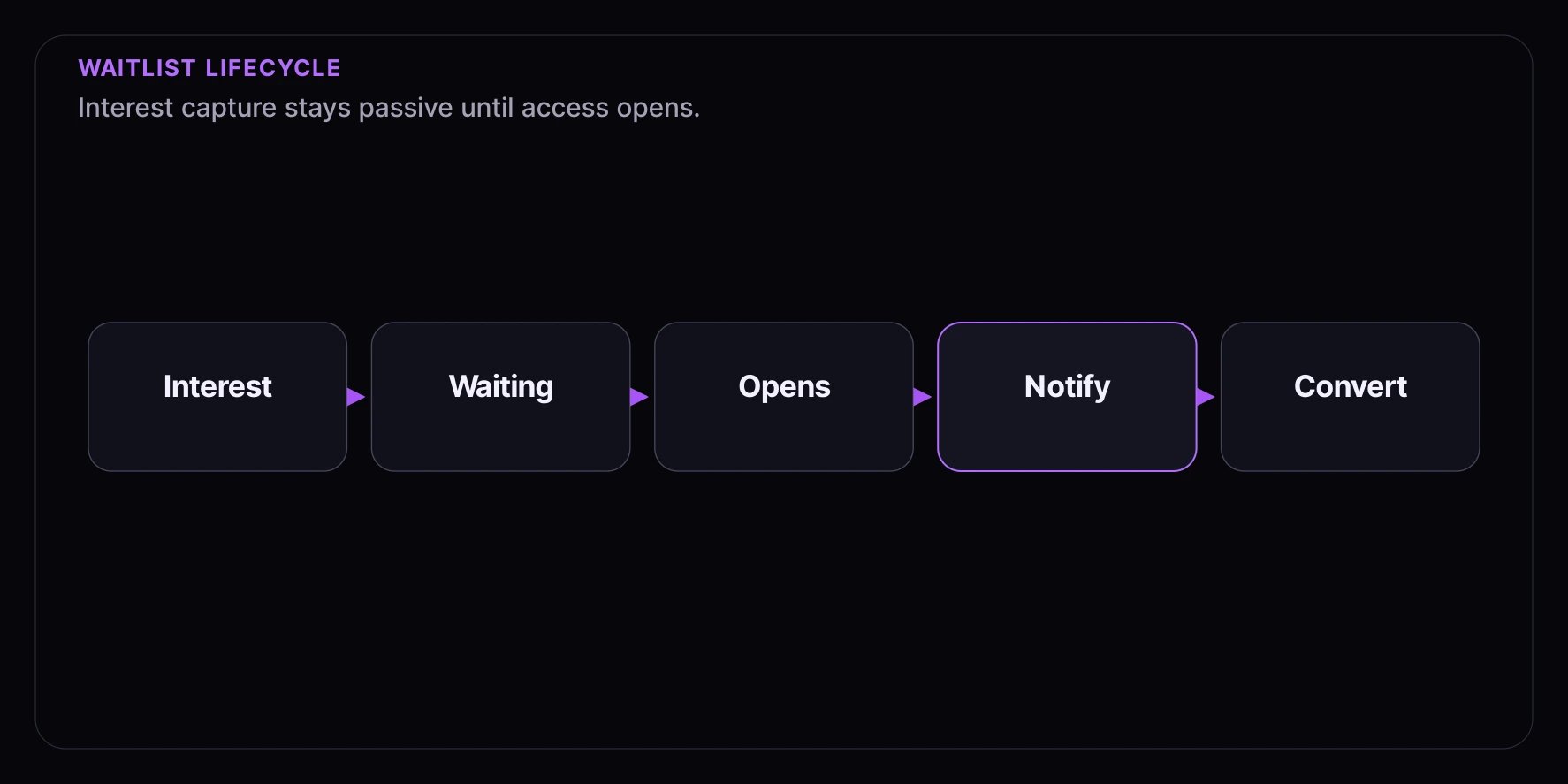
A **Waitlist** is a distribution mechanism for capturing interest and notifying consumers when access becomes available. Unlike other distributions that actively allocate access, waitlists are passive collectors that work alongside other distribution types.
## How Waitlists Work
 ### Signup Phase
1. Consumer discovers an upcoming experience or sold-out product
2. Consumer provides their email or phone number
3. System confirms their signup and sets expectations
### Waiting Phase
1. Consumers accumulate on the waitlist
2. No real-time position display (unlike queues), though you can prioritize by signup time
3. Waitlist remains passive until a trigger event
### Notification Phase
1. Trigger event occurs (launch, restock, availability)
2. Waitlist members are notified (all at once, in batches, or by priority — see Notification Strategies)
3. Consumers convert through the available distribution (queue, draw, or instant access)
## The Consumer Experience
### Signing Up
Consumers see:
* Clear message about what they're signing up for
* Email or phone input field
* Confirmation of what to expect ("We'll notify you when it's available")
### While Waiting
Consumers know:
* They're on the list
* They'll be notified when it's available
* No action needed until then
### When Notified
Consumers receive:
* Alert that the product/event is now available
* Direct link to access or purchase
* Optional: Time-limited access window
## Consumer Journey
### Signup Phase
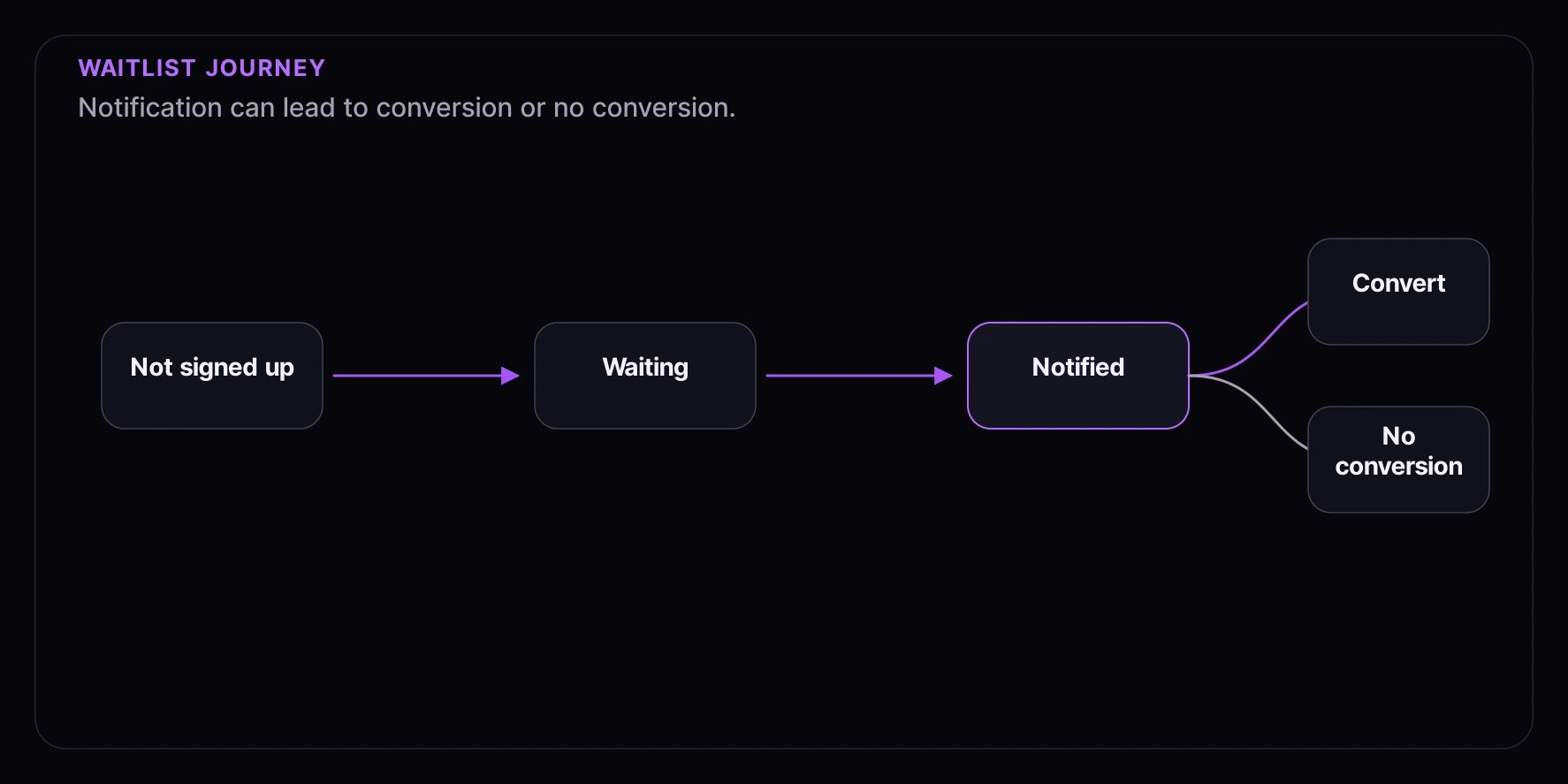
1. Consumer discovers an upcoming experience or sold-out product
2. Consumer provides their email or phone number
3. System confirms their signup and sets expectations
### Waiting Phase
1. Consumers accumulate on the waitlist
2. No real-time position display (unlike queues), though you can prioritize by signup time
3. Waitlist remains passive until a trigger event
### Notification Phase
1. Trigger event occurs (launch, restock, availability)
2. Waitlist members are notified (all at once, in batches, or by priority — see Notification Strategies)
3. Consumers convert through the available distribution (queue, draw, or instant access)
## The Consumer Experience
### Signing Up
Consumers see:
* Clear message about what they're signing up for
* Email or phone input field
* Confirmation of what to expect ("We'll notify you when it's available")
### While Waiting
Consumers know:
* They're on the list
* They'll be notified when it's available
* No action needed until then
### When Notified
Consumers receive:
* Alert that the product/event is now available
* Direct link to access or purchase
* Optional: Time-limited access window
## Consumer Journey
 ## When to Use Waitlists
| Scenario | Why Waitlist Works |
| -------------------- | ---------------------------------------------------- |
| Pre-launch | Capture demand before product is available |
| Coming soon page | Build anticipation and collect interested consumers |
| Sold out products | "Notify me when back in stock" |
| Overflow handling | When queue/draw is full, capture additional interest |
| Invite-only launches | Collect requests before opening access |
## Configuration Options
### Capacity
Maximum number of waitlist signups:
* **Unlimited**: Accept all interested consumers
* **Limited**: Cap signups (e.g., 10,000 maximum)
Setting a limit can create scarcity ("Only 500 waitlist spots remaining!").
### Contact Requirements
What information to collect:
* **Email only**: Most common, sufficient for notifications
* **Email + phone**: For SMS notifications
* **Full profile**: When you need more consumer data
### Guest vs. Verified
Who can join:
* **Allow guests**: Maximum signup rate, anonymous consumers welcome
* **Require account**: Better data, can connect to consumer history
## Use Case Examples
### Pre-Launch Interest
Capture interest before a product launches:
**Setup:**
* Create waitlist when announcing the product
* Unlimited capacity (capture all interest)
* Email required for notifications
**Consumer journey:**
1. See "Coming Soon" page
2. Sign up for waitlist
3. Receive launch notification
4. Join queue or draw when it opens
### Overflow Handling
When your primary distribution is at capacity:
**Setup:**
* Create waitlist alongside queue or draw
* Show waitlist option when primary is full
* Notify if spots open up
**Consumer journey:**
1. Try to join queue
2. Queue is full
3. Offered waitlist instead ("Get notified if spots open")
4. Notified if capacity increases or spots become available
### Restock Notifications
Alert consumers when out-of-stock items return:
**Setup:**
* Show waitlist on sold-out product pages
* Unlimited capacity
* Email required
**Consumer journey:**
1. See "Sold Out" on product page
2. Sign up for restock notification
3. Receive alert when restocked
4. Immediate access to purchase
## Notification Strategies
### Blast Notification
Notify all waitlist members at once:
* **Best for**: Product launches with high inventory, flash sales, unlimited access events
* **Timing**: Everyone gets the same notification at the same time
* **Result**: First to act gets the product (standard checkout rules apply)
### Batched Notification
Notify in waves to manage traffic:
* **Best for**: Limited inventory, capacity-constrained systems
* **How it works**: Notify in batches over time (e.g., groups of consumers every few minutes)
* **Result**: Spreads traffic, gives each batch a fair chance
### Priority Notification
Notify based on signup time or consumer attributes:
* **Best for**: Rewarding early signers or VIP consumers
* **Example**: VIP consumers notified first, then general waitlist
* **Result**: Loyal consumers get first access
## Best Practices
### 1. Always Collect Contact Info
Waitlists require a way to notify consumers. At minimum, require email or phone.
For better conversion, verify contact information (send confirmation email/SMS on signup).
### 2. Set Clear Expectations
Be transparent about what joining means:
> "Join our waitlist to be notified when this drops. You'll receive one email when it's available."
### 3. Provide Easy Unsubscribe
Always include an opt-out option:
* One-click unsubscribe in every notification
* "Leave waitlist" option in consumer account
* Respect opt-outs immediately
### 4. Time-Bound Access
Give notified consumers a reasonable window:
* "Your exclusive access expires in 24 hours"
* Creates urgency while being fair
* Prevents indefinite "I'll buy it later" delays
### 5. Track Conversion
Monitor waitlist effectiveness:
* **Signup count**: How many joined
* **Notification sent**: How many were notified
* **Converted**: How many purchased
* **Conversion rate**: Typical range is 10-30%
## Common Patterns
### Coming Soon Page
Minimal waitlist for pre-launch:
* Show product teaser
* Collect email addresses
* Send one notification at launch
### Sold Out Fallback
When inventory depletes:
* Show "Sold Out" status
* Offer "Notify me when back in stock"
* Automatically notify on restock
### VIP Pre-Registration
Tiered waitlist access:
* **VIP Waitlist**: First access, limited to VIP audience
* **General Waitlist**: Second access, open to everyone
VIP members get notified earlier, giving them priority access.
## Integration with Other Distributions
Waitlists work alongside other distribution types:
### Waitlist → Queue
1. Consumers join waitlist before launch
2. At launch, queue opens
3. Waitlist members get notified
4. They join the queue at their convenience
### Waitlist → Draw
1. Consumers join waitlist before draw registration
2. Draw registration opens
3. Waitlist members get notified
4. They enter the draw for a chance to win
### Waitlist → Timed Release
1. Consumers join waitlist before drop
2. Timed release scheduled
3. Waitlist members get notified just before release
4. They're ready when the countdown hits zero
## Related Concepts
* [Distributions Overview](/concepts/distributions/overview) — Common distribution concepts
* [Queue Distribution](/concepts/distributions/queue) — First-come, first-served alternative
* [Draw Distribution](/concepts/distributions/lottery) — Random selection alternative
* [Auction Distribution](/concepts/distributions/auction) — Competitive bidding
* [Appointment Distribution](/concepts/distributions/appointment) — Time-slot booking
* [Timed Release Distribution](/concepts/distributions/instant) — Instant access at scheduled time
* [Audiences](/concepts/audiences) — For segmented waitlist notifications
## When to Use Waitlists
| Scenario | Why Waitlist Works |
| -------------------- | ---------------------------------------------------- |
| Pre-launch | Capture demand before product is available |
| Coming soon page | Build anticipation and collect interested consumers |
| Sold out products | "Notify me when back in stock" |
| Overflow handling | When queue/draw is full, capture additional interest |
| Invite-only launches | Collect requests before opening access |
## Configuration Options
### Capacity
Maximum number of waitlist signups:
* **Unlimited**: Accept all interested consumers
* **Limited**: Cap signups (e.g., 10,000 maximum)
Setting a limit can create scarcity ("Only 500 waitlist spots remaining!").
### Contact Requirements
What information to collect:
* **Email only**: Most common, sufficient for notifications
* **Email + phone**: For SMS notifications
* **Full profile**: When you need more consumer data
### Guest vs. Verified
Who can join:
* **Allow guests**: Maximum signup rate, anonymous consumers welcome
* **Require account**: Better data, can connect to consumer history
## Use Case Examples
### Pre-Launch Interest
Capture interest before a product launches:
**Setup:**
* Create waitlist when announcing the product
* Unlimited capacity (capture all interest)
* Email required for notifications
**Consumer journey:**
1. See "Coming Soon" page
2. Sign up for waitlist
3. Receive launch notification
4. Join queue or draw when it opens
### Overflow Handling
When your primary distribution is at capacity:
**Setup:**
* Create waitlist alongside queue or draw
* Show waitlist option when primary is full
* Notify if spots open up
**Consumer journey:**
1. Try to join queue
2. Queue is full
3. Offered waitlist instead ("Get notified if spots open")
4. Notified if capacity increases or spots become available
### Restock Notifications
Alert consumers when out-of-stock items return:
**Setup:**
* Show waitlist on sold-out product pages
* Unlimited capacity
* Email required
**Consumer journey:**
1. See "Sold Out" on product page
2. Sign up for restock notification
3. Receive alert when restocked
4. Immediate access to purchase
## Notification Strategies
### Blast Notification
Notify all waitlist members at once:
* **Best for**: Product launches with high inventory, flash sales, unlimited access events
* **Timing**: Everyone gets the same notification at the same time
* **Result**: First to act gets the product (standard checkout rules apply)
### Batched Notification
Notify in waves to manage traffic:
* **Best for**: Limited inventory, capacity-constrained systems
* **How it works**: Notify in batches over time (e.g., groups of consumers every few minutes)
* **Result**: Spreads traffic, gives each batch a fair chance
### Priority Notification
Notify based on signup time or consumer attributes:
* **Best for**: Rewarding early signers or VIP consumers
* **Example**: VIP consumers notified first, then general waitlist
* **Result**: Loyal consumers get first access
## Best Practices
### 1. Always Collect Contact Info
Waitlists require a way to notify consumers. At minimum, require email or phone.
For better conversion, verify contact information (send confirmation email/SMS on signup).
### 2. Set Clear Expectations
Be transparent about what joining means:
> "Join our waitlist to be notified when this drops. You'll receive one email when it's available."
### 3. Provide Easy Unsubscribe
Always include an opt-out option:
* One-click unsubscribe in every notification
* "Leave waitlist" option in consumer account
* Respect opt-outs immediately
### 4. Time-Bound Access
Give notified consumers a reasonable window:
* "Your exclusive access expires in 24 hours"
* Creates urgency while being fair
* Prevents indefinite "I'll buy it later" delays
### 5. Track Conversion
Monitor waitlist effectiveness:
* **Signup count**: How many joined
* **Notification sent**: How many were notified
* **Converted**: How many purchased
* **Conversion rate**: Typical range is 10-30%
## Common Patterns
### Coming Soon Page
Minimal waitlist for pre-launch:
* Show product teaser
* Collect email addresses
* Send one notification at launch
### Sold Out Fallback
When inventory depletes:
* Show "Sold Out" status
* Offer "Notify me when back in stock"
* Automatically notify on restock
### VIP Pre-Registration
Tiered waitlist access:
* **VIP Waitlist**: First access, limited to VIP audience
* **General Waitlist**: Second access, open to everyone
VIP members get notified earlier, giving them priority access.
## Integration with Other Distributions
Waitlists work alongside other distribution types:
### Waitlist → Queue
1. Consumers join waitlist before launch
2. At launch, queue opens
3. Waitlist members get notified
4. They join the queue at their convenience
### Waitlist → Draw
1. Consumers join waitlist before draw registration
2. Draw registration opens
3. Waitlist members get notified
4. They enter the draw for a chance to win
### Waitlist → Timed Release
1. Consumers join waitlist before drop
2. Timed release scheduled
3. Waitlist members get notified just before release
4. They're ready when the countdown hits zero
## Related Concepts
* [Distributions Overview](/concepts/distributions/overview) — Common distribution concepts
* [Queue Distribution](/concepts/distributions/queue) — First-come, first-served alternative
* [Draw Distribution](/concepts/distributions/lottery) — Random selection alternative
* [Auction Distribution](/concepts/distributions/auction) — Competitive bidding
* [Appointment Distribution](/concepts/distributions/appointment) — Time-slot booking
* [Timed Release Distribution](/concepts/distributions/instant) — Instant access at scheduled time
* [Audiences](/concepts/audiences) — For segmented waitlist notifications