> ## Documentation Index
> Fetch the complete documentation index at: https://docs.fanfare.io/llms.txt
> Use this file to discover all available pages before exploring further.
# Introduction to Fanfare
> Learn the public journey model behind Fanfare SDK integrations.
Fanfare helps commerce teams run controlled-access experiences for high-demand launches. Your storefront keeps ownership of the product page, cart, checkout, analytics, and customer messaging. Fanfare provides the public journey state that tells your application what the customer can do next.
## Mental Model
The core concept is a **journey**: one customer's progress through one Fanfare experience.
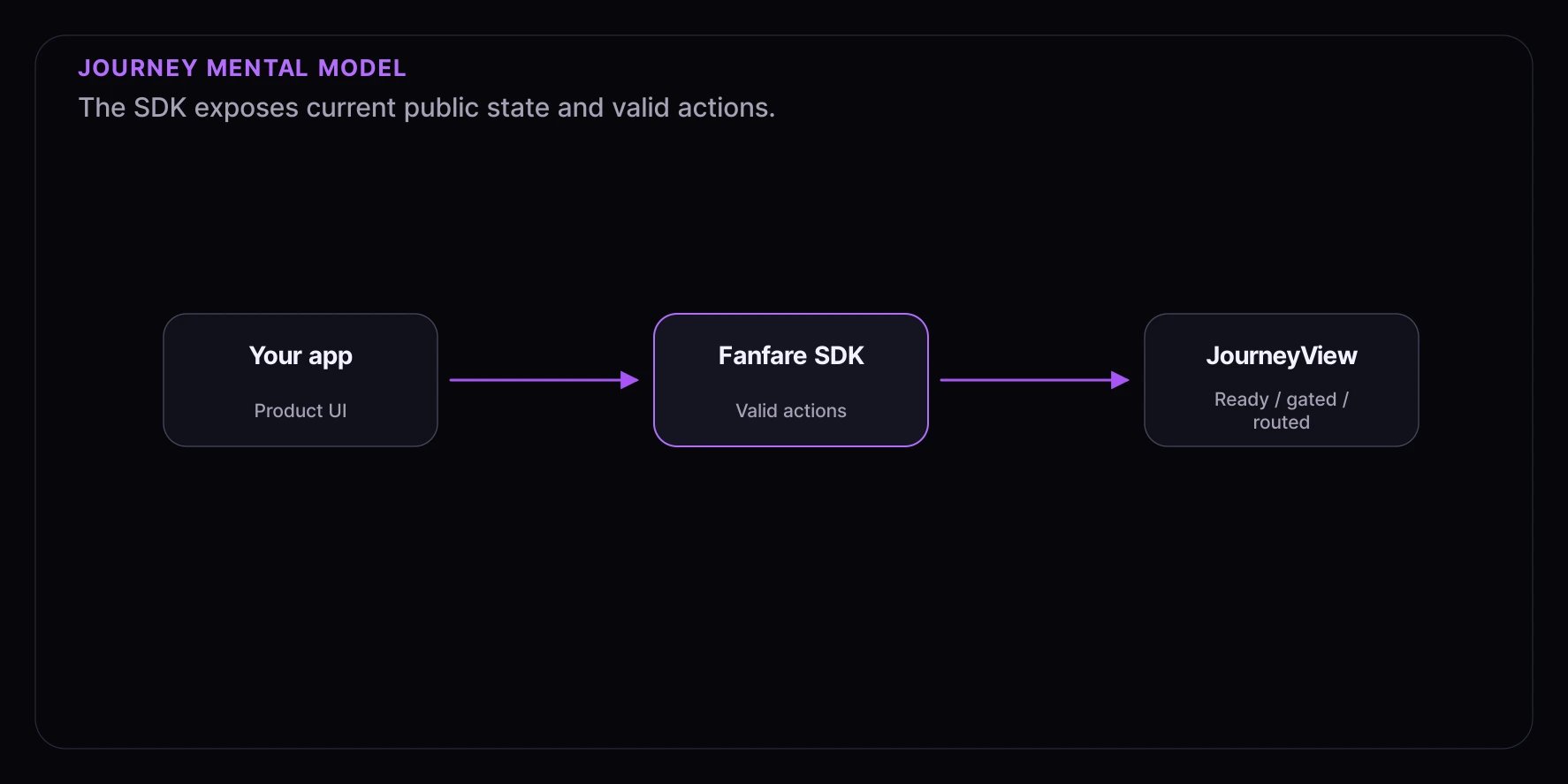 Your integration reads the journey state, renders the matching UI, and calls only actions that are available in that state. It does not need to know private routing, enforcement, or operational details.
## Key Concepts
### Organization
Your Fanfare account is an organization. Your dashboard provides an `organizationId` and publishable keys for browser SDK setup.
### Experience
An experience is the customer-facing event you embed in your site, such as a product launch, ticket sale, appointment release, or member access window. SDK examples use experience IDs such as `exp_123`.
### Journey
A journey is the SDK object for a customer inside an experience. In the core SDK, you get one with:
```ts theme={null}
const journey = sdk.journeys.get("exp_123");
```
Most UI should render from `journey.view$`, which emits `JourneyView`.
### JourneyView
`JourneyView` is the public UI contract. It exposes top-level stages such as:
| Stage | What your UI usually shows |
| --------- | ----------------------------------------------- |
| `ready` | A start CTA or auto-start setup. |
| `routing` | A loading state while the public path resolves. |
| `gated` | Auth, access-code, or verification UI. |
| `routed` | The current sequence state. |
When the journey is routed, the nested sequence has a `phase` such as `scheduled`, `enterable`, `participating`, `settling`, `granted`, `ended`, or `unavailable`. It also has a `mechanism` such as `queue`, `draw`, `auction`, `appointment`, `timed_release`, or `waitlist`. See [Journey State](/sdk/core/journey-state) for the full model.
### Grant
When the customer has access to continue, the public view exposes `sequence.phase === "granted"` and a `sequence.grant`. Treat grant values as sensitive runtime data. Use them only for the next step in your integration, such as a server handoff or checkout transition.
## Integration Paths
| Path | Best fit | Main APIs |
| ---------------- | --------------------------------------------- | ------------------------------------------------------------- |
| React components | Most React storefronts and launch pages. | `FanfareProvider`, `ExperienceWidget`, `useExperienceJourney` |
| Core SDK | Fully custom UI or non-standard app state. | `initFanfare`, `sdk.journeys.get()`, `JourneyView` |
| Web components | Static pages, CMS embeds, or non-React hosts. | `registerWebComponents()`, `` |
Start with [Choose Your Path](/sdk/choose-your-path) if you are deciding between these options.
## How The Browser SDK Fits
Your integration reads the journey state, renders the matching UI, and calls only actions that are available in that state. It does not need to know private routing, enforcement, or operational details.
## Key Concepts
### Organization
Your Fanfare account is an organization. Your dashboard provides an `organizationId` and publishable keys for browser SDK setup.
### Experience
An experience is the customer-facing event you embed in your site, such as a product launch, ticket sale, appointment release, or member access window. SDK examples use experience IDs such as `exp_123`.
### Journey
A journey is the SDK object for a customer inside an experience. In the core SDK, you get one with:
```ts theme={null}
const journey = sdk.journeys.get("exp_123");
```
Most UI should render from `journey.view$`, which emits `JourneyView`.
### JourneyView
`JourneyView` is the public UI contract. It exposes top-level stages such as:
| Stage | What your UI usually shows |
| --------- | ----------------------------------------------- |
| `ready` | A start CTA or auto-start setup. |
| `routing` | A loading state while the public path resolves. |
| `gated` | Auth, access-code, or verification UI. |
| `routed` | The current sequence state. |
When the journey is routed, the nested sequence has a `phase` such as `scheduled`, `enterable`, `participating`, `settling`, `granted`, `ended`, or `unavailable`. It also has a `mechanism` such as `queue`, `draw`, `auction`, `appointment`, `timed_release`, or `waitlist`. See [Journey State](/sdk/core/journey-state) for the full model.
### Grant
When the customer has access to continue, the public view exposes `sequence.phase === "granted"` and a `sequence.grant`. Treat grant values as sensitive runtime data. Use them only for the next step in your integration, such as a server handoff or checkout transition.
## Integration Paths
| Path | Best fit | Main APIs |
| ---------------- | --------------------------------------------- | ------------------------------------------------------------- |
| React components | Most React storefronts and launch pages. | `FanfareProvider`, `ExperienceWidget`, `useExperienceJourney` |
| Core SDK | Fully custom UI or non-standard app state. | `initFanfare`, `sdk.journeys.get()`, `JourneyView` |
| Web components | Static pages, CMS embeds, or non-React hosts. | `registerWebComponents()`, `` |
Start with [Choose Your Path](/sdk/choose-your-path) if you are deciding between these options.
## How The Browser SDK Fits
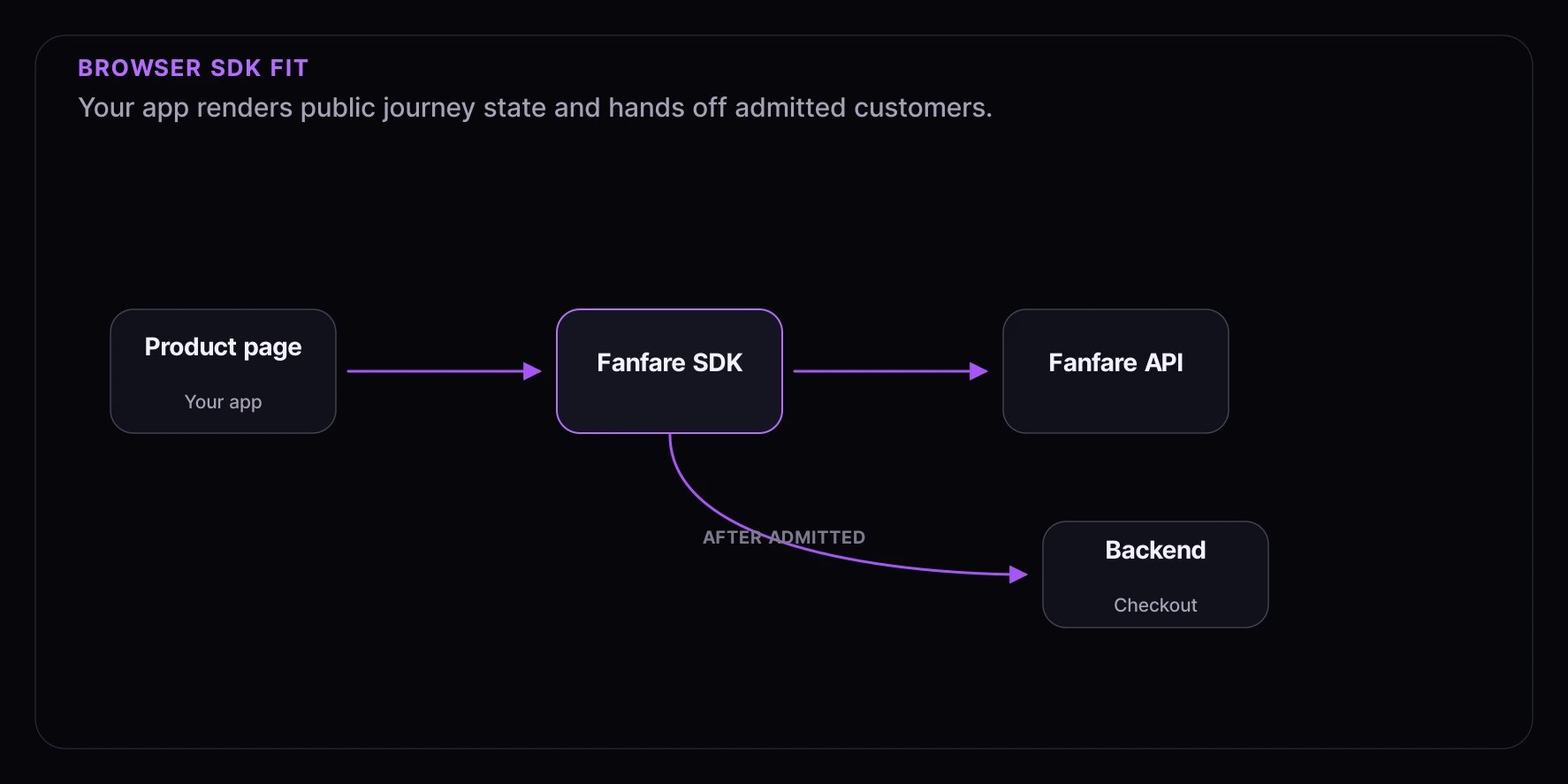 The SDK manages the browser-side journey. Your backend should validate the granted customer before completing protected business actions. Keep secret keys and validation logic on the server.
## What You Need
* A Fanfare account and dashboard access.
* An `organizationId` and browser-safe `publishableKey`.
* An experience ID, such as `exp_123`.
* A frontend integration path: React, core SDK, or web components.
* A server-side handoff for checkout or another protected next step.
## Public-Safe Integration Rule
Build against the public state and action contract. Avoid customer-facing copy, analytics, tests, or routing logic that depends on private reasons why a customer reached a state.
## Next Steps
* [Installation](/getting-started/installation) - Install the current SDK packages.
* [Quickstart](/getting-started/quickstart) - Add a React `ExperienceWidget`.
* [Public Integration Model](/sdk/security-and-public-model) - Learn what the public SDK contract exposes.
The SDK manages the browser-side journey. Your backend should validate the granted customer before completing protected business actions. Keep secret keys and validation logic on the server.
## What You Need
* A Fanfare account and dashboard access.
* An `organizationId` and browser-safe `publishableKey`.
* An experience ID, such as `exp_123`.
* A frontend integration path: React, core SDK, or web components.
* A server-side handoff for checkout or another protected next step.
## Public-Safe Integration Rule
Build against the public state and action contract. Avoid customer-facing copy, analytics, tests, or routing logic that depends on private reasons why a customer reached a state.
## Next Steps
* [Installation](/getting-started/installation) - Install the current SDK packages.
* [Quickstart](/getting-started/quickstart) - Add a React `ExperienceWidget`.
* [Public Integration Model](/sdk/security-and-public-model) - Learn what the public SDK contract exposes.