> ## Documentation Index
> Fetch the complete documentation index at: https://docs.fanfare.io/llms.txt
> Use this file to discover all available pages before exploring further.

# Identified consumers

# Identified Consumers Guide

Learn how to authenticate consumers with email or phone number using OTP (One-Time Password) verification.

## Overview

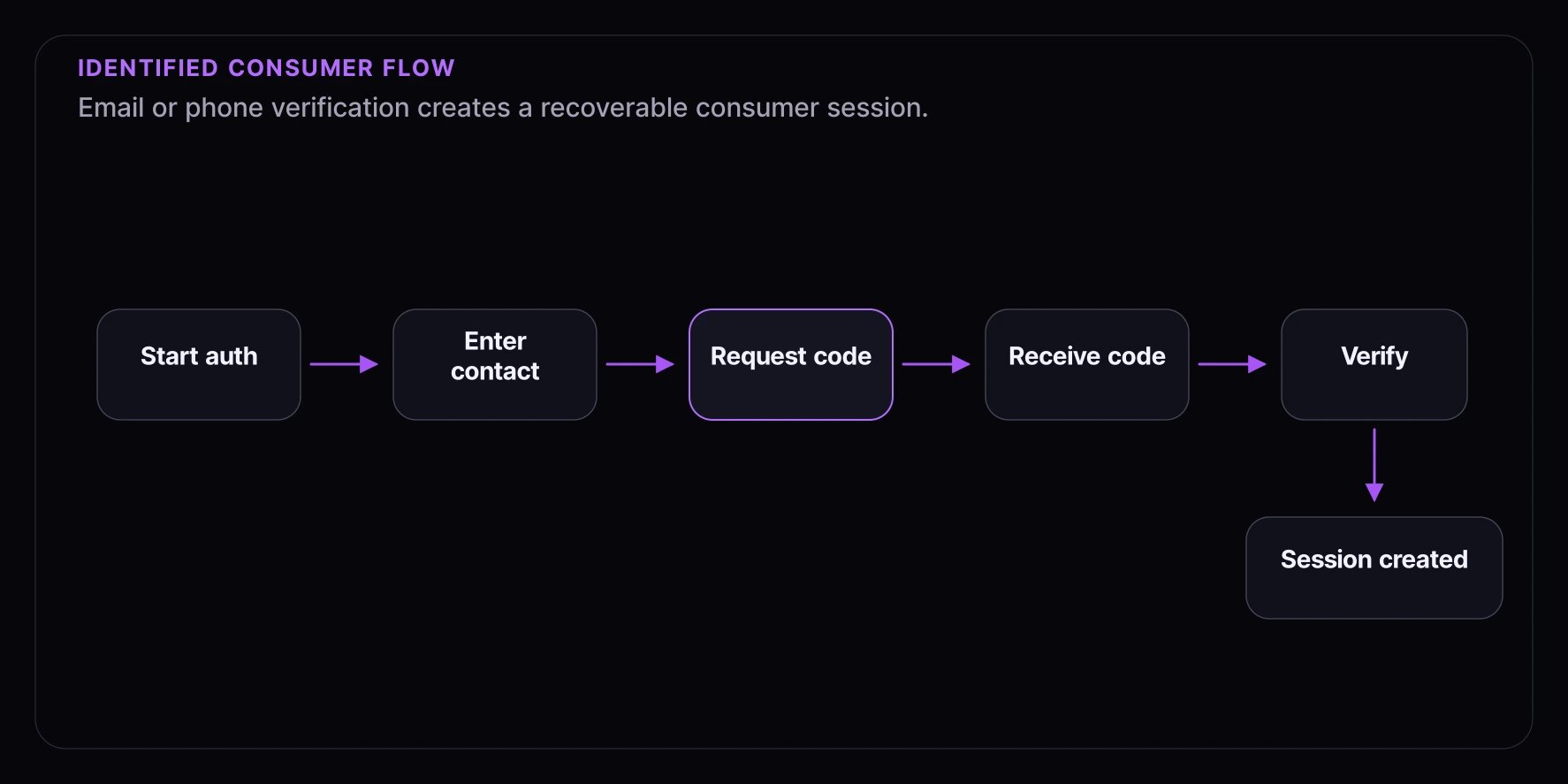
Identified authentication creates a verified consumer record tied to an email address or phone number. This enables features like notifications, order history, and cross-device session continuity.

**What you'll learn:**

* Implementing email OTP authentication
* Implementing phone OTP authentication
* Managing authenticated sessions
* Handling authentication flows in your UI

**Complexity:** Intermediate
**Time to complete:** 30 minutes

## Prerequisites

* Fanfare SDK installed and configured
* Understanding of async authentication flows
* Email/SMS delivery configured in Fanfare dashboard

## When to Use Identified Authentication

Use identified authentication when you need:

* **Notifications**: Email/SMS updates about queue position, draw results
* **Cross-device access**: Same consumer identity across devices
* **Order history**: Link purchases to a persistent identity
* **Audience targeting**: Target consumers based on email domain, etc.

## Authentication Flow

<img src="https://mintcdn.com/fanfare/9lBxxAA0GJkGRgw-/images/guides/identified-consumer-flow.webp?fit=max&auto=format&n=9lBxxAA0GJkGRgw-&q=85&s=87de046ab32c85387cc8dc90925a6498" alt="Identified consumer flow diagram showing contact entry, OTP request, code receipt, verification, and session creation." width="1774" height="887" data-path="images/guides/identified-consumer-flow.webp" />

## Step 1: Email OTP Authentication

### Request OTP

```tsx theme={null}
import { useFanfareAuth } from "@fanfare-io/fanfare-sdk-react";
import { useState } from "react";

function EmailAuthForm() {
  const { requestOtp, verifyOtp, isAuthenticated, session } = useFanfareAuth();
  const [email, setEmail] = useState("");
  const [code, setCode] = useState("");
  const [step, setStep] = useState<"email" | "code">("email");
  const [error, setError] = useState<string | null>(null);
  const [isLoading, setIsLoading] = useState(false);

  const handleRequestOtp = async (e: React.FormEvent) => {
    e.preventDefault();
    setError(null);
    setIsLoading(true);

    try {
      await requestOtp({ email });
      setStep("code");
    } catch (err) {
      setError(err instanceof Error ? err.message : "Failed to send code");
    } finally {
      setIsLoading(false);
    }
  };

  const handleVerifyOtp = async (e: React.FormEvent) => {
    e.preventDefault();
    setError(null);
    setIsLoading(true);

    try {
      await verifyOtp({ email, code });
      // Success! User is now authenticated
    } catch (err) {
      setError(err instanceof Error ? err.message : "Invalid code");
    } finally {
      setIsLoading(false);
    }
  };

  if (isAuthenticated) {
    return (
      <div className="auth-success">
        <p>Signed in as: {session?.email}</p>
      </div>
    );
  }

  if (step === "email") {
    return (
      <form onSubmit={handleRequestOtp} className="auth-form">
        <h2>Sign In</h2>
        <p>Enter your email to receive a verification code.</p>

        <input
          type="email"
          value={email}
          onChange={(e) => setEmail(e.target.value)}
          placeholder="your@email.com"
          required
          disabled={isLoading}
        />

        {error && <p className="error">{error}</p>}

        <button type="submit" disabled={isLoading}>
          {isLoading ? "Sending..." : "Send Code"}
        </button>
      </form>
    );
  }

  return (
    <form onSubmit={handleVerifyOtp} className="auth-form">
      <h2>Enter Verification Code</h2>
      <p>We sent a code to {email}</p>

      <input
        type="text"
        value={code}
        onChange={(e) => setCode(e.target.value)}
        placeholder="123456"
        maxLength={6}
        pattern="[0-9]*"
        inputMode="numeric"
        required
        disabled={isLoading}
        autoFocus
      />

      {error && <p className="error">{error}</p>}

      <button type="submit" disabled={isLoading}>
        {isLoading ? "Verifying..." : "Verify"}
      </button>

      <button type="button" onClick={() => setStep("email")} className="link-button">
        Use different email
      </button>
    </form>
  );
}
```

## Step 2: Phone OTP Authentication

```tsx theme={null}
import { useFanfareAuth } from "@fanfare-io/fanfare-sdk-react";
import { useState } from "react";

function PhoneAuthForm() {
  const { requestOtp, verifyOtp, isAuthenticated, session } = useFanfareAuth();
  const [phone, setPhone] = useState("");
  const [code, setCode] = useState("");
  const [step, setStep] = useState<"phone" | "code">("phone");
  const [error, setError] = useState<string | null>(null);
  const [isLoading, setIsLoading] = useState(false);
  const [countryCode, setCountryCode] = useState("US");

  const handleRequestOtp = async (e: React.FormEvent) => {
    e.preventDefault();
    setError(null);
    setIsLoading(true);

    try {
      // Include country code for proper E.164 formatting
      await requestOtp({ phone, defaultCountry: countryCode });
      setStep("code");
    } catch (err) {
      setError(err instanceof Error ? err.message : "Failed to send code");
    } finally {
      setIsLoading(false);
    }
  };

  const handleVerifyOtp = async (e: React.FormEvent) => {
    e.preventDefault();
    setError(null);
    setIsLoading(true);

    try {
      await verifyOtp({ phone, code, defaultCountry: countryCode });
      // Success! User is now authenticated
    } catch (err) {
      setError(err instanceof Error ? err.message : "Invalid code");
    } finally {
      setIsLoading(false);
    }
  };

  if (isAuthenticated) {
    return (
      <div className="auth-success">
        <p>Signed in with: {session?.phone}</p>
      </div>
    );
  }

  if (step === "phone") {
    return (
      <form onSubmit={handleRequestOtp} className="auth-form">
        <h2>Sign In with Phone</h2>
        <p>Enter your phone number to receive a verification code.</p>

        <div className="phone-input">
          <select value={countryCode} onChange={(e) => setCountryCode(e.target.value)} disabled={isLoading}>
            <option value="US">+1 (US)</option>
            <option value="GB">+44 (UK)</option>
            <option value="CA">+1 (CA)</option>
            <option value="AU">+61 (AU)</option>
            {/* Add more countries as needed */}
          </select>

          <input
            type="tel"
            value={phone}
            onChange={(e) => setPhone(e.target.value)}
            placeholder="(555) 123-4567"
            required
            disabled={isLoading}
          />
        </div>

        {error && <p className="error">{error}</p>}

        <button type="submit" disabled={isLoading}>
          {isLoading ? "Sending..." : "Send Code"}
        </button>
      </form>
    );
  }

  return (
    <form onSubmit={handleVerifyOtp} className="auth-form">
      <h2>Enter Verification Code</h2>
      <p>We sent a code to your phone</p>

      <input
        type="text"
        value={code}
        onChange={(e) => setCode(e.target.value)}
        placeholder="123456"
        maxLength={6}
        pattern="[0-9]*"
        inputMode="numeric"
        required
        disabled={isLoading}
        autoFocus
      />

      {error && <p className="error">{error}</p>}

      <button type="submit" disabled={isLoading}>
        {isLoading ? "Verifying..." : "Verify"}
      </button>
    </form>
  );
}
```

## Step 3: Combined Auth Form

Offer both email and phone authentication:

```tsx theme={null}
import { useFanfareAuth } from "@fanfare-io/fanfare-sdk-react";
import { useState } from "react";

type AuthMethod = "email" | "phone";
type AuthStep = "choose" | "input" | "verify";

function CombinedAuthForm() {
  const { requestOtp, verifyOtp, isAuthenticated, session } = useFanfareAuth();
  const [method, setMethod] = useState<AuthMethod>("email");
  const [step, setStep] = useState<AuthStep>("choose");
  const [identifier, setIdentifier] = useState("");
  const [code, setCode] = useState("");
  const [error, setError] = useState<string | null>(null);
  const [isLoading, setIsLoading] = useState(false);

  const handleRequestOtp = async () => {
    setError(null);
    setIsLoading(true);

    try {
      if (method === "email") {
        await requestOtp({ email: identifier });
      } else {
        await requestOtp({ phone: identifier, defaultCountry: "US" });
      }
      setStep("verify");
    } catch (err) {
      setError(err instanceof Error ? err.message : "Failed to send code");
    } finally {
      setIsLoading(false);
    }
  };

  const handleVerifyOtp = async () => {
    setError(null);
    setIsLoading(true);

    try {
      if (method === "email") {
        await verifyOtp({ email: identifier, code });
      } else {
        await verifyOtp({ phone: identifier, code, defaultCountry: "US" });
      }
    } catch (err) {
      setError(err instanceof Error ? err.message : "Invalid code");
    } finally {
      setIsLoading(false);
    }
  };

  if (isAuthenticated) {
    return (
      <div className="auth-success">
        <h3>Welcome!</h3>
        <p>Signed in as: {session?.email || session?.phone}</p>
      </div>
    );
  }

  if (step === "choose") {
    return (
      <div className="auth-choose">
        <h2>Sign In</h2>
        <p>Choose how you'd like to verify your identity</p>

        <button
          onClick={() => {
            setMethod("email");
            setStep("input");
          }}
        >
          Continue with Email
        </button>

        <button
          onClick={() => {
            setMethod("phone");
            setStep("input");
          }}
        >
          Continue with Phone
        </button>
      </div>
    );
  }

  if (step === "input") {
    return (
      <div className="auth-input">
        <h2>Enter your {method}</h2>

        <input
          type={method === "email" ? "email" : "tel"}
          value={identifier}
          onChange={(e) => setIdentifier(e.target.value)}
          placeholder={method === "email" ? "your@email.com" : "(555) 123-4567"}
          disabled={isLoading}
        />

        {error && <p className="error">{error}</p>}

        <button onClick={handleRequestOtp} disabled={isLoading || !identifier}>
          {isLoading ? "Sending..." : "Send Verification Code"}
        </button>

        <button onClick={() => setStep("choose")} className="link-button">
          Use different method
        </button>
      </div>
    );
  }

  return (
    <div className="auth-verify">
      <h2>Enter Code</h2>
      <p>We sent a 6-digit code to your {method}</p>

      <input
        type="text"
        value={code}
        onChange={(e) => setCode(e.target.value.replace(/\D/g, ""))}
        placeholder="123456"
        maxLength={6}
        inputMode="numeric"
        disabled={isLoading}
        autoFocus
      />

      {error && <p className="error">{error}</p>}

      <button onClick={handleVerifyOtp} disabled={isLoading || code.length !== 6}>
        {isLoading ? "Verifying..." : "Verify"}
      </button>

      <button onClick={handleRequestOtp} disabled={isLoading} className="link-button">
        Resend code
      </button>
    </div>
  );
}
```

## Step 4: Core SDK Implementation

Using the core SDK directly:

```typescript theme={null}
import initFanfare from "@fanfare-io/fanfare-sdk-core";

const sdk = await initFanfare({
  organizationId: "org_xxx",
  publishableKey: "pk_live_xxx",
});

// Email authentication
async function authenticateWithEmail(email: string) {
  // Step 1: Request OTP
  await sdk.auth.requestOtp({ email });
  console.log("OTP sent to:", email);

  // Step 2: Wait for user to enter code...
  // In a real app, show UI for code entry
}

async function verifyEmailOtp(email: string, code: string) {
  const session = await sdk.auth.verifyOtp({ email, code });
  console.log("Authenticated:", session.consumerId);
  console.log("Email:", session.email);
  return session;
}

// Phone authentication
async function authenticateWithPhone(phone: string, countryCode: string) {
  await sdk.auth.requestOtp({ phone, defaultCountry: countryCode });
  console.log("OTP sent to:", phone);
}

async function verifyPhoneOtp(phone: string, code: string, countryCode: string) {
  const session = await sdk.auth.verifyOtp({ phone, code, defaultCountry: countryCode });
  console.log("Authenticated:", session.consumerId);
  console.log("Phone:", session.phone);
  return session;
}
```

## Step 5: Session Management

### Check Authentication Status

```typescript theme={null}
function AuthStatus() {
  const { isAuthenticated, isGuest, session } = useFanfareAuth();

  return (
    <div className="auth-status">
      {isAuthenticated ? (
        <>
          <p>Status: {isGuest ? "Guest" : "Identified"}</p>
          <p>Consumer: {session?.consumerId}</p>
          {session?.email && <p>Email: {session.email}</p>}
          {session?.phone && <p>Phone: {session.phone}</p>}
          <p>Expires: {session?.expiresAt}</p>
        </>
      ) : (
        <p>Not authenticated</p>
      )}
    </div>
  );
}
```

### Logout

```typescript theme={null}
function LogoutButton() {
  const { isAuthenticated, logout } = useFanfareAuth();

  if (!isAuthenticated) return null;

  const handleLogout = async () => {
    try {
      await logout();
      // Optionally redirect or show message
    } catch (error) {
      console.error("Logout failed:", error);
    }
  };

  return <button onClick={handleLogout}>Sign Out</button>;
}
```

## Step 6: Handling OTP Errors

Common OTP error cases:

```typescript theme={null}
async function handleVerifyOtp(email: string, code: string) {
  try {
    await verifyOtp({ email, code });
  } catch (error) {
    if (error instanceof Error) {
      // Handle specific error types
      if (error.message.includes("otp_expired")) {
        // Code has expired (usually after 10 minutes)
        showError("Code expired. Please request a new one.");
        setStep("input"); // Go back to request new code
      } else if (error.message.includes("otp_invalid")) {
        // Wrong code entered
        showError("Invalid code. Please check and try again.");
        setCode(""); // Clear the input
      } else if (error.message.includes("rate_limit")) {
        // Too many attempts
        showError("Too many attempts. Please wait a few minutes.");
      } else {
        // Generic error
        showError("Verification failed. Please try again.");
      }
    }
  }
}
```

## Step 7: OTP Input Component

Create a user-friendly OTP input:

```tsx theme={null}
interface OtpInputProps {
  length?: number;
  value: string;
  onChange: (value: string) => void;
  disabled?: boolean;
}

function OtpInput({ length = 6, value, onChange, disabled }: OtpInputProps) {
  const inputRefs = useRef<(HTMLInputElement | null)[]>([]);

  const handleChange = (index: number, digit: string) => {
    if (!/^\d*$/.test(digit)) return;

    const newValue = value.split("");
    newValue[index] = digit;
    onChange(newValue.join(""));

    // Auto-advance to next input
    if (digit && index < length - 1) {
      inputRefs.current[index + 1]?.focus();
    }
  };

  const handleKeyDown = (index: number, e: React.KeyboardEvent) => {
    if (e.key === "Backspace" && !value[index] && index > 0) {
      inputRefs.current[index - 1]?.focus();
    }
  };

  const handlePaste = (e: React.ClipboardEvent) => {
    e.preventDefault();
    const pastedData = e.clipboardData.getData("text").replace(/\D/g, "").slice(0, length);
    onChange(pastedData);
  };

  return (
    <div className="otp-input" onPaste={handlePaste}>
      {Array.from({ length }).map((_, index) => (
        <input
          key={index}
          ref={(el) => {
            inputRefs.current[index] = el;
          }}
          type="text"
          inputMode="numeric"
          maxLength={1}
          value={value[index] || ""}
          onChange={(e) => handleChange(index, e.target.value)}
          onKeyDown={(e) => handleKeyDown(index, e)}
          disabled={disabled}
          className="otp-digit"
          autoFocus={index === 0}
        />
      ))}
    </div>
  );
}
```

## Authenticated Session Data

```typescript theme={null}
interface AuthenticatedSession {
  type: "authenticated";
  consumerId: string; // Unique consumer identifier
  email?: string; // If authenticated with email
  phone?: string; // If authenticated with phone (E.164 format)
  expiresAt: string; // ISO 8601 timestamp
  sessionSignals?: Record<string, unknown>;
}
```

## Best Practices

### 1. Validate Input Before Sending

```typescript theme={null}
function isValidEmail(email: string): boolean {
  return /^[^\s@]+@[^\s@]+\.[^\s@]+$/.test(email);
}

function isValidPhone(phone: string): boolean {
  // Basic validation - actual validation happens server-side
  return /^\+?[\d\s-()]+$/.test(phone) && phone.replace(/\D/g, "").length >= 10;
}
```

### 2. Show Loading States

```tsx theme={null}
<button disabled={isLoading}>
  {isLoading ? (
    <>
      <Spinner /> Sending...
    </>
  ) : (
    "Send Code"
  )}
</button>
```

### 3. Implement Resend Cooldown

```tsx theme={null}
function ResendButton({ onResend }: { onResend: () => Promise<void> }) {
  const [cooldown, setCooldown] = useState(0);

  useEffect(() => {
    if (cooldown > 0) {
      const timer = setTimeout(() => setCooldown(cooldown - 1), 1000);
      return () => clearTimeout(timer);
    }
  }, [cooldown]);

  const handleResend = async () => {
    await onResend();
    setCooldown(60); // 60 second cooldown
  };

  return (
    <button onClick={handleResend} disabled={cooldown > 0}>
      {cooldown > 0 ? `Resend in ${cooldown}s` : "Resend code"}
    </button>
  );
}
```

### 4. Clear Sensitive Data

```typescript theme={null}
// Clear code input after failed attempts
const handleVerifyError = () => {
  setCode("");
  codeInputRef.current?.focus();
};
```

## Troubleshooting

### OTP Not Received

* Check spam/junk folders for email
* Verify phone number includes country code
* Check SMS delivery status in Fanfare dashboard
* Ensure messaging is configured in organization settings

### Invalid Code Errors

* Codes expire after 10 minutes
* Codes are single-use
* Ensure no leading/trailing spaces

### Rate Limiting

* OTP requests are rate-limited per email/phone
* Wait before requesting new codes
* Implement cooldown UI

## What's Next

* [Consumer Linking](/guides/authentication/consumer-linking) - Link anonymous sessions to identified
* [JWT Tokens](/guides/authentication/jwt-tokens) - Server-side authentication
* [Checkout Integration](/guides/checkout-integration/checkout-overview) - Complete checkout flows