> ## Documentation Index
> Fetch the complete documentation index at: https://docs.fanfare.io/llms.txt
> Use this file to discover all available pages before exploring further.
# Payment processing
# Payment Processing Guide
Learn how to integrate payment processing with Fanfare admission flows for secure, validated transactions.
## Overview
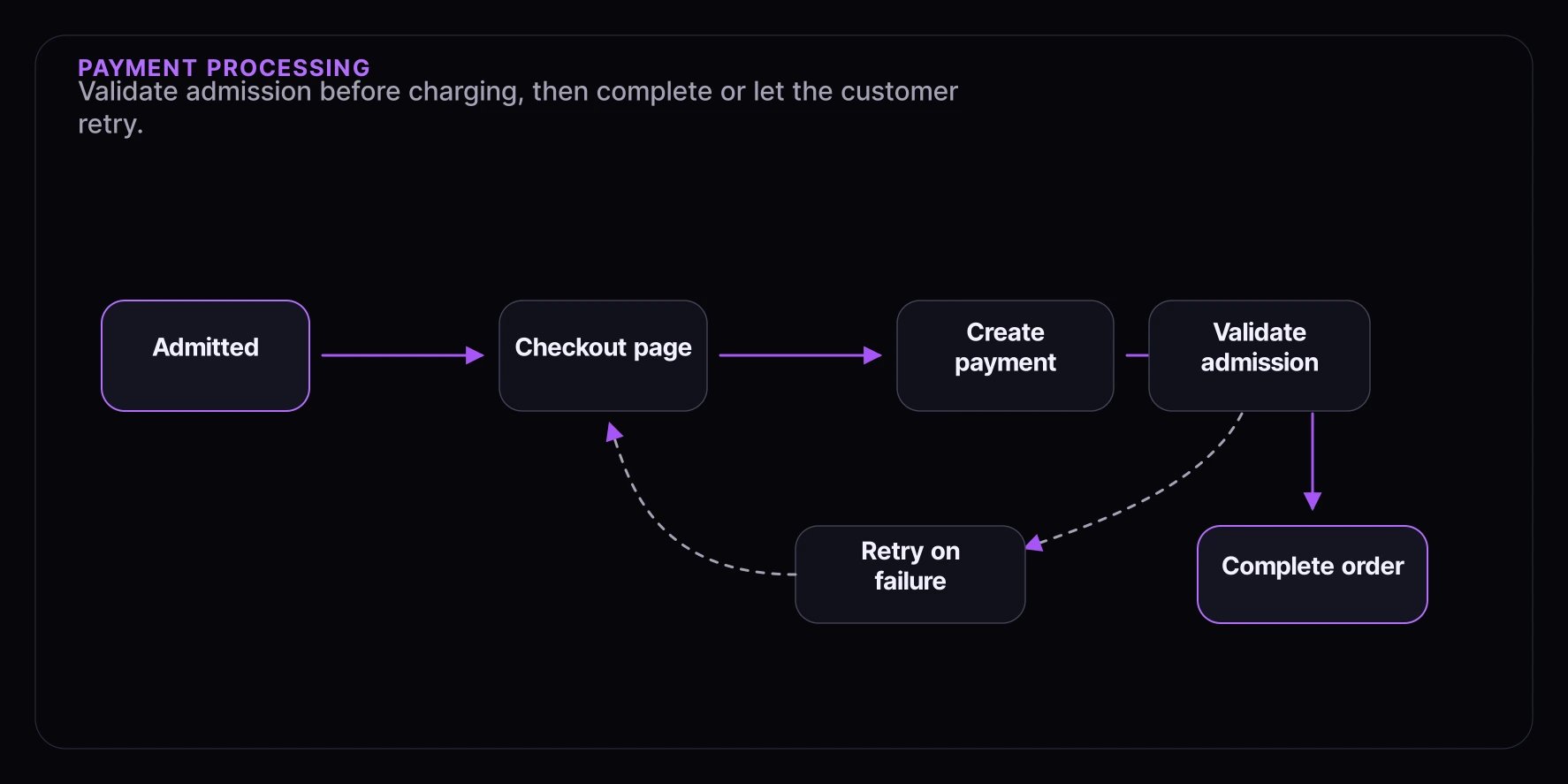
When a consumer is admitted through Fanfare, they have a limited time window to complete their purchase. This guide covers integrating payment providers while validating admission status.
**What you'll learn:**
* Validating admission before payment
* Integrating with Stripe, PayPal, and other providers
* Handling payment failures
* Securing the payment flow
**Complexity:** Intermediate
**Time to complete:** 35 minutes
## Prerequisites
* [Checkout Overview](/guides/checkout-integration/checkout-overview) guide completed
* Payment provider account (Stripe, PayPal, etc.)
* Backend server for secure payment processing
## Payment Flow Architecture
 ## Stripe Integration
Fanfare-facing amounts should remain decimal strings such as `"199.99"`. Convert to provider-specific minor units only when calling a payment provider, and use a currency-aware helper so zero-decimal currencies are handled correctly.
### Step 1: Create Payment Intent with Admission Validation
```typescript theme={null}
// routes/payments.ts
import Stripe from "stripe";
import express from "express";
const stripe = new Stripe(process.env.STRIPE_SECRET_KEY!);
const router = express.Router();
interface CreatePaymentParams {
admissionToken: string;
consumerId: string;
distributionId: string;
distributionType: "queue" | "draw" | "auction";
amount: string;
currencyCode: string;
items: Array<{ productId: string; variantId?: string; quantity: number; unitAmount?: string }>;
}
router.post("/create-payment-intent", async (req, res) => {
try {
const { admissionToken, consumerId, distributionId, distributionType, amount, currencyCode, items } =
req.body as CreatePaymentParams;
// 1. Validate admission with Fanfare FIRST
const isValid = await validateAdmission({
token: admissionToken,
consumerId,
distributionId,
distributionType,
});
if (!isValid) {
return res.status(403).json({
error: "ADMISSION_INVALID",
message: "Your access has expired. Please rejoin the experience.",
});
}
// 2. Create Stripe PaymentIntent
const paymentIntent = await stripe.paymentIntents.create({
amount: moneyToProviderMinorUnits(amount, currencyCode),
currency: currencyCode.toLowerCase(),
automatic_payment_methods: { enabled: true },
metadata: {
admissionToken,
consumerId,
distributionId,
distributionType,
items: JSON.stringify(items),
},
});
// 3. Return client secret
res.json({
clientSecret: paymentIntent.client_secret,
paymentIntentId: paymentIntent.id,
});
} catch (error) {
console.error("Payment intent creation failed:", error);
res.status(500).json({ error: "Failed to create payment" });
}
});
```
### Step 2: Frontend Payment Form
```tsx theme={null}
import { loadStripe } from "@stripe/stripe-js";
import { Elements, PaymentElement, useStripe, useElements } from "@stripe/react-stripe-js";
import { useState, useEffect } from "react";
const stripePromise = loadStripe(process.env.NEXT_PUBLIC_STRIPE_KEY!);
interface CheckoutFormProps {
admissionToken: string;
consumerId: string;
distributionId: string;
distributionType: "queue" | "draw" | "auction";
cart: CartItem[];
totalAmount: string;
}
function PaymentForm({ onSuccess, onError }: { onSuccess: () => void; onError: (msg: string) => void }) {
const stripe = useStripe();
const elements = useElements();
const [isProcessing, setIsProcessing] = useState(false);
const handleSubmit = async (e: React.FormEvent) => {
e.preventDefault();
if (!stripe || !elements) return;
setIsProcessing(true);
const { error, paymentIntent } = await stripe.confirmPayment({
elements,
confirmParams: {
return_url: `${window.location.origin}/checkout/complete`,
},
redirect: "if_required",
});
if (error) {
onError(error.message ?? "Payment failed");
setIsProcessing(false);
} else if (paymentIntent?.status === "succeeded") {
onSuccess();
}
};
return (
);
}
export function StripeCheckout(props: CheckoutFormProps) {
const [clientSecret, setClientSecret] = useState(null);
const [error, setError] = useState(null);
useEffect(() => {
async function createIntent() {
try {
const res = await fetch("/api/payments/create-payment-intent", {
method: "POST",
headers: { "Content-Type": "application/json" },
body: JSON.stringify({
admissionToken: props.admissionToken,
consumerId: props.consumerId,
distributionId: props.distributionId,
distributionType: props.distributionType,
amount: props.totalAmount,
currencyCode: "USD",
items: props.cart,
}),
});
if (!res.ok) {
const data = await res.json();
if (data.error === "ADMISSION_INVALID") {
setError("Your access has expired. Please return to the experience.");
return;
}
throw new Error(data.message);
}
const { clientSecret } = await res.json();
setClientSecret(clientSecret);
} catch (err) {
setError(err instanceof Error ? err.message : "Failed to initialize payment");
}
}
createIntent();
}, [props]);
if (error) {
return (
);
}
if (!clientSecret) {
return
## Stripe Integration
Fanfare-facing amounts should remain decimal strings such as `"199.99"`. Convert to provider-specific minor units only when calling a payment provider, and use a currency-aware helper so zero-decimal currencies are handled correctly.
### Step 1: Create Payment Intent with Admission Validation
```typescript theme={null}
// routes/payments.ts
import Stripe from "stripe";
import express from "express";
const stripe = new Stripe(process.env.STRIPE_SECRET_KEY!);
const router = express.Router();
interface CreatePaymentParams {
admissionToken: string;
consumerId: string;
distributionId: string;
distributionType: "queue" | "draw" | "auction";
amount: string;
currencyCode: string;
items: Array<{ productId: string; variantId?: string; quantity: number; unitAmount?: string }>;
}
router.post("/create-payment-intent", async (req, res) => {
try {
const { admissionToken, consumerId, distributionId, distributionType, amount, currencyCode, items } =
req.body as CreatePaymentParams;
// 1. Validate admission with Fanfare FIRST
const isValid = await validateAdmission({
token: admissionToken,
consumerId,
distributionId,
distributionType,
});
if (!isValid) {
return res.status(403).json({
error: "ADMISSION_INVALID",
message: "Your access has expired. Please rejoin the experience.",
});
}
// 2. Create Stripe PaymentIntent
const paymentIntent = await stripe.paymentIntents.create({
amount: moneyToProviderMinorUnits(amount, currencyCode),
currency: currencyCode.toLowerCase(),
automatic_payment_methods: { enabled: true },
metadata: {
admissionToken,
consumerId,
distributionId,
distributionType,
items: JSON.stringify(items),
},
});
// 3. Return client secret
res.json({
clientSecret: paymentIntent.client_secret,
paymentIntentId: paymentIntent.id,
});
} catch (error) {
console.error("Payment intent creation failed:", error);
res.status(500).json({ error: "Failed to create payment" });
}
});
```
### Step 2: Frontend Payment Form
```tsx theme={null}
import { loadStripe } from "@stripe/stripe-js";
import { Elements, PaymentElement, useStripe, useElements } from "@stripe/react-stripe-js";
import { useState, useEffect } from "react";
const stripePromise = loadStripe(process.env.NEXT_PUBLIC_STRIPE_KEY!);
interface CheckoutFormProps {
admissionToken: string;
consumerId: string;
distributionId: string;
distributionType: "queue" | "draw" | "auction";
cart: CartItem[];
totalAmount: string;
}
function PaymentForm({ onSuccess, onError }: { onSuccess: () => void; onError: (msg: string) => void }) {
const stripe = useStripe();
const elements = useElements();
const [isProcessing, setIsProcessing] = useState(false);
const handleSubmit = async (e: React.FormEvent) => {
e.preventDefault();
if (!stripe || !elements) return;
setIsProcessing(true);
const { error, paymentIntent } = await stripe.confirmPayment({
elements,
confirmParams: {
return_url: `${window.location.origin}/checkout/complete`,
},
redirect: "if_required",
});
if (error) {
onError(error.message ?? "Payment failed");
setIsProcessing(false);
} else if (paymentIntent?.status === "succeeded") {
onSuccess();
}
};
return (
);
}
export function StripeCheckout(props: CheckoutFormProps) {
const [clientSecret, setClientSecret] = useState(null);
const [error, setError] = useState(null);
useEffect(() => {
async function createIntent() {
try {
const res = await fetch("/api/payments/create-payment-intent", {
method: "POST",
headers: { "Content-Type": "application/json" },
body: JSON.stringify({
admissionToken: props.admissionToken,
consumerId: props.consumerId,
distributionId: props.distributionId,
distributionType: props.distributionType,
amount: props.totalAmount,
currencyCode: "USD",
items: props.cart,
}),
});
if (!res.ok) {
const data = await res.json();
if (data.error === "ADMISSION_INVALID") {
setError("Your access has expired. Please return to the experience.");
return;
}
throw new Error(data.message);
}
const { clientSecret } = await res.json();
setClientSecret(clientSecret);
} catch (err) {
setError(err instanceof Error ? err.message : "Failed to initialize payment");
}
}
createIntent();
}, [props]);
if (error) {
return (
);
}
if (!clientSecret) {
return Preparing payment...
;
}
return (
(window.location.href = "/checkout/success")} onError={setError} />
);
}
```
### Step 3: Handle Stripe Webhooks
```typescript theme={null}
// routes/webhooks/stripe.ts
import Stripe from "stripe";
import express from "express";
const stripe = new Stripe(process.env.STRIPE_SECRET_KEY!);
const webhookSecret = process.env.STRIPE_WEBHOOK_SECRET!;
const router = express.Router();
router.post("/webhook", express.raw({ type: "application/json" }), async (req, res) => {
const sig = req.headers["stripe-signature"]!;
let event: Stripe.Event;
try {
event = stripe.webhooks.constructEvent(req.body, sig, webhookSecret);
} catch (err) {
console.error("Webhook signature verification failed");
return res.status(400).send("Invalid signature");
}
switch (event.type) {
case "payment_intent.succeeded": {
const paymentIntent = event.data.object as Stripe.PaymentIntent;
await handlePaymentSuccess(paymentIntent);
break;
}
case "payment_intent.payment_failed": {
const paymentIntent = event.data.object as Stripe.PaymentIntent;
await handlePaymentFailure(paymentIntent);
break;
}
}
res.json({ received: true });
});
async function handlePaymentSuccess(paymentIntent: Stripe.PaymentIntent) {
const { admissionToken, consumerId, distributionId, distributionType, items } = paymentIntent.metadata;
// 1. Create order in your system
const order = await createOrder({
consumerId,
items: JSON.parse(items),
paymentIntentId: paymentIntent.id,
amount: providerMinorUnitsToMoneyString(paymentIntent.amount, paymentIntent.currency),
currencyCode: paymentIntent.currency.toUpperCase(),
});
// 2. Complete admission with Fanfare
await completeAdmission({
distributionId,
distributionType: distributionType as "queue" | "draw" | "auction",
consumerId,
});
// 3. Send confirmation email
await sendOrderConfirmation(order);
console.log(`Order ${order.id} created for payment ${paymentIntent.id}`);
}
async function handlePaymentFailure(paymentIntent: Stripe.PaymentIntent) {
console.log(`Payment failed: ${paymentIntent.id}`);
// Don't invalidate admission - allow retry
}
```
## PayPal Integration
### Step 1: Create PayPal Order
```typescript theme={null}
// routes/paypal.ts
import { PayPalHttpClient, OrdersApi, Order } from "@paypal/paypal-server-sdk";
const paypalClient = new PayPalHttpClient({
clientId: process.env.PAYPAL_CLIENT_ID!,
clientSecret: process.env.PAYPAL_CLIENT_SECRET!,
environment: process.env.NODE_ENV === "production" ? "production" : "sandbox",
});
const ordersApi = new OrdersApi(paypalClient);
router.post("/create-paypal-order", async (req, res) => {
const { admissionToken, consumerId, distributionId, distributionType, amount, currencyCode, items } = req.body;
// 1. Validate admission
const isValid = await validateAdmission({
token: admissionToken,
consumerId,
distributionId,
distributionType,
});
if (!isValid) {
return res.status(403).json({
error: "ADMISSION_INVALID",
message: "Your access has expired.",
});
}
// 2. Create PayPal order
const order = await ordersApi.ordersCreate({
body: {
intent: "CAPTURE",
purchaseUnits: [
{
amount: {
currencyCode,
value: amount,
},
customId: JSON.stringify({
admissionToken,
consumerId,
distributionId,
distributionType,
}),
},
],
},
});
res.json({ orderId: order.result.id });
});
router.post("/capture-paypal-order", async (req, res) => {
const { orderId } = req.body;
const capture = await ordersApi.ordersCapture({
id: orderId,
});
if (capture.result.status === "COMPLETED") {
const customData = JSON.parse(capture.result.purchaseUnits![0].customId!);
// Create order and complete admission
await handlePayPalSuccess(capture.result, customData);
res.json({ success: true });
} else {
res.status(400).json({ error: "Capture failed" });
}
});
```
### Step 2: PayPal Frontend
```tsx theme={null}
import { PayPalScriptProvider, PayPalButtons } from "@paypal/react-paypal-js";
export function PayPalCheckout(props: CheckoutFormProps) {
const createOrder = async () => {
const res = await fetch("/api/payments/create-paypal-order", {
method: "POST",
headers: { "Content-Type": "application/json" },
body: JSON.stringify({
admissionToken: props.admissionToken,
consumerId: props.consumerId,
distributionId: props.distributionId,
distributionType: props.distributionType,
amount: props.totalAmount,
currencyCode: "USD",
items: props.cart,
}),
});
const { orderId } = await res.json();
return orderId;
};
const onApprove = async (data: { orderID: string }) => {
const res = await fetch("/api/payments/capture-paypal-order", {
method: "POST",
headers: { "Content-Type": "application/json" },
body: JSON.stringify({ orderId: data.orderID }),
});
if (res.ok) {
window.location.href = "/checkout/success";
}
};
return (
console.error("PayPal error:", err)}
/>
);
}
```
## Error Handling
### Payment Failures
```tsx theme={null}
function PaymentErrorHandler({ error, onRetry }: { error: PaymentError; onRetry: () => void }) {
const getErrorMessage = (error: PaymentError) => {
switch (error.code) {
case "card_declined":
return "Your card was declined. Please try a different payment method.";
case "insufficient_funds":
return "Insufficient funds. Please try a different card.";
case "expired_card":
return "Your card has expired. Please use a different card.";
case "ADMISSION_INVALID":
return "Your access has expired. Please return to the experience.";
default:
return "Payment failed. Please try again.";
}
};
const canRetry = error.code !== "ADMISSION_INVALID";
return (
);
}
```
### Idempotency
```typescript theme={null}
// Ensure payments aren't processed twice
async function createPaymentWithIdempotency(params: CreatePaymentParams, idempotencyKey: string) {
return await stripe.paymentIntents.create(
{
amount: moneyToProviderMinorUnits(params.amount, params.currencyCode),
currency: params.currencyCode.toLowerCase(),
metadata: {
admissionToken: params.admissionToken,
consumerId: params.consumerId,
distributionId: params.distributionId,
distributionType: params.distributionType,
},
},
{
idempotencyKey,
}
);
}
// Generate idempotency key from admission context
function generateIdempotencyKey(admissionToken: string, consumerId: string) {
return `${admissionToken}-${consumerId}-${Date.now()}`;
}
```
## Best Practices
### 1. Always Validate Before Payment
```typescript theme={null}
// Never create payment intent without validation
async function createPayment(params: CreatePaymentParams) {
// ALWAYS validate first
const isValid = await validateAdmission(params);
if (!isValid) {
throw new AdmissionError("Invalid admission");
}
// Then proceed with payment
return stripe.paymentIntents.create(/* ... */);
}
```
### 2. Don't Invalidate on Payment Failure
```typescript theme={null}
// On payment failure
async function handlePaymentFailure(paymentIntent: Stripe.PaymentIntent) {
// Log the failure
console.log("Payment failed:", paymentIntent.id);
// DON'T complete/invalidate admission
// User should be able to retry with same admission
}
```
### 3. Use Webhooks for Reliability
```typescript theme={null}
// Don't rely solely on client-side confirmation
// Always use webhooks for order creation
router.post("/webhook", async (req, res) => {
// Webhook ensures order is created even if user closes browser
});
```
### 4. Monitor Payment + Admission Metrics
```typescript theme={null}
analytics.track("payment_attempted", {
admissionToken,
amount,
distributionType,
});
analytics.track("payment_completed", {
admissionToken,
orderId,
amount,
});
```
## Troubleshooting
### Payment Created But Admission Invalid
The admission may have expired between page load and payment submission:
* Validate admission at payment creation time
* Show clear expiration countdown to users
* Handle gracefully with clear error messages
### Double Charges
* Use idempotency keys
* Check for existing payments before creating new ones
* Use webhooks as source of truth
## What's Next
* [Order Completion](/guides/checkout-integration/order-completion) - Complete the order cycle
* [Webhooks](/guides/advanced/webhooks-guide) - Server-side event handling
* [Error Handling](/guides/advanced/error-handling) - Comprehensive error management