> ## Documentation Index
> Fetch the complete documentation index at: https://docs.fanfare.io/llms.txt
> Use this file to discover all available pages before exploring further.
# SSR Integration
> Integrate Fanfare in server-rendered applications with a browser-only SDK boundary.
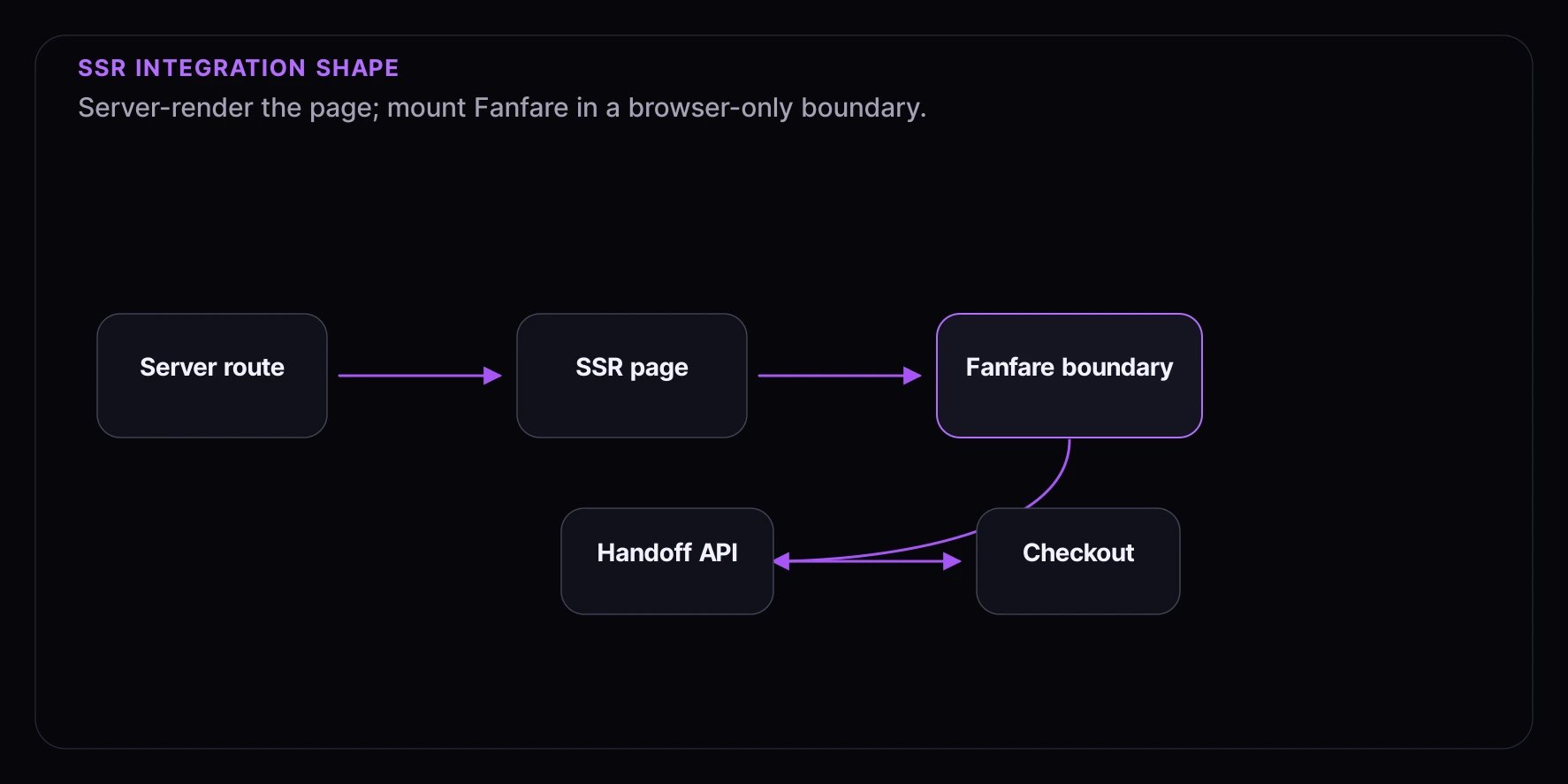
Server-rendered apps should treat Fanfare as a browser SDK. Render the surrounding page on the server, then mount Fanfare inside a client component after hydration.
The server can prepare product data, authenticated customer context, and checkout routes. The SDK should be initialized in the browser with a publishable key, and admitted customers should be handed to a trusted server or checkout boundary.
## Integration Shape
Key rules:
* Put `FanfareProvider`, `ExperienceWidget`, and `useExperienceJourney` in client-only code.
* Use environment variables that are safe for the browser, such as `NEXT_PUBLIC_FANFARE_PUBLISHABLE_KEY`.
* Keep grants out of URLs and third-party telemetry.
* Let the server validate the handoff before protected checkout actions.
## Next.js App Router
Create a small client provider.
```tsx theme={null}
"use client";
import { FanfareProvider } from "@fanfare-io/fanfare-sdk-react";
import "@fanfare-io/fanfare-sdk-react/styles";
export function FanfareClientProvider({ children }: { children: React.ReactNode }) {
return (
{children}
);
}
```
Wrap only the part of the tree that needs Fanfare.
```tsx theme={null}
import { FanfareClientProvider } from "@/components/fanfare-client-provider";
import { LaunchExperience } from "@/components/launch-experience";
export default async function ProductPage() {
const product = await getProduct();
return (
{product.name}
);
}
```
Render the widget in a client component.
```tsx theme={null}
"use client";
import { ExperienceWidget } from "@fanfare-io/fanfare-sdk-react";
export function LaunchExperience({ experienceId }: { experienceId: string }) {
return (
{
await fetch("/api/fanfare/admission", {
method: "POST",
headers: { "Content-Type": "application/json" },
body: JSON.stringify({ admissionGrant }),
});
window.location.assign("/checkout");
}}
/>
);
}
```
Use `checkoutUrl` instead of `onGranted` when simple browser navigation is enough.
## Custom Client UI
For a custom SSR page, keep the server-rendered shell stable and branch on `JourneyView` only after the client component mounts.
```tsx theme={null}
"use client";
import { useExperienceJourney } from "@fanfare-io/fanfare-sdk-react";
export function CustomLaunch({ experienceId }: { experienceId: string }) {
const { view, start, error } = useExperienceJourney(experienceId);
if (error) return ;
if (!view) return ;
if (view.journeyStage === "ready") {
return ;
}
if (view.journeyStage === "routing") return ;
if (view.journeyStage === "gated") return ;
return ;
}
```
Avoid rendering state-specific buttons from server assumptions. The current client view decides what is valid.
## Remix And Nuxt
The same boundary applies in other SSR frameworks:
* Load product and routing data on the server.
* Mount Fanfare in browser-only code.
* Import `@fanfare-io/fanfare-sdk-react/styles` once for React surfaces.
* Use the core SDK or web components when React is not part of the client island.
For static or CMS-rendered islands, register the web component once:
```html theme={null}
```
## Server Handoff
Your admission endpoint should accept the grant from your own page and prepare the next trusted step.
```ts theme={null}
export async function POST(request: Request) {
const { admissionGrant } = await request.json();
await prepareCheckout({ admissionGrant });
return Response.json({ ok: true });
}
```
Keep the endpoint focused on your application contract. Do not mirror private routing details into public responses.
## Testing SSR Integrations
* Confirm the page renders without accessing browser-only APIs on the server.
* Confirm the client boundary hydrates and renders a public journey state.
* Test admitted handoff through your own API route.
* Repeat with a returning browser session.
* Keep assertions based on visible states and app-owned side effects.
See [Testing Your Integration](/getting-started/testing) for app-boundary test guidance.
 Key rules:
* Put `FanfareProvider`, `ExperienceWidget`, and `useExperienceJourney` in client-only code.
* Use environment variables that are safe for the browser, such as `NEXT_PUBLIC_FANFARE_PUBLISHABLE_KEY`.
* Keep grants out of URLs and third-party telemetry.
* Let the server validate the handoff before protected checkout actions.
## Next.js App Router
Create a small client provider.
```tsx theme={null}
"use client";
import { FanfareProvider } from "@fanfare-io/fanfare-sdk-react";
import "@fanfare-io/fanfare-sdk-react/styles";
export function FanfareClientProvider({ children }: { children: React.ReactNode }) {
return (
Key rules:
* Put `FanfareProvider`, `ExperienceWidget`, and `useExperienceJourney` in client-only code.
* Use environment variables that are safe for the browser, such as `NEXT_PUBLIC_FANFARE_PUBLISHABLE_KEY`.
* Keep grants out of URLs and third-party telemetry.
* Let the server validate the handoff before protected checkout actions.
## Next.js App Router
Create a small client provider.
```tsx theme={null}
"use client";
import { FanfareProvider } from "@fanfare-io/fanfare-sdk-react";
import "@fanfare-io/fanfare-sdk-react/styles";
export function FanfareClientProvider({ children }: { children: React.ReactNode }) {
return (