> ## Documentation Index
> Fetch the complete documentation index at: https://docs.fanfare.io/llms.txt
> Use this file to discover all available pages before exploring further.
# Scaling Your Integration
> Design patterns and strategies for handling high-traffic events with Fanfare.
Fanfare is designed to handle massive traffic spikes during high-demand product launches and events. This guide covers best practices for ensuring your integration scales effectively.
## Understanding Traffic Patterns
Product launches and limited releases typically follow predictable traffic patterns:
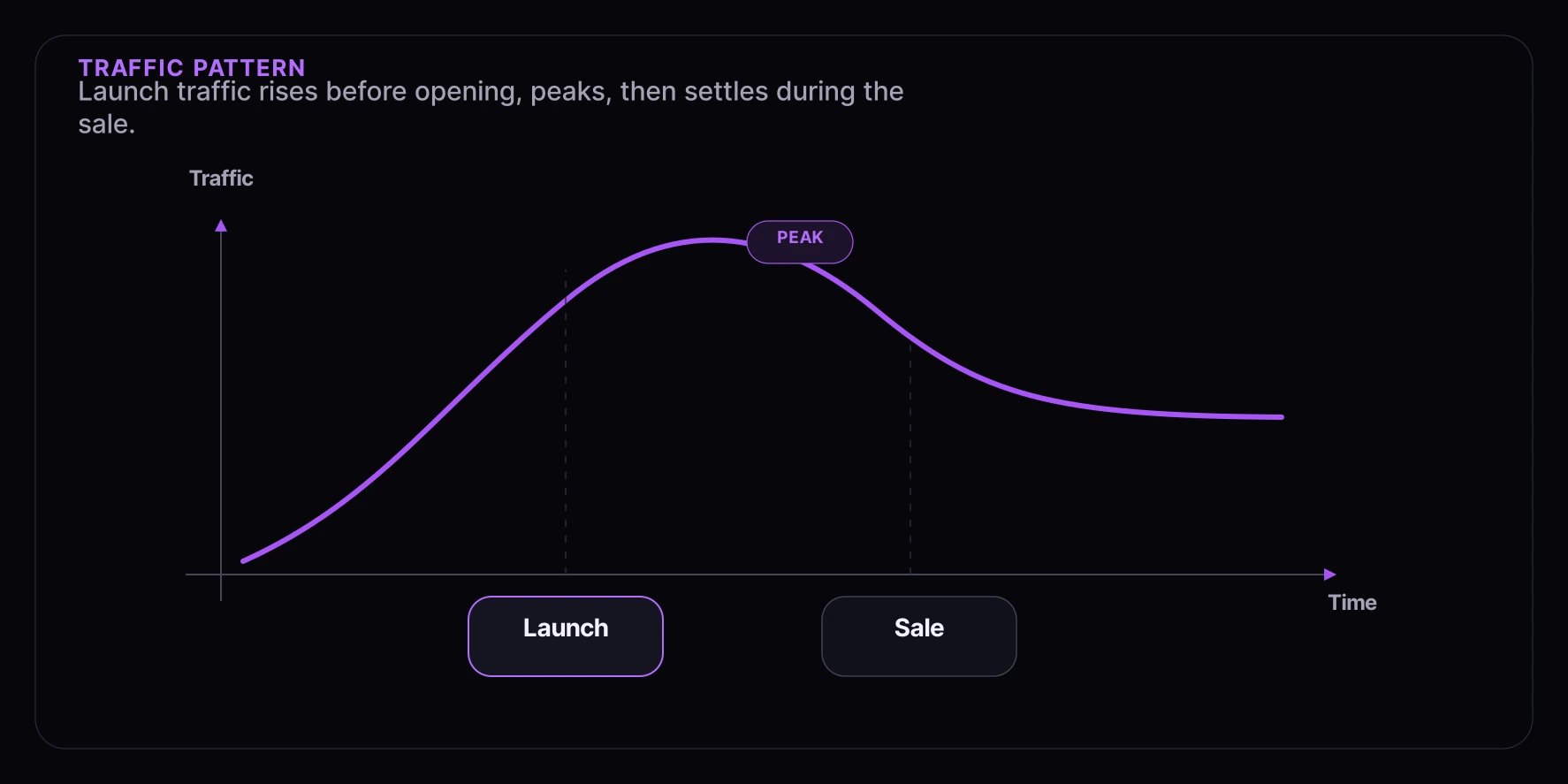 * **Pre-launch surge**: Traffic builds as the launch time approaches
* **Peak at launch**: Maximum traffic at the moment the experience opens
* **Sustained period**: Consistent traffic during the sale
* **Gradual decline**: Traffic decreases as inventory sells out
## Capacity Planning
### Estimate Your Traffic
Before a high-demand event, estimate expected traffic:
| Factor | Consideration |
| ---------------- | ------------------------------ |
| Email list size | Direct notification recipients |
| Social followers | Potential viral reach |
| Previous events | Historical traffic data |
| Product demand | Hype level and scarcity |
| Marketing spend | Paid promotion reach |
### Set Appropriate Limits
Configure experience limits to match your fulfillment capacity.
```typescript theme={null}
// Example: Configure sequence limits
const sequence = {
name: "General Access",
maxParticipants: 10000, // Match your inventory/capacity
accessType: "queue",
};
```
Setting limits too high can create fulfillment bottlenecks. Set limits based on what you can actually deliver.
## Architecture Recommendations
### Separate Landing Pages
Keep your product pages separate from Fanfare experiences.
* **Pre-launch surge**: Traffic builds as the launch time approaches
* **Peak at launch**: Maximum traffic at the moment the experience opens
* **Sustained period**: Consistent traffic during the sale
* **Gradual decline**: Traffic decreases as inventory sells out
## Capacity Planning
### Estimate Your Traffic
Before a high-demand event, estimate expected traffic:
| Factor | Consideration |
| ---------------- | ------------------------------ |
| Email list size | Direct notification recipients |
| Social followers | Potential viral reach |
| Previous events | Historical traffic data |
| Product demand | Hype level and scarcity |
| Marketing spend | Paid promotion reach |
### Set Appropriate Limits
Configure experience limits to match your fulfillment capacity.
```typescript theme={null}
// Example: Configure sequence limits
const sequence = {
name: "General Access",
maxParticipants: 10000, // Match your inventory/capacity
accessType: "queue",
};
```
Setting limits too high can create fulfillment bottlenecks. Set limits based on what you can actually deliver.
## Architecture Recommendations
### Separate Landing Pages
Keep your product pages separate from Fanfare experiences.
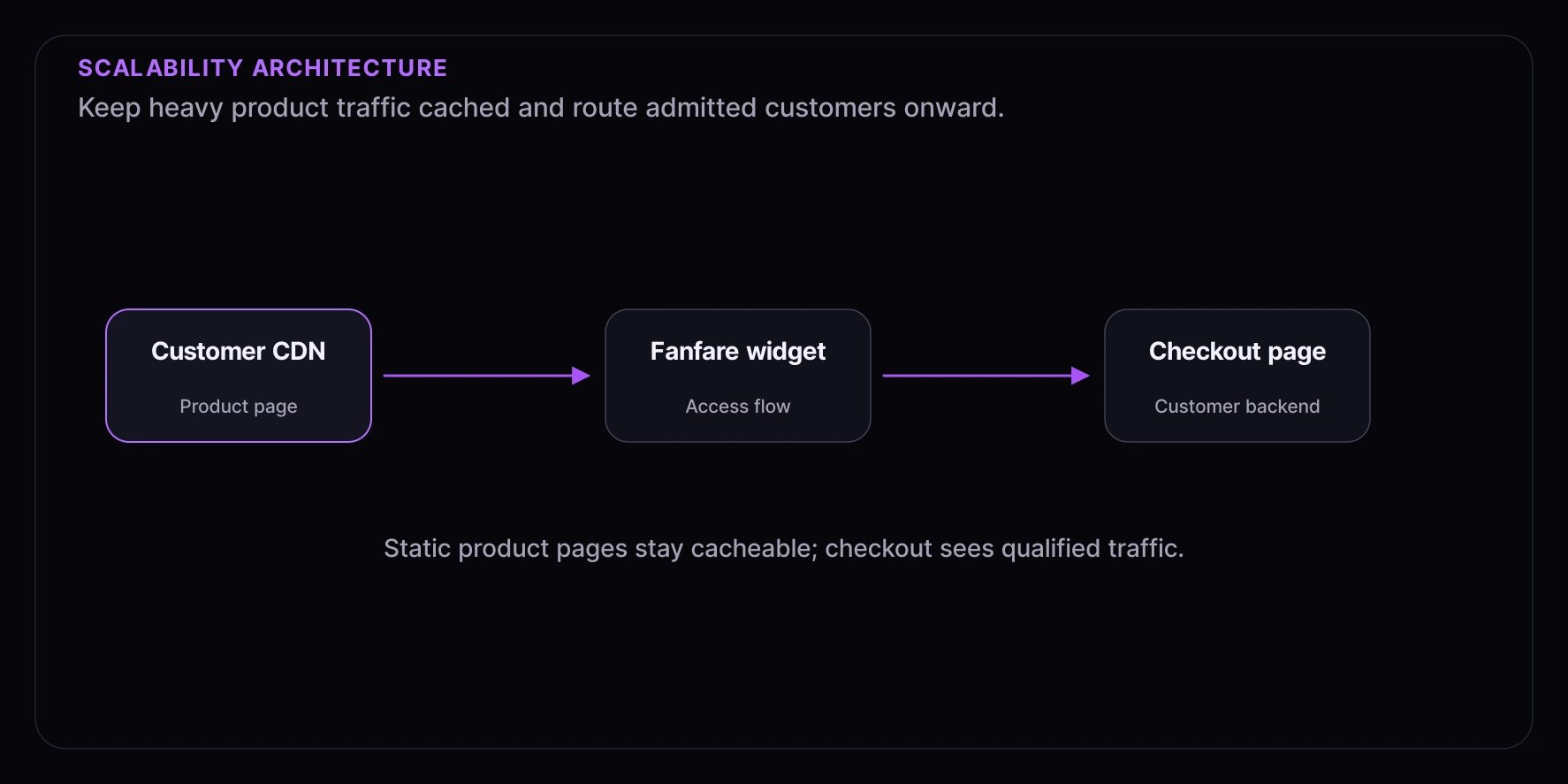 Benefits:
* Product pages can be heavily cached
* Fanfare handles the surge traffic
* Your checkout only sees qualified traffic
### CDN Configuration
Cache static assets aggressively.
```nginx theme={null}
# Nginx example for static assets
location /static/ {
expires 1y;
add_header Cache-Control "public, immutable";
}
# Dynamic Fanfare content should not be cached
location /api/fanfare/ {
proxy_pass https://consumer.fanfare.io;
proxy_cache_bypass 1;
}
```
## High-Traffic Scenarios
### Queue-Based Distribution
Queues are ideal for high-traffic scenarios as they naturally throttle access.
```typescript theme={null}
// Consumers enter the queue
await client.queues.enter(queueId);
// Monitor position updates
client.on("queue:position-updated", ({ position, estimatedWait }) => {
updateUI(position, estimatedWait);
});
// Handle access grants
client.on("queue:access-granted", ({ handoffToken }) => {
// Exchange the grant server-side, then navigate without putting it in the URL.
fetch("/api/checkout/handoff", {
method: "POST",
headers: {
Authorization: `Bearer ${handoffToken}`,
},
}).then(() => {
window.location.href = "/checkout";
});
});
```
### Draw-Based Distribution
Draws distribute access randomly, ideal for fairness in high-demand situations.
```typescript theme={null}
// Register for the draw
await client.draws.enter(drawId);
// Check draw status
client.on("draw:completed", ({ isWinner, result }) => {
if (isWinner) {
// Winner - proceed to purchase
showWinnerUI(result.handoffToken);
} else {
// Not selected
showNotSelectedUI();
}
});
```
## Error Handling at Scale
### Retry with Backoff
Implement exponential backoff for transient errors.
```typescript theme={null}
async function withRetry(fn: () => Promise, maxRetries = 3): Promise {
let lastError: Error | undefined;
for (let attempt = 1; attempt <= maxRetries; attempt++) {
try {
return await fn();
} catch (error) {
lastError = error as Error;
// Don't retry client errors (4xx)
if (error instanceof FanfareError && error.status && error.status < 500) {
throw error;
}
// Exponential backoff: 1s, 2s, 4s...
const delay = Math.min(1000 * Math.pow(2, attempt - 1), 30000);
await new Promise((resolve) => setTimeout(resolve, delay));
}
}
throw lastError;
}
// Usage
const session = await withRetry(() => client.experiences.enter(experienceId));
```
### Graceful Degradation
Handle failures gracefully to maintain user trust.
```typescript theme={null}
try {
await client.experiences.enter(experienceId);
} catch (error) {
if (error instanceof FanfareError) {
switch (error.code) {
case "RATE_LIMITED":
showMessage("High demand - please wait a moment and try again");
break;
case "SERVICE_UNAVAILABLE":
showMessage("System is busy - you're still in line");
enableAutoRetry();
break;
default:
showMessage("Something went wrong - please refresh the page");
}
}
}
```
## Load Testing
### Pre-Launch Testing
Test your integration under expected load before the event.
```typescript theme={null}
// Example k6 load test script
import http from "k6/http";
import { check, sleep } from "k6";
export const options = {
stages: [
{ duration: "2m", target: 1000 }, // Ramp up
{ duration: "5m", target: 1000 }, // Sustain
{ duration: "2m", target: 5000 }, // Spike
{ duration: "5m", target: 1000 }, // Return to normal
{ duration: "2m", target: 0 }, // Ramp down
],
};
export default function () {
const res = http.get("https://your-site.com/product-page");
check(res, {
"status is 200": (r) => r.status === 200,
"response time < 500ms": (r) => r.timings.duration < 500,
});
sleep(1);
}
```
### Testing Checklist
Verify the SDK initializes correctly when many users load the page simultaneously.
Simulate many users entering an experience at the exact same moment.
Verify position updates are delivered reliably under load.
Ensure the checkout handoff works when many users are granted access simultaneously.
Verify graceful handling of rate limits, timeouts, and service errors.
## Monitoring During Events
### Key Metrics to Watch
| Metric | Warning Threshold | Description |
| --------------- | ----------------- | ------------------------ |
| Error rate | > 1% | API and SDK errors |
| P95 latency | > 2s | Request response times |
| Queue depth | Capacity - 10% | Approaching limits |
| Handoff success | \< 95% | Checkout completion rate |
### Real-Time Dashboards
Set up monitoring dashboards before high-traffic events.
```typescript theme={null}
// Example: Track key events for monitoring
client.on("queue:position-updated", () => {
analytics.track("queue_position_updated");
});
client.on("queue:access-granted", () => {
analytics.track("access_granted");
});
client.on("error", (error) => {
analytics.track("sdk_error", { code: error.code });
});
```
## Communication During Events
### Status Page
Consider setting up a status page for high-profile events.
* Current queue depth
* Estimated wait times
* Any known issues
* Updates on inventory
### User Messaging
Prepare messaging for common scenarios:
| Scenario | Message |
| --------------- | -------------------------------------------------------------- |
| High traffic | "We're experiencing high demand. Thank you for your patience." |
| Temporary delay | "Your place in line is secure. We'll update you shortly." |
| Sold out | "This item has sold out. Join the waitlist for restocks." |
## Next Steps
* [Performance Optimization](/resources/best-practices/performance) - Optimize your integration
* [Fairness Guide](/resources/best-practices/fairness) - Ensure equitable distribution
* [Testing Strategies](/resources/best-practices/testing) - Validate under load
Benefits:
* Product pages can be heavily cached
* Fanfare handles the surge traffic
* Your checkout only sees qualified traffic
### CDN Configuration
Cache static assets aggressively.
```nginx theme={null}
# Nginx example for static assets
location /static/ {
expires 1y;
add_header Cache-Control "public, immutable";
}
# Dynamic Fanfare content should not be cached
location /api/fanfare/ {
proxy_pass https://consumer.fanfare.io;
proxy_cache_bypass 1;
}
```
## High-Traffic Scenarios
### Queue-Based Distribution
Queues are ideal for high-traffic scenarios as they naturally throttle access.
```typescript theme={null}
// Consumers enter the queue
await client.queues.enter(queueId);
// Monitor position updates
client.on("queue:position-updated", ({ position, estimatedWait }) => {
updateUI(position, estimatedWait);
});
// Handle access grants
client.on("queue:access-granted", ({ handoffToken }) => {
// Exchange the grant server-side, then navigate without putting it in the URL.
fetch("/api/checkout/handoff", {
method: "POST",
headers: {
Authorization: `Bearer ${handoffToken}`,
},
}).then(() => {
window.location.href = "/checkout";
});
});
```
### Draw-Based Distribution
Draws distribute access randomly, ideal for fairness in high-demand situations.
```typescript theme={null}
// Register for the draw
await client.draws.enter(drawId);
// Check draw status
client.on("draw:completed", ({ isWinner, result }) => {
if (isWinner) {
// Winner - proceed to purchase
showWinnerUI(result.handoffToken);
} else {
// Not selected
showNotSelectedUI();
}
});
```
## Error Handling at Scale
### Retry with Backoff
Implement exponential backoff for transient errors.
```typescript theme={null}
async function withRetry(fn: () => Promise, maxRetries = 3): Promise {
let lastError: Error | undefined;
for (let attempt = 1; attempt <= maxRetries; attempt++) {
try {
return await fn();
} catch (error) {
lastError = error as Error;
// Don't retry client errors (4xx)
if (error instanceof FanfareError && error.status && error.status < 500) {
throw error;
}
// Exponential backoff: 1s, 2s, 4s...
const delay = Math.min(1000 * Math.pow(2, attempt - 1), 30000);
await new Promise((resolve) => setTimeout(resolve, delay));
}
}
throw lastError;
}
// Usage
const session = await withRetry(() => client.experiences.enter(experienceId));
```
### Graceful Degradation
Handle failures gracefully to maintain user trust.
```typescript theme={null}
try {
await client.experiences.enter(experienceId);
} catch (error) {
if (error instanceof FanfareError) {
switch (error.code) {
case "RATE_LIMITED":
showMessage("High demand - please wait a moment and try again");
break;
case "SERVICE_UNAVAILABLE":
showMessage("System is busy - you're still in line");
enableAutoRetry();
break;
default:
showMessage("Something went wrong - please refresh the page");
}
}
}
```
## Load Testing
### Pre-Launch Testing
Test your integration under expected load before the event.
```typescript theme={null}
// Example k6 load test script
import http from "k6/http";
import { check, sleep } from "k6";
export const options = {
stages: [
{ duration: "2m", target: 1000 }, // Ramp up
{ duration: "5m", target: 1000 }, // Sustain
{ duration: "2m", target: 5000 }, // Spike
{ duration: "5m", target: 1000 }, // Return to normal
{ duration: "2m", target: 0 }, // Ramp down
],
};
export default function () {
const res = http.get("https://your-site.com/product-page");
check(res, {
"status is 200": (r) => r.status === 200,
"response time < 500ms": (r) => r.timings.duration < 500,
});
sleep(1);
}
```
### Testing Checklist
Verify the SDK initializes correctly when many users load the page simultaneously.
Simulate many users entering an experience at the exact same moment.
Verify position updates are delivered reliably under load.
Ensure the checkout handoff works when many users are granted access simultaneously.
Verify graceful handling of rate limits, timeouts, and service errors.
## Monitoring During Events
### Key Metrics to Watch
| Metric | Warning Threshold | Description |
| --------------- | ----------------- | ------------------------ |
| Error rate | > 1% | API and SDK errors |
| P95 latency | > 2s | Request response times |
| Queue depth | Capacity - 10% | Approaching limits |
| Handoff success | \< 95% | Checkout completion rate |
### Real-Time Dashboards
Set up monitoring dashboards before high-traffic events.
```typescript theme={null}
// Example: Track key events for monitoring
client.on("queue:position-updated", () => {
analytics.track("queue_position_updated");
});
client.on("queue:access-granted", () => {
analytics.track("access_granted");
});
client.on("error", (error) => {
analytics.track("sdk_error", { code: error.code });
});
```
## Communication During Events
### Status Page
Consider setting up a status page for high-profile events.
* Current queue depth
* Estimated wait times
* Any known issues
* Updates on inventory
### User Messaging
Prepare messaging for common scenarios:
| Scenario | Message |
| --------------- | -------------------------------------------------------------- |
| High traffic | "We're experiencing high demand. Thank you for your patience." |
| Temporary delay | "Your place in line is secure. We'll update you shortly." |
| Sold out | "This item has sold out. Join the waitlist for restocks." |
## Next Steps
* [Performance Optimization](/resources/best-practices/performance) - Optimize your integration
* [Fairness Guide](/resources/best-practices/fairness) - Ensure equitable distribution
* [Testing Strategies](/resources/best-practices/testing) - Validate under load