Audiences

An Audience is a group of consumers you want to target with specific access or experiences. Audiences let you create VIP early access, invite-only launches, and targeted promotions.

Why Use Audiences?

Audiences help you:
  • Reward loyalty — Give your best consumers early access
  • Create exclusivity — Run invite-only launches
  • Target segments — Different experiences for different consumer groups
  • Sync with your tools — Import audiences from your marketing platforms

Audience Types

Dynamic Audiences

Membership is calculated automatically based on rules you define. As consumer attributes change, membership updates automatically. Example: VIP consumers with high loyalty scores
Audience: "VIP Consumers"
Rule: Loyalty score greater than 100
Result: Consumers automatically join/leave as their score changes
Best for:
  • Loyalty tiers (high-value consumers)
  • Engagement segments (active users)
  • Geographic targeting (consumers in specific regions)

Static Lists

Membership is manually curated. Consumers don’t automatically join or leave. Example: Beta testers for a new feature
Audience: "Beta Testers"
Members: Manually added list of consumer emails
Result: Fixed membership until you change it
Best for:
  • Invite lists for exclusive launches
  • Contest winners
  • Manually curated VIP lists

Synced Lists

Membership is imported and maintained from external systems like your email platform or e-commerce store. Example: Newsletter subscribers from Klaviyo
Audience: "Newsletter Subscribers"
Source: Synced from Klaviyo segment
Result: Keeps in sync as your Klaviyo segment changes
Best for:
  • Using existing marketing segments
  • E-commerce consumer data
  • Maintaining consistency across platforms

Creating Rules for Dynamic Audiences

Dynamic audiences use rules to determine who qualifies. You define conditions based on consumer attributes.

Available Attributes

AttributeDescriptionExample
Loyalty scoreConsumer value score (0-200+)Score > 100
Total ordersNumber of purchasesOrders > 5
Lifetime valueTotal amount spentLTV > $500
Activity levelRecent engagementActivity > 50
StatusAccount statusStatus = Active
LocationCountry, region, cityCountry = US
Email domainConsumer’s email domainContains @company.com

Rule Operators

OperatorMeaningExample
EqualsExact matchCountry equals “US”
Greater thanAbove valueLoyalty score > 100
Less thanBelow valueOrders < 3
BetweenWithin rangeLTV between 100100-500
ContainsText includesEmail contains “@vip”
In listOne of several valuesCountry is US, Canada, or UK
ExistsHas a valuePhone exists

Combining Rules

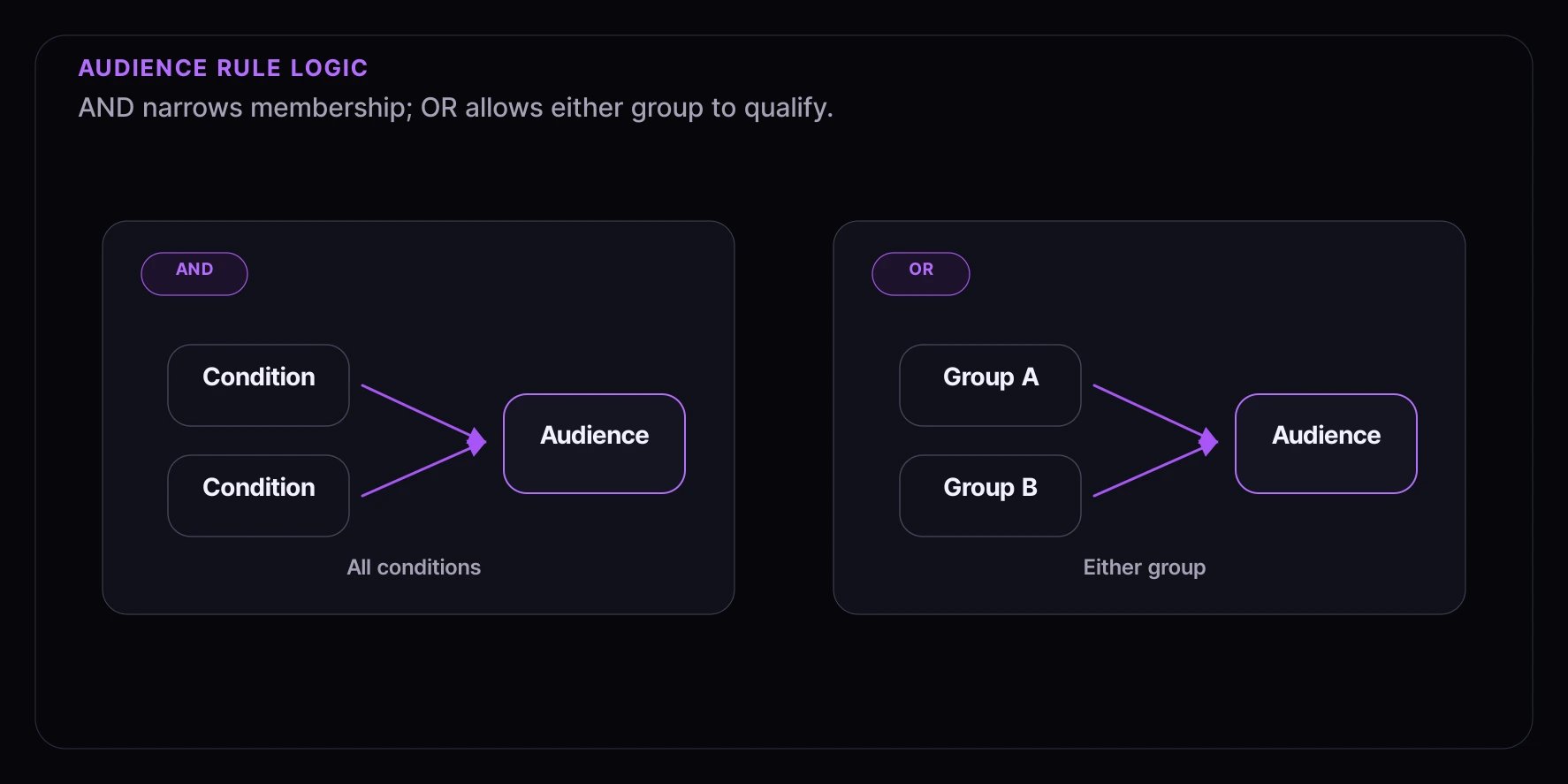
AND logic: All conditions must be true
VIP California Consumers:
├── Loyalty score > 100 (AND)
├── Region = California (AND)
└── Status = Active
OR logic: Any condition can be true
Eligible for Promotion:
├── Group A: Loyalty score > 150
│       (OR)
└── Group B: Total orders > 10

Using Audiences with Experiences

Audiences control which consumers can access specific parts of your experience:
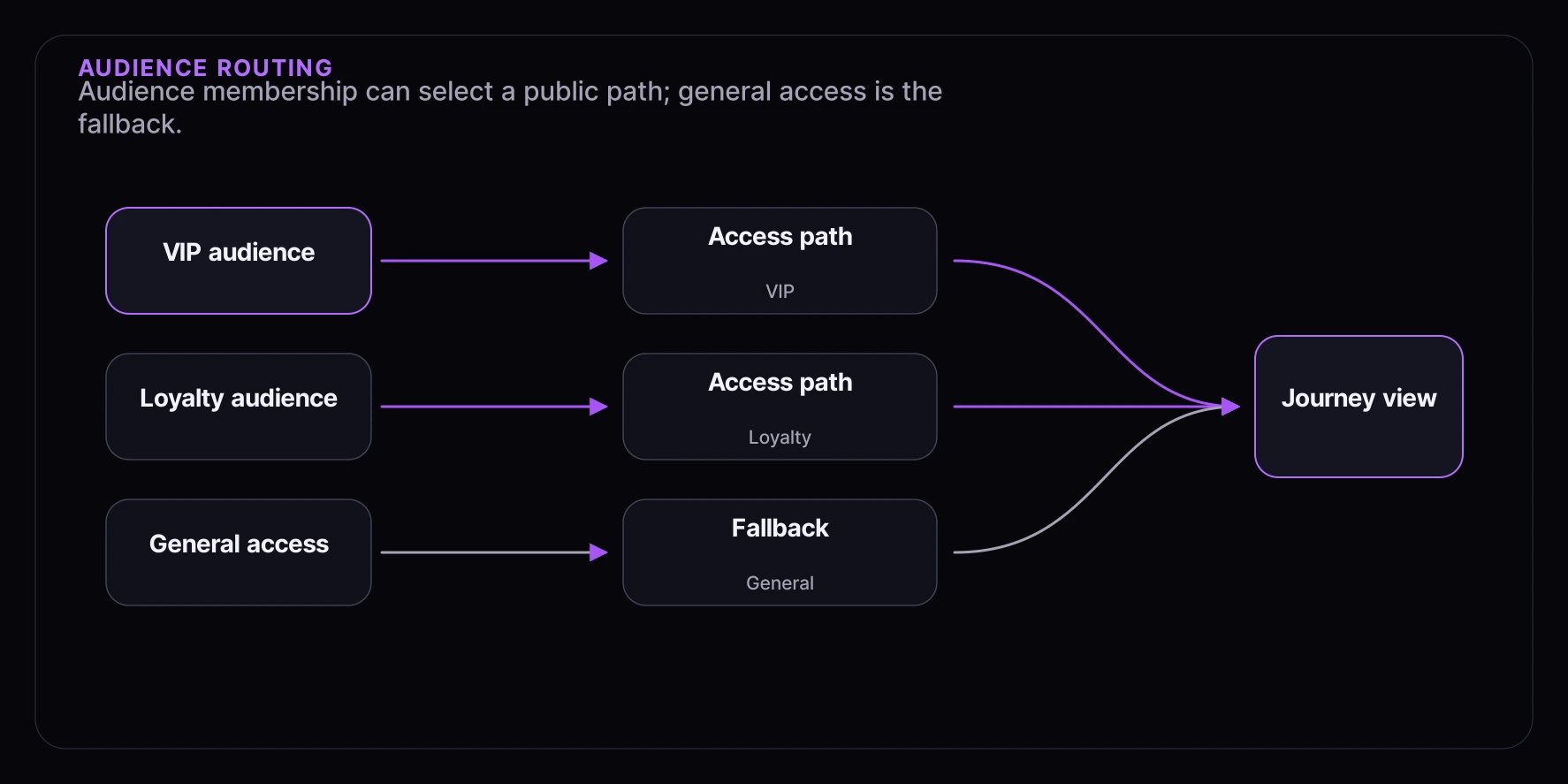
┌─────────────────────────────────────────────────────────────────┐
│                     YOUR EXPERIENCE                              │
├─────────────────────────────────────────────────────────────────┤
│                                                                 │
│  ┌──────────────────┐                                          │
│  │   VIP ACCESS     │ ◄── Requires: VIP Audience               │
│  │   Early draw     │                                          │
│  └──────────────────┘                                          │
│           │                                                     │
│           ▼ (if not VIP)                                       │
│  ┌──────────────────┐                                          │
│  │  LOYALTY ACCESS  │ ◄── Requires: Loyalty Members Audience   │
│  │   Priority queue │                                          │
│  └──────────────────┘                                          │
│           │                                                     │
│           ▼ (if not in loyalty program)                        │
│  ┌──────────────────┐                                          │
│  │  GENERAL ACCESS  │ ◄── No audience required                 │
│  │   Standard queue │                                          │
│  └──────────────────┘                                          │
│                                                                 │
└─────────────────────────────────────────────────────────────────┘

How Routing Works

  1. Consumer enters your experience
  2. System checks access paths in priority order
  3. For each path, checks if consumer is in the required audience
  4. Consumer gets the first path they qualify for

Common Audience Examples

VIP Consumers

Reward your most valuable consumers with early access:
Audience: "VIP Consumers"
Type: Dynamic
Rules:
├── Loyalty score > 100
└── Total orders > 5

Local Consumers

Target consumers near your store for in-person events:
Audience: "NYC Area Consumers"
Type: Dynamic
Rules:
├── Region = New York
└── Status = Active

High Spenders

Create exclusive offers for big spenders:
Audience: "High Value Consumers"
Type: Dynamic
Rules:
└── Lifetime value > $1,000

Newsletter Subscribers

Use your existing email list for early access:
Audience: "Newsletter Subscribers"
Type: Synced
Source: Klaviyo "Active Subscribers" segment

Invite List

Hand-pick consumers for exclusive launches:
Audience: "Product Launch Invites"
Type: Static List
Members: [imported CSV of email addresses]

Keeping Audiences Fresh

Dynamic Audiences

Set how often membership should be recalculated:
Refresh RateBest For
Every 15 minutesReal-time access decisions
Every hourMost use cases
Every 24 hoursStable segments

Synced Lists

Syncing happens automatically based on your integration:
  • Klaviyo: Near real-time
  • Shopify: Periodic sync
  • CSV import: Manual refresh

Best Practices

Start Simple

Begin with basic rules and refine over time:
  1. Start with one or two conditions
  2. Test with a small launch
  3. Add complexity based on results

Use Descriptive Names

Name audiences clearly so your team understands them:
  • Good: “VIP Consumers - Loyalty Score > 100”
  • Good: “NYC Metro Area - Active”
  • Avoid: “Audience 1” or “Test”

Monitor Audience Sizes

Keep an eye on how many consumers qualify:
  • Too small? Rules might be too restrictive
  • Too large? Rules might be too broad
  • Unexpected changes? Something in your data changed

Test Before Launch

Verify the right consumers are included before a big launch:
  1. Preview audience membership
  2. Spot-check specific consumers
  3. Test the full experience flow

Next Steps