

How Appointments Work
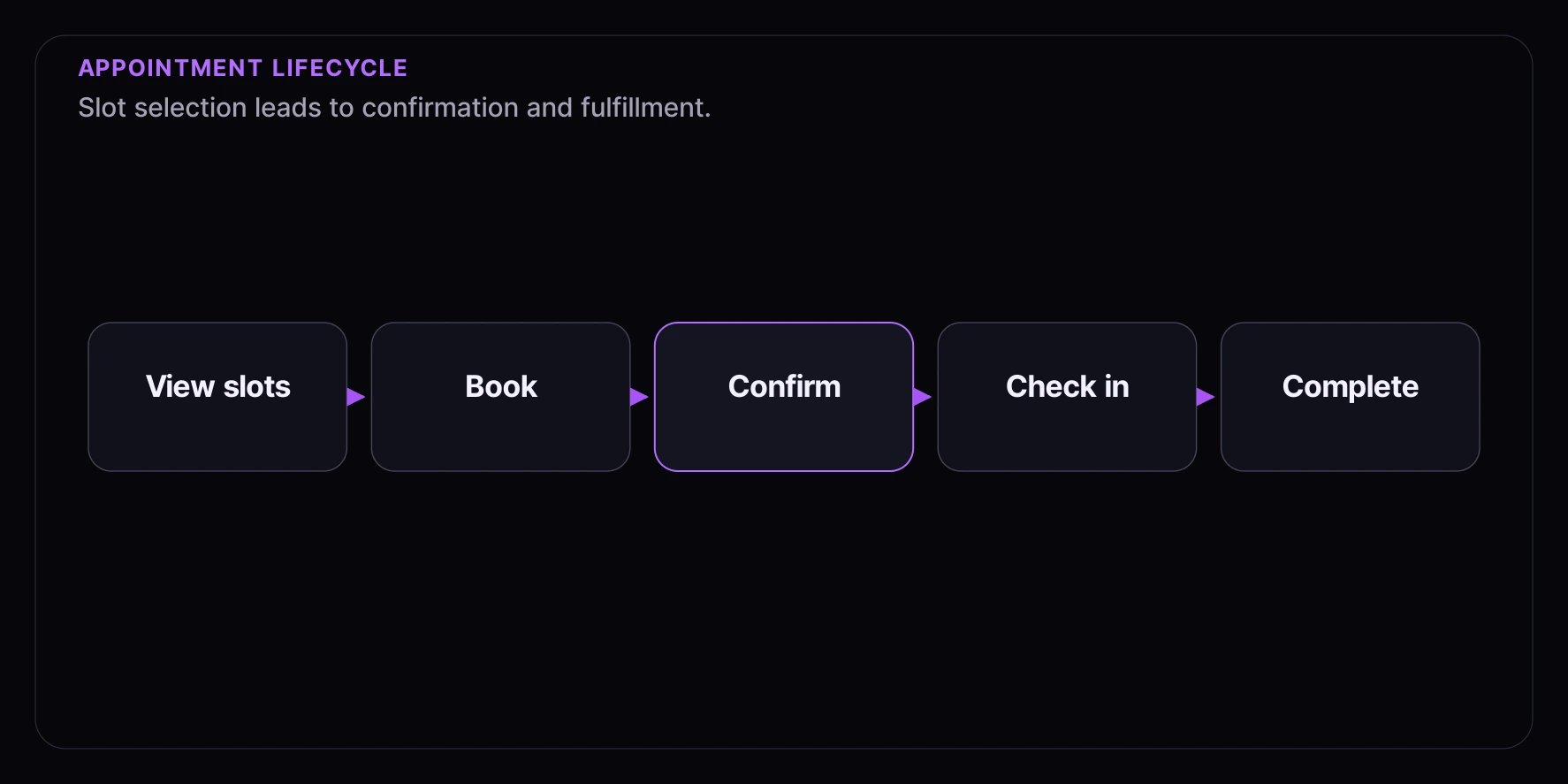
Availability Phase
- Consumer views available time slots for their desired date
- Each slot shows remaining capacity
- Past slots are automatically hidden
- Buffer times between slots ensure smooth operations
Booking Phase
- Consumer selects an available slot
- System validates capacity is still available
- Booking is confirmed instantly
- Consumer receives confirmation with details
Fulfillment Phase
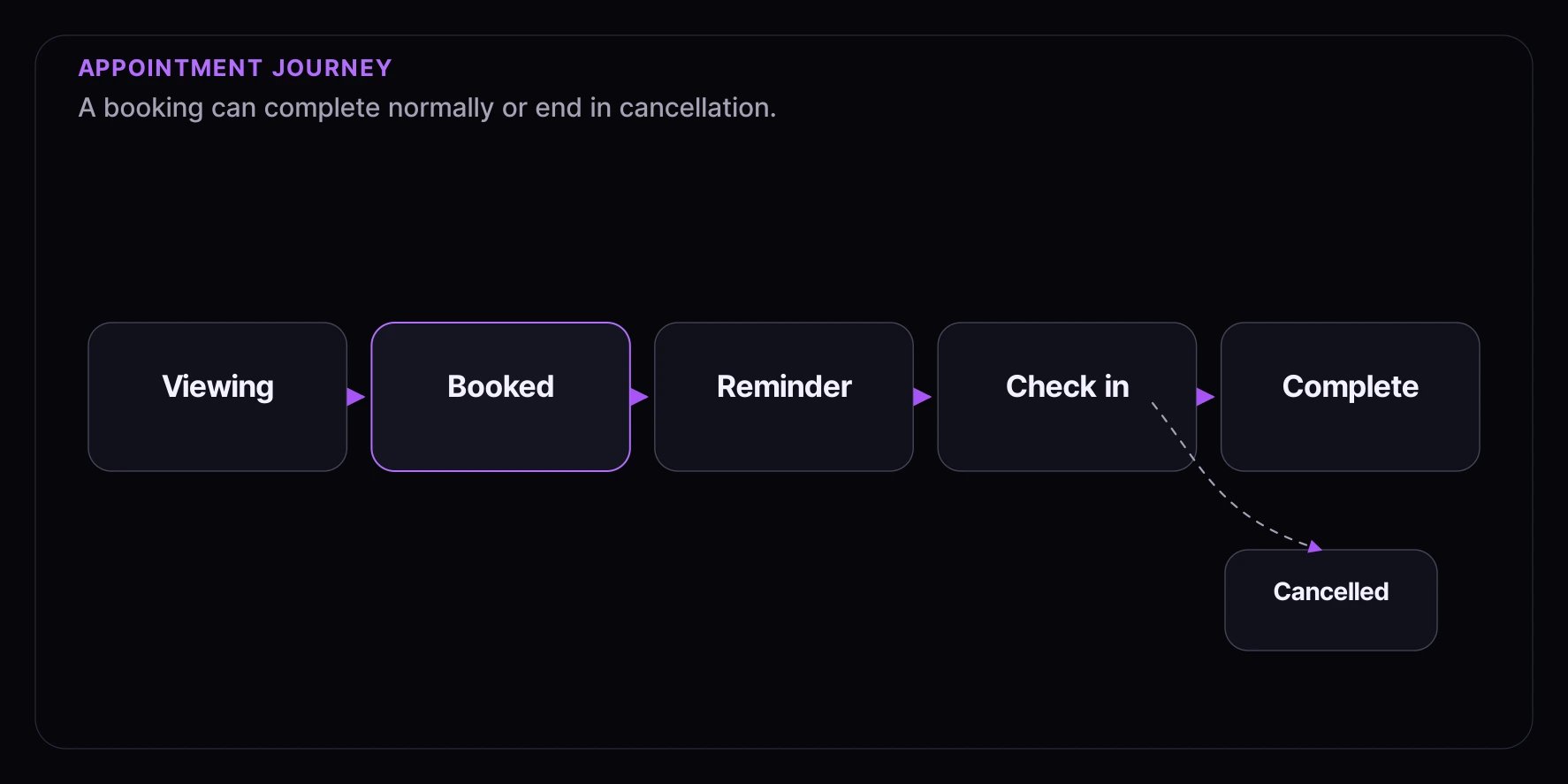
- Consumer receives reminders before their appointment
- Consumer arrives and checks in
- Appointment is marked as completed
- No-shows are tracked for analytics
The Consumer Experience
Browsing Slots
Consumers see a calendar or time picker showing:- Available dates
- Time slots for each date
- Remaining capacity per slot (“3 spots left”)
- Fully booked slots clearly marked
After Booking
Consumers receive:- Instant confirmation with appointment details
- Location information (address, directions, parking)
- Confirmation code for check-in
- 24-hour reminder before their appointment
- 2-hour reminder (optional) for same-day appointments
At the Appointment
- Consumer arrives and presents confirmation code
- Staff can check them in via the dashboard
- Appointment marked as completed
Consumer Journey
When to Use Appointments
Configuration Options
Slot Duration
How long each appointment lasts:- 15 minutes: Quick pickups, brief consultations
- 30 minutes: Standard appointments
- 60 minutes: Extended sessions, detailed consultations
- Custom: Any duration that fits your needs
Buffer Time
Gap between appointment slots for preparation:- Purpose: Staff preparation, cleaning, transition time
- Example: 30-minute slots with 10-minute buffers = slots at 9:00, 9:40, 10:20
- No buffer: Back-to-back appointments (for quick services)
Capacity Per Slot
How many consumers can book the same time slot:- 1 per slot: One-on-one consultations, personal shopping
- 5-10 per slot: Group pickup windows
- 20+ per slot: Large venue time blocks, events
Location
Associate appointments with a physical location:- Store address and directions
- Operating hours
- Holiday schedules
- Per-location capacity settings
Best Practices
1. Account for No-Shows
Expect some percentage of consumers won’t arrive:- Track no-show rates over time
- Consider slight overbooking for high no-show services
- Send reminders to reduce no-shows
2. Set Appropriate Buffers
Allow time for:- Consumer late arrivals
- Staff preparation
- Cleaning between appointments
- General transitions
3. Require Verified Accounts
For appointments, verified accounts provide:- Accountability (reduces no-shows)
- Contact information for reminders
- History tracking for repeat consumers
4. Send Reminders
Multiple reminders reduce no-shows significantly:- 24 hours before — Standard reminder for all appointments
- 2 hours before — Optional reminder for same-day appointments
- Include easy reschedule/cancel options in every reminder
5. Allow Easy Cancellation
Make cancellation simple:- Clear cancellation policy
- Reasonable deadline (e.g., 24 hours before)
- Cancelled slots automatically become available again
- One-click cancellation in reminder emails
Common Patterns
In-Store Pickup
- Slot duration: 15 minutes
- Buffer: None (back-to-back is fine)
- Capacity: 10-20 per slot
- Use case: Order pickups, returns, exchanges
One-on-One Consultation
- Slot duration: 30-60 minutes
- Buffer: 15 minutes
- Capacity: 1 per slot
- Use case: Personal shopping, styling, product demos
Group Event Time Block
- Slot duration: 1-2 hours
- Buffer: 30 minutes
- Capacity: 20-50 per slot
- Use case: VIP shopping events, product launches
Virtual Appointment
- Slot duration: Based on service type
- Buffer: 5-10 minutes
- Capacity: 1 per slot (video call) or unlimited (webinar)
- Use case: Remote consultations, virtual tours
Notifications
Confirmation (Sent Immediately)
- Appointment date and time (in consumer’s timezone)
- Location name and address
- Confirmation code
- What to bring/expect
- Cancel/reschedule link
Reminders
24 hours before:- Friendly reminder with all details
- You can add custom content like weather tips or parking reminders
- Easy cancel/reschedule option
- Final reminder
- Direct link for virtual appointments
- Parking/arrival instructions
Handling No-Shows
Track and manage consumers who don’t arrive:- Mark as no-show in the dashboard
- Track no-show rates by consumer, time slot, day of week
- Consider no-show policies:
- Warning after first no-show
- Require deposit for repeat no-shows
- Limit future booking ability
Related Concepts
- Distributions Overview — Common distribution concepts
- Queue Distribution — First-come, first-served alternative
- Draw Distribution — Random selection alternative
- Auction Distribution — Competitive bidding
- Timed Release Distribution — Instant access at scheduled time
- Waitlist Distribution — Interest capture and notifications
- Real-Time Updates — Instant slot availability updates