
Anonymous Consumers Guide

Learn how to implement guest checkout flows with anonymous consumer authentication.

Overview

Anonymous (guest) authentication allows consumers to participate in experiences without providing personal information. This is ideal for guest checkout flows, quick access scenarios, or when you want to minimize friction. What you’ll learn:
  • Creating guest sessions
  • Managing anonymous consumer lifecycles
  • Persisting anonymous sessions across visits
  • Converting anonymous consumers to identified
Complexity: Beginner Time to complete: 20 minutes

Prerequisites

  • Fanfare SDK installed and configured
  • Basic understanding of authentication concepts

How Anonymous Authentication Works
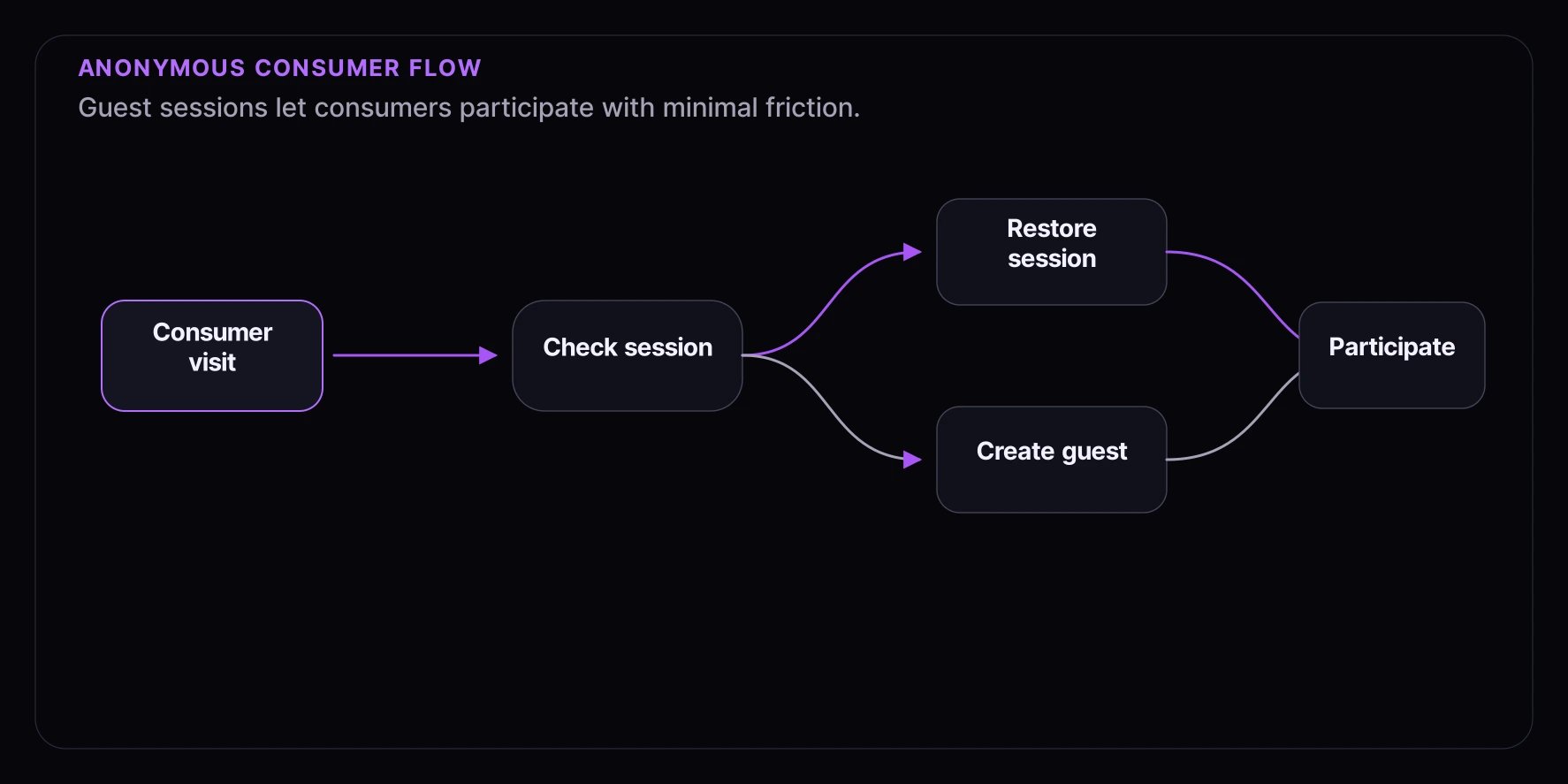
┌─────────────────────────────────────────────────────────┐
│                   Consumer Visit                         │
└─────────────────────────────────────────────────────────┘


              ┌───────────────────────┐
              │   Check for Session    │
              └───────────────────────┘

           ┌───────────────┴───────────────┐
           │                               │
    No Session                      Has Session
           │                               │
           ▼                               ▼
   ┌───────────────┐              ┌───────────────┐
   │ Create Guest  │              │    Restore    │
   │   Session     │              │    Session    │
   └───────────────┘              └───────────────┘
           │                               │
           └───────────────┬───────────────┘


              ┌───────────────────────┐
              │   Participate in      │
              │     Experience        │
              └───────────────────────┘

Step 1: Create a Guest Session

The SDK provides a simple method to create an anonymous session:
import { useFanfareAuth } from "@waitify-io/fanfare-sdk-react";

function AuthButton() {
  const { isAuthenticated, isGuest, guest, session } = useFanfareAuth();

  const handleGuestAuth = async () => {
    try {
      const guestSession = await guest();
      console.log("Guest session created:", guestSession.consumerId);
    } catch (error) {
      console.error("Failed to create guest session:", error);
    }
  };

  if (isAuthenticated) {
    return (
      <div>
        <p>Authenticated as: {isGuest ? "Guest" : "Identified"}</p>
        <p>Consumer ID: {session?.consumerId}</p>
      </div>
    );
  }

  return <button onClick={handleGuestAuth}>Continue as Guest</button>;
}

Using the Core SDK

import Fanfare from "@waitify-io/fanfare-sdk-core";

const sdk = await Fanfare.init({
  organizationId: "org_xxx",
  publishableKey: "pk_live_xxx",
});

// Check if already authenticated
const status = sdk.auth.check();

if (!status.isAuthenticated) {
  // Create guest session
  const session = await sdk.auth.guest();
  console.log("Guest ID:", session.guestId);
  console.log("Consumer ID:", session.consumerId);
}

Step 2: Automatic Guest Authentication

For a frictionless experience, automatically create a guest session when needed:
import { useFanfareAuth } from "@waitify-io/fanfare-sdk-react";
import { useEffect, useState } from "react";

function useAutoGuestAuth() {
  const { isAuthenticated, guest } = useFanfareAuth();
  const [isReady, setIsReady] = useState(false);
  const [error, setError] = useState<Error | null>(null);

  useEffect(() => {
    async function authenticate() {
      if (isAuthenticated) {
        setIsReady(true);
        return;
      }

      try {
        await guest();
        setIsReady(true);
      } catch (err) {
        setError(err instanceof Error ? err : new Error("Auth failed"));
      }
    }

    authenticate();
  }, [isAuthenticated, guest]);

  return { isReady, error };
}

// Usage
function ExperienceWrapper({ children }: { children: React.ReactNode }) {
  const { isReady, error } = useAutoGuestAuth();

  if (error) {
    return <p>Failed to initialize: {error.message}</p>;
  }

  if (!isReady) {
    return <p>Initializing...</p>;
  }

  return <>{children}</>;
}

Step 3: Understanding the Guest Session

The guest session includes:
interface GuestSession {
  type: "guest";
  consumerId: string; // Unique consumer identifier (UUIDv7)
  guestId: string; // Same as consumerId for guests
  expiresAt: string; // ISO 8601 timestamp
  deviceFingerprint?: string; // Browser fingerprint (if enabled)
}

Session Lifecycle

  1. Creation: Guest session created via /auth/guest endpoint
  2. Persistence: Session stored in localStorage (default behavior)
  3. Token Refresh: Access token refreshes automatically before expiry
  4. Expiration: Session expires based on sessionDuration config (default 1 hour)

Step 4: Session Persistence

Sessions persist automatically via localStorage:
// The SDK handles this automatically, but you can control it:
<FanfareProvider
  organizationId="org_xxx"
  publishableKey="pk_live_xxx"
  autoRestore={true}  // Restore session on mount (default)
  autoResume={true}   // Resume active operations (default)
/>

Manual Session Management

// Restore session manually
const { session, experiences } = await sdk.restore();

if (session) {
  console.log("Session restored:", session.consumerId);

  // Resume polling for active queues
  await sdk.resume();

  // Check active participations
  console.log("Active queues:", Object.keys(experiences.queues));
  console.log("Active draws:", Object.keys(experiences.draws));
}

Clearing Session

// Logout clears the session
await sdk.auth.logout();

// This clears:
// - Access token
// - Refresh token
// - Session from localStorage
// - Active participations (locally)

Step 5: Cross-Tab Synchronization

The SDK synchronizes sessions across browser tabs automatically:
<FanfareProvider
  organizationId="org_xxx"
  publishableKey="pk_live_xxx"
  sync={{
    enabled: true,           // Enable cross-tab sync
    syncKeys: [              // What to synchronize
      "session",
      "activeQueues",
      "activeDraws",
      "refreshToken"
    ],
    channelName: "fanfare-sdk-sync"  // BroadcastChannel name
  }}
/>

What Gets Synchronized

  • Session state: Login/logout syncs across tabs
  • Active participations: Queue/draw entries shared
  • Token refresh: One tab refreshes, all tabs update

Step 6: Device Fingerprinting

Guest sessions can be bound to a device fingerprint for security:
<FanfareProvider
  organizationId="org_xxx"
  publishableKey="pk_live_xxx"
  features={{
    fingerprinting: true  // Enable device fingerprinting (default)
  }}
/>

Fingerprint Benefits

  • Fraud prevention: Detect suspicious multi-account behavior
  • Session binding: Tie admission tokens to the originating device
  • Queue position protection: Prevent queue position transfer

Privacy Considerations

// Disable fingerprinting for privacy compliance
<FanfareProvider
  features={{
    fingerprinting: false
  }}
/>

Step 7: Anonymous Session Events

Subscribe to authentication events:
import { useFanfare } from "@waitify-io/fanfare-sdk-react";
import { useEffect } from "react";

function AuthEventHandler() {
  const fanfare = useFanfare();

  useEffect(() => {
    // New authentication
    const unsubAuth = fanfare.on("auth:authenticated", ({ session, isNew }) => {
      console.log("Authenticated:", session.consumerId);
      console.log("Is new session:", isNew);
    });

    // Session refreshed
    const unsubRefresh = fanfare.on("auth:refreshed", ({ session }) => {
      console.log("Session refreshed:", session.expiresAt);
    });

    // Logout
    const unsubLogout = fanfare.on("auth:logout", ({ reason }) => {
      console.log("Logged out:", reason);
    });

    // Auth error
    const unsubError = fanfare.on("auth:error", ({ error, context }) => {
      console.error("Auth error:", error.message, "Context:", context);
    });

    return () => {
      unsubAuth();
      unsubRefresh();
      unsubLogout();
      unsubError();
    };
  }, [fanfare]);

  return null;
}

Complete Example: Guest Experience Flow

import { FanfareProvider, useFanfareAuth, useExperienceJourney } from "@waitify-io/fanfare-sdk-react";
import { useEffect, useState } from "react";

function GuestExperience({ experienceId }: { experienceId: string }) {
  const { isAuthenticated, isGuest, guest, session } = useFanfareAuth();
  const { journey, state, status, start } = useExperienceJourney(experienceId);
  const [isInitializing, setIsInitializing] = useState(true);

  // Step 1: Auto-authenticate as guest
  useEffect(() => {
    async function init() {
      if (!isAuthenticated) {
        await guest();
      }
      setIsInitializing(false);
    }
    init();
  }, [isAuthenticated, guest]);

  // Step 2: Start journey when authenticated
  useEffect(() => {
    if (isAuthenticated && status === "idle" && !isInitializing) {
      start();
    }
  }, [isAuthenticated, status, isInitializing, start]);

  if (isInitializing) {
    return <div className="loading">Preparing your experience...</div>;
  }

  const snapshot = state?.snapshot;

  return (
    <div className="guest-experience">
      {/* Session Info */}
      <div className="session-info">
        <p>Session Type: {isGuest ? "Guest" : "Identified"}</p>
        <p>Consumer ID: {session?.consumerId?.slice(0, 8)}...</p>
      </div>

      {/* Experience Status */}
      <div className="experience-status">
        <p>Status: {status}</p>
      </div>

      {/* Actions */}
      <div className="actions">
        {snapshot?.availableActions.sequence.includes("enter_queue") && (
          <button onClick={() => journey?.perform("enter_queue")} className="primary-btn">
            Join Queue
          </button>
        )}

        {snapshot?.sequenceStage === "admitted" && (
          <div className="admitted">
            <h3>You're In!</h3>
            <a href={`/checkout?token=${snapshot.context.admittanceToken}`} className="checkout-btn">
              Continue to Checkout
            </a>
          </div>
        )}
      </div>
    </div>
  );
}

export function App() {
  return (
    <FanfareProvider organizationId="org_xxx" publishableKey="pk_live_xxx" autoRestore={true} autoResume={true}>
      <GuestExperience experienceId="exp_product_launch" />
    </FanfareProvider>
  );
}

Best Practices

1. Always Check Authentication First

const status = sdk.auth.check();

if (status.isAuthenticated) {
  // Use existing session
} else {
  // Create new guest session
  await sdk.auth.guest();
}

2. Handle Session Expiration

sdk.on("auth:error", async ({ error, context }) => {
  if (context === "unauthorized") {
    // Session expired, re-authenticate
    await sdk.auth.guest();
  }
});

3. Provide Clear Upgrade Path

function GuestBanner() {
  const { isGuest, requestOtp } = useFanfareAuth();
  const [showUpgrade, setShowUpgrade] = useState(false);

  if (!isGuest) return null;

  return (
    <div className="guest-banner">
      <p>Want to save your progress and get notifications?</p>
      <button onClick={() => setShowUpgrade(true)}>Create Account</button>

      {showUpgrade && <UpgradeForm onSubmit={(email) => requestOtp({ email })} />}
    </div>
  );
}

4. Graceful Degradation

async function ensureAuthenticated() {
  try {
    const status = sdk.auth.check();
    if (!status.isAuthenticated) {
      await sdk.auth.guest();
    }
    return true;
  } catch (error) {
    console.error("Auth failed:", error);
    // Show error UI or retry logic
    return false;
  }
}

Troubleshooting

Session Not Persisting

  • Check localStorage is available (not in incognito)
  • Verify autoRestore is enabled
  • Check for storage quota issues

Guest Session Fails

  • Verify API credentials
  • Check network connectivity
  • Review console for error messages

Cross-Tab Sync Issues

  • Ensure same origin for all tabs
  • Verify BroadcastChannel support
  • Check sync configuration

What’s Next