Mobile WebView Integration Guide

Learn how to integrate Fanfare experiences into iOS and Android applications using WebViews.

Overview

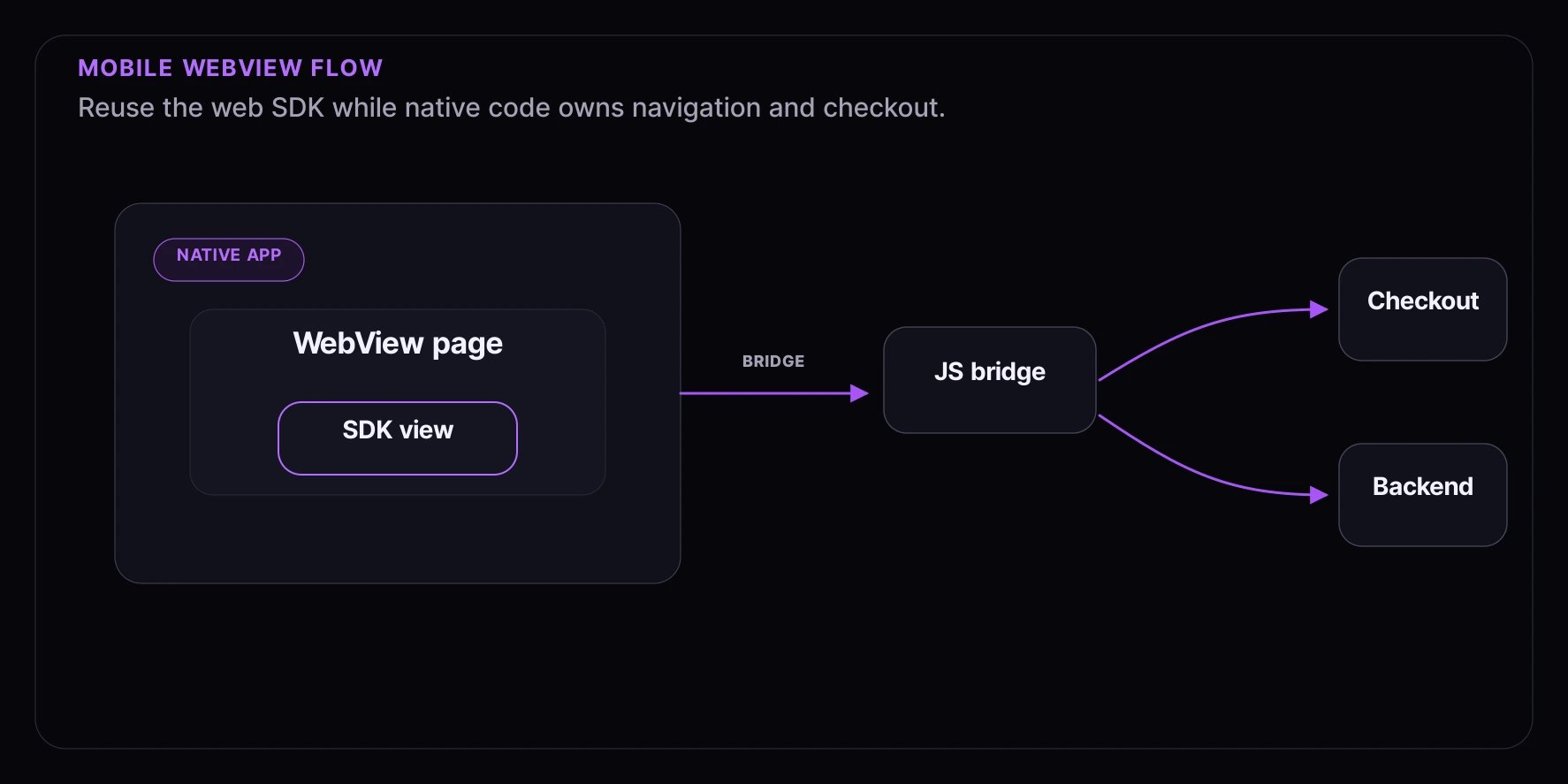
This guide covers embedding Fanfare experiences in mobile apps using WebViews. This approach lets you leverage your existing web integration while providing a native app experience. What you’ll learn:
  • Setting up WebView for Fanfare integration
  • Bridging JavaScript and native code
  • Handling authentication across contexts
  • Managing deep links and handoffs
Complexity: Intermediate Time to complete: 45 minutes

Prerequisites

  • A Fanfare account with API credentials
  • iOS (Swift/SwiftUI) or Android (Kotlin) development environment
  • An existing web implementation of Fanfare
  • Basic understanding of WebView communication

Architecture Overview

┌─────────────────────────────────────────┐
│           Mobile App (Native)            │
│  ┌─────────────────────────────────┐    │
│  │         WebView                  │    │
│  │  ┌───────────────────────────┐  │    │
│  │  │    Fanfare SDK (JS)       │  │    │
│  │  │  - Queue/Draw/Auction UI  │  │    │
│  │  │  - Authentication         │  │    │
│  │  └───────────────────────────┘  │    │
│  └─────────────────────────────────┘    │
│                  │                       │
│                  ▼                       │
│         JavaScript Bridge                │
│                  │                       │
│                  ▼                       │
│         Native Handlers                  │
│  - Checkout navigation                   │
│  - Authentication                        │
│  - Deep link handling                    │
└─────────────────────────────────────────┘

iOS Integration (SwiftUI)

Step 1: Create WebView Component

// FanfareWebView.swift
import SwiftUI
import WebKit

struct FanfareWebView: UIViewRepresentable {
    let experienceUrl: URL
    let onAdmitted: (String) -> Void
    let onError: (String) -> Void

    func makeUIView(context: Context) -> WKWebView {
        let config = WKWebViewConfiguration()

        // Enable JavaScript
        config.preferences.javaScriptEnabled = true

        // Add message handler for JS -> Native communication
        let contentController = WKUserContentController()
        contentController.add(context.coordinator, name: "fanfareHandler")
        config.userContentController = contentController

        // Allow local storage
        config.websiteDataStore = WKWebsiteDataStore.default()

        let webView = WKWebView(frame: .zero, configuration: config)
        webView.navigationDelegate = context.coordinator

        return webView
    }

    func updateUIView(_ webView: WKWebView, context: Context) {
        let request = URLRequest(url: experienceUrl)
        webView.load(request)
    }

    func makeCoordinator() -> Coordinator {
        Coordinator(onAdmitted: onAdmitted, onError: onError)
    }

    class Coordinator: NSObject, WKNavigationDelegate, WKScriptMessageHandler {
        let onAdmitted: (String) -> Void
        let onError: (String) -> Void

        init(onAdmitted: @escaping (String) -> Void, onError: @escaping (String) -> Void) {
            self.onAdmitted = onAdmitted
            self.onError = onError
        }

        // Handle messages from JavaScript
        func userContentController(
            _ userContentController: WKUserContentController,
            didReceive message: WKScriptMessage
        ) {
            guard let body = message.body as? [String: Any],
                  let type = body["type"] as? String else { return }

            switch type {
            case "admitted":
                if let token = body["admissionToken"] as? String {
                    onAdmitted(token)
                }
            case "error":
                if let message = body["message"] as? String {
                    onError(message)
                }
            case "checkout":
                if let url = body["url"] as? String {
                    handleCheckout(url: url)
                }
            default:
                break
            }
        }

        private func handleCheckout(url: String) {
            // Navigate to native checkout or open in-app browser
            if let checkoutUrl = URL(string: url) {
                UIApplication.shared.open(checkoutUrl)
            }
        }

        // Handle navigation
        func webView(
            _ webView: WKWebView,
            decidePolicyFor navigationAction: WKNavigationAction,
            decisionHandler: @escaping (WKNavigationActionPolicy) -> Void
        ) {
            // Intercept checkout URLs
            if let url = navigationAction.request.url,
               url.path.contains("/checkout") {
                handleCheckout(url: url.absoluteString)
                decisionHandler(.cancel)
                return
            }
            decisionHandler(.allow)
        }
    }
}

Step 2: Use in SwiftUI View

// ExperienceView.swift
import SwiftUI

struct ExperienceView: View {
    let experienceId: String
    @State private var showCheckout = false
    @State private var admissionToken: String?
    @State private var errorMessage: String?

    var experienceUrl: URL {
        // Your web app URL with experience
        URL(string: "https://your-app.com/experience/\(experienceId)")!
    }

    var body: some View {
        VStack {
            if let error = errorMessage {
                ErrorView(message: error) {
                    errorMessage = nil
                }
            }

            FanfareWebView(
                experienceUrl: experienceUrl,
                onAdmitted: { token in
                    admissionToken = token
                    showCheckout = true
                },
                onError: { message in
                    errorMessage = message
                }
            )
            .edgesIgnoringSafeArea(.all)
        }
        .sheet(isPresented: $showCheckout) {
            if let token = admissionToken {
                CheckoutView(admissionToken: token)
            }
        }
    }
}

Step 3: Web-Side JavaScript Bridge

Add this to your web experience page:
// fanfare-mobile-bridge.ts

interface FanfareMobileMessage {
  type: "admitted" | "error" | "checkout" | "status";
  admissionToken?: string;
  message?: string;
  url?: string;
  data?: Record<string, unknown>;
}

function sendToNative(message: FanfareMobileMessage) {
  // iOS WebKit handler
  if (window.webkit?.messageHandlers?.fanfareHandler) {
    window.webkit.messageHandlers.fanfareHandler.postMessage(message);
    return;
  }

  // Android JavascriptInterface
  if (window.FanfareAndroid?.postMessage) {
    window.FanfareAndroid.postMessage(JSON.stringify(message));
    return;
  }

  console.warn("No native handler found");
}

// Hook into journey state changes
export function setupMobileBridge(journey: ExperienceJourney) {
  journey.state.listen((snapshot) => {
    // Notify native when admitted
    if (snapshot.sequenceStage === "admitted") {
      sendToNative({
        type: "admitted",
        admissionToken: snapshot.context.admittanceToken,
      });
    }

    // Notify native of status changes
    sendToNative({
      type: "status",
      data: {
        stage: snapshot.journeyStage,
        sequenceStage: snapshot.sequenceStage,
      },
    });
  });
}

// Export for checkout handling
export function navigateToCheckout(url: string, token: string) {
  const checkoutUrl = new URL(url);
  checkoutUrl.searchParams.set("admission_token", token);

  sendToNative({
    type: "checkout",
    url: checkoutUrl.toString(),
  });
}

Android Integration (Kotlin)

Step 1: Create WebView Component

// FanfareWebView.kt
package com.yourapp.fanfare

import android.annotation.SuppressLint
import android.content.Context
import android.webkit.*
import androidx.compose.runtime.*
import androidx.compose.ui.viewinterop.AndroidView

@SuppressLint("SetJavaScriptEnabled")
@Composable
fun FanfareWebView(
    experienceUrl: String,
    onAdmitted: (String) -> Unit,
    onError: (String) -> Unit,
    onCheckout: (String) -> Unit
) {
    AndroidView(
        factory = { context ->
            WebView(context).apply {
                settings.apply {
                    javaScriptEnabled = true
                    domStorageEnabled = true
                    databaseEnabled = true
                    cacheMode = WebSettings.LOAD_DEFAULT
                }

                // Add JavaScript interface
                addJavascriptInterface(
                    FanfareJsInterface(onAdmitted, onError, onCheckout),
                    "FanfareAndroid"
                )

                webViewClient = object : WebViewClient() {
                    override fun shouldOverrideUrlLoading(
                        view: WebView?,
                        request: WebResourceRequest?
                    ): Boolean {
                        val url = request?.url?.toString() ?: return false

                        // Intercept checkout URLs
                        if (url.contains("/checkout")) {
                            onCheckout(url)
                            return true
                        }

                        return false
                    }
                }

                loadUrl(experienceUrl)
            }
        }
    )
}

class FanfareJsInterface(
    private val onAdmitted: (String) -> Unit,
    private val onError: (String) -> Unit,
    private val onCheckout: (String) -> Unit
) {
    @JavascriptInterface
    fun postMessage(jsonMessage: String) {
        try {
            val message = JSONObject(jsonMessage)
            when (message.getString("type")) {
                "admitted" -> {
                    message.optString("admissionToken")?.let { onAdmitted(it) }
                }
                "error" -> {
                    message.optString("message")?.let { onError(it) }
                }
                "checkout" -> {
                    message.optString("url")?.let { onCheckout(it) }
                }
            }
        } catch (e: Exception) {
            onError("Failed to parse message: ${e.message}")
        }
    }
}

Step 2: Use in Compose

// ExperienceScreen.kt
package com.yourapp.ui

import androidx.compose.foundation.layout.*
import androidx.compose.material3.*
import androidx.compose.runtime.*
import androidx.compose.ui.Modifier
import com.yourapp.fanfare.FanfareWebView

@Composable
fun ExperienceScreen(
    experienceId: String,
    onNavigateToCheckout: (String, String) -> Unit
) {
    var showError by remember { mutableStateOf<String?>(null) }
    var admissionToken by remember { mutableStateOf<String?>(null) }

    val experienceUrl = "https://your-app.com/experience/$experienceId"

    Column(modifier = Modifier.fillMaxSize()) {
        // Error banner
        showError?.let { error ->
            ErrorBanner(
                message = error,
                onDismiss = { showError = null }
            )
        }

        // WebView
        FanfareWebView(
            experienceUrl = experienceUrl,
            onAdmitted = { token ->
                admissionToken = token
                // Optionally auto-navigate to checkout
            },
            onError = { message ->
                showError = message
            },
            onCheckout = { url ->
                admissionToken?.let { token ->
                    onNavigateToCheckout(url, token)
                }
            }
        )
    }
}

Authentication Bridging

Passing User Identity to WebView

If users are authenticated in your native app, pass their identity to the web experience:

iOS

// Pass auth token via URL parameter
func makeExperienceUrl(experienceId: String, userToken: String) -> URL {
    var components = URLComponents(string: "https://your-app.com/experience/\(experienceId)")!
    components.queryItems = [
        URLQueryItem(name: "native_auth", value: userToken)
    ]
    return components.url!
}

// Or inject via JavaScript after page load
func injectAuthToken(_ webView: WKWebView, token: String) {
    let script = """
    window.nativeAuthToken = '\(token)';
    window.dispatchEvent(new CustomEvent('nativeAuth', { detail: { token: '\(token)' } }));
    """
    webView.evaluateJavaScript(script)
}

Web-Side Handling

// Handle native auth token
function handleNativeAuth() {
  // Check URL parameter
  const params = new URLSearchParams(window.location.search);
  const nativeToken = params.get("native_auth");

  if (nativeToken) {
    linkNativeIdentity(nativeToken);
    return;
  }

  // Listen for injected token
  window.addEventListener("nativeAuth", (event: CustomEvent) => {
    linkNativeIdentity(event.detail.token);
  });
}

async function linkNativeIdentity(nativeToken: string) {
  // Exchange native token for Fanfare session via your backend
  const response = await fetch("/api/fanfare/link", {
    method: "POST",
    headers: { "Content-Type": "application/json" },
    body: JSON.stringify({ nativeToken }),
  });

  const { exchangeCode } = await response.json();

  // Exchange for Fanfare session
  await fanfare.auth.exchangeExternal({ exchangeCode });
}
// AppDelegate.swift or SceneDelegate.swift
func application(
    _ application: UIApplication,
    continue userActivity: NSUserActivity,
    restorationHandler: @escaping ([UIUserActivityRestoring]?) -> Void
) -> Bool {
    guard userActivity.activityType == NSUserActivityTypeBrowsingWeb,
          let url = userActivity.webpageURL else {
        return false
    }

    // Handle experience deep links
    if let experienceId = parseExperienceId(from: url) {
        navigateToExperience(experienceId)
        return true
    }

    // Handle checkout completion
    if url.path.contains("/checkout/complete") {
        handleCheckoutComplete(url: url)
        return true
    }

    return false
}
// MainActivity.kt
override fun onCreate(savedInstanceState: Bundle?) {
    super.onCreate(savedInstanceState)

    // Handle deep link
    intent?.data?.let { uri ->
        when {
            uri.path?.contains("/experience/") == true -> {
                val experienceId = uri.lastPathSegment
                navigateToExperience(experienceId)
            }
            uri.path?.contains("/checkout/complete") == true -> {
                handleCheckoutComplete(uri)
            }
        }
    }
}

Handling Checkout Flow

Native Checkout Integration

When admitted, you can handle checkout natively:
// iOS
func handleAdmission(token: String) {
    // Option 1: Open native checkout
    let checkoutVC = CheckoutViewController(admissionToken: token)
    present(checkoutVC, animated: true)

    // Option 2: Open in-app browser for web checkout
    let checkoutUrl = URL(string: "https://your-store.com/checkout?token=\(token)")!
    let safariVC = SFSafariViewController(url: checkoutUrl)
    present(safariVC, animated: true)

    // Option 3: Open external browser
    UIApplication.shared.open(checkoutUrl)
}
// Android
fun handleAdmission(token: String) {
    // Option 1: Open native checkout
    val intent = Intent(this, CheckoutActivity::class.java).apply {
        putExtra("admission_token", token)
    }
    startActivity(intent)

    // Option 2: Open Chrome Custom Tabs
    val checkoutUrl = "https://your-store.com/checkout?token=$token"
    CustomTabsIntent.Builder()
        .build()
        .launchUrl(this, Uri.parse(checkoutUrl))
}

Performance Optimization

Preload WebView Content

// iOS - Preload WebView in background
class WebViewPreloader {
    static let shared = WebViewPreloader()

    private var preloadedWebView: WKWebView?

    func preload(url: URL) {
        DispatchQueue.main.async {
            let config = WKWebViewConfiguration()
            config.preferences.javaScriptEnabled = true

            let webView = WKWebView(frame: .zero, configuration: config)
            webView.load(URLRequest(url: url))

            self.preloadedWebView = webView
        }
    }

    func getPreloadedWebView() -> WKWebView? {
        let webView = preloadedWebView
        preloadedWebView = nil
        return webView
    }
}

Cache Management

// Web-side cache hints
if ("serviceWorker" in navigator) {
  navigator.serviceWorker.register("/sw.js").then(() => {
    // Cache Fanfare SDK and experience assets
  });
}

Troubleshooting

WebView Not Loading

  • Check network permissions in app manifest
  • Verify JavaScript is enabled
  • Check for content security policy issues
  • Test URL in regular browser first

Bridge Messages Not Received

  • Verify message handler names match
  • Check JavaScript console for errors
  • Ensure postMessage format is correct
  • Test with simple message first

Authentication Issues

  • Check cookie handling in WebView settings
  • Verify localStorage is enabled
  • Test token exchange endpoint
  • Check for CORS issues

Performance Issues

  • Enable hardware acceleration
  • Use preloading for faster initial load
  • Consider caching strategies
  • Profile JavaScript execution

What’s Next