

Cart Reservation Guide
Learn how to hold inventory during the checkout window to prevent overselling when consumers are admitted from Fanfare experiences.Overview
When a consumer is admitted from a queue, draw, or auction, you may want to reserve their selected items until they complete checkout. This guide covers patterns for inventory reservation during the admission window. What you’ll learn:- Reservation strategies for different scenarios
- Implementing time-limited holds
- Handling reservation expiration
- Integration with your inventory system
Prerequisites
- Checkout Overview guide completed
- Understanding of your inventory management system
- Backend development capabilities
Why Reserve Inventory?
Without reservation, admitted consumers may find their items sold out by the time they reach checkout: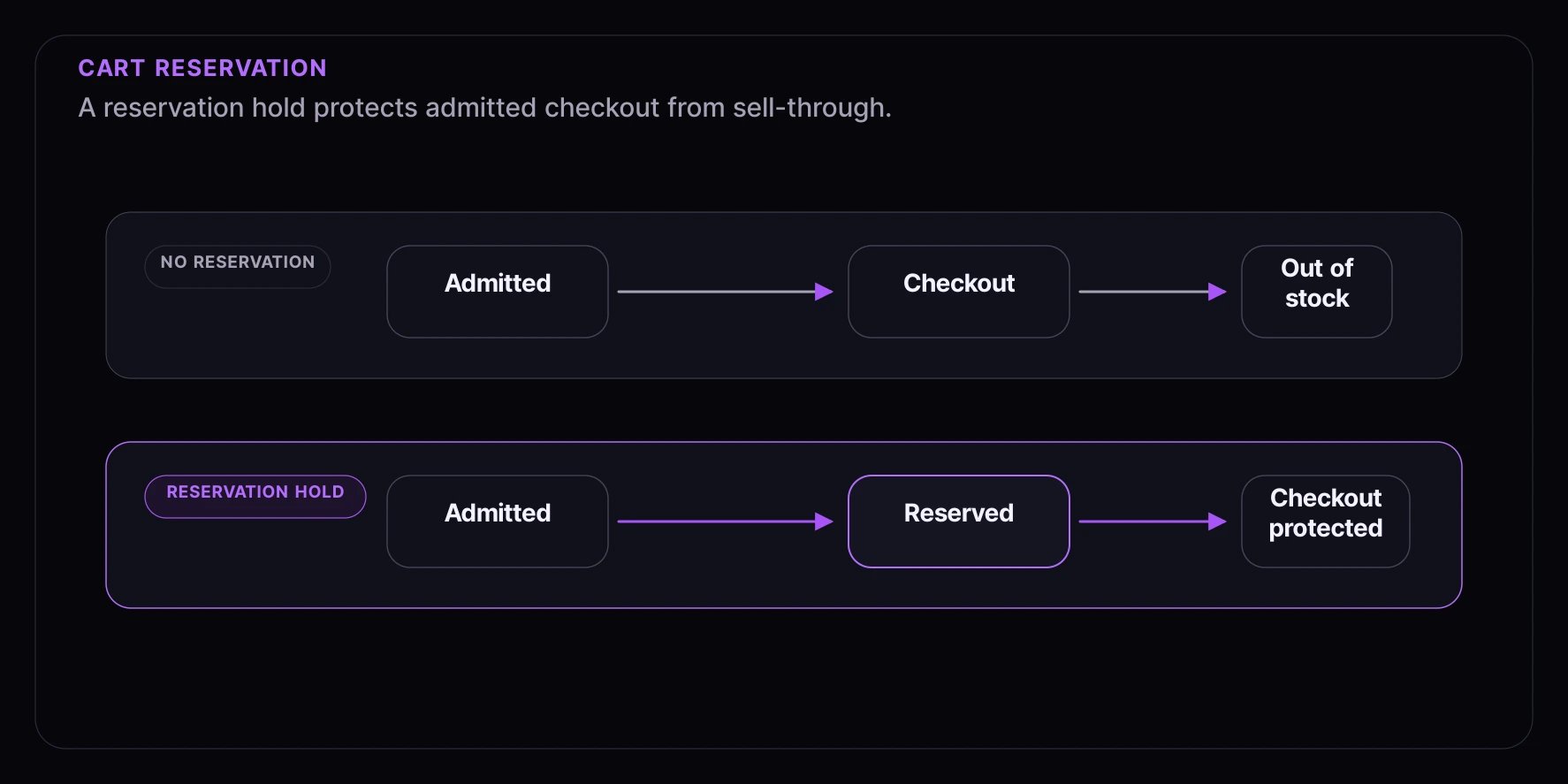
Reservation Strategies
Strategy 1: Soft Reservation (Optimistic)
Reserve inventory on admission, release if not purchased:// When consumer is admitted
async function onConsumerAdmitted(consumerId: string, productId: string, quantity: number) {
const reservation = await createReservation({
consumerId,
productId,
quantity,
expiresAt: Date.now() + 10 * 60 * 1000, // 10 minutes
});
// Schedule release if not completed
scheduleReservationRelease(reservation.id, reservation.expiresAt);
return reservation;
}
// On successful checkout
async function onCheckoutComplete(reservationId: string) {
await convertReservationToOrder(reservationId);
}
// On expiration or abandonment
async function releaseReservation(reservationId: string) {
await deleteReservation(reservationId);
// Inventory is automatically available again
}
Strategy 2: Hard Allocation (Guaranteed)
Deduct from inventory on admission, refund if not purchased:async function onConsumerAdmitted(consumerId: string, productId: string, quantity: number) {
// Deduct from available inventory
const result = await decrementInventory(productId, quantity);
if (!result.success) {
throw new Error("Insufficient inventory");
}
// Track the allocation
await createAllocation({
consumerId,
productId,
quantity,
expiresAt: Date.now() + 10 * 60 * 1000,
});
}
async function releaseAllocation(allocationId: string) {
const allocation = await getAllocation(allocationId);
// Return inventory
await incrementInventory(allocation.productId, allocation.quantity);
await deleteAllocation(allocationId);
}
Strategy 3: Queue-Based Allocation
Allocate based on queue position:// Pre-allocate inventory based on queue size
async function setupQueueInventory(queueId: string, productId: string, totalInventory: number) {
await setQueueInventoryPool({
queueId,
productId,
available: totalInventory,
allocated: 0,
});
}
// Allocate on admission
async function onAdmitted(queueId: string, consumerId: string, productId: string) {
const pool = await getQueueInventoryPool(queueId, productId);
if (pool.available <= 0) {
// No more inventory - consumer can still browse but can't purchase
return { allocated: false };
}
// Atomic allocation
await atomicAllocate(queueId, consumerId, productId, 1);
return { allocated: true };
}
Implementation Example
Database Schema
-- Reservations table
CREATE TABLE reservations (
  id UUID PRIMARY KEY DEFAULT gen_random_uuid(),
  consumer_id TEXT NOT NULL,
  experience_id TEXT NOT NULL,
  admission_grant TEXT NOT NULL,
  product_id TEXT NOT NULL,
  variant_id TEXT,
  quantity INTEGER NOT NULL DEFAULT 1,
  status TEXT NOT NULL DEFAULT 'active', -- active, converted, released, expired
  created_at TIMESTAMP DEFAULT NOW(),
  expires_at TIMESTAMP NOT NULL,
  converted_at TIMESTAMP,
  order_id TEXT
);

-- Index for cleanup job
CREATE INDEX idx_reservations_expires ON reservations(expires_at) WHERE status = 'active';

-- Index for lookups
CREATE INDEX idx_reservations_consumer ON reservations(consumer_id, status);
Reservation Service
// services/reservation.service.ts
import { db } from "./db";

function inventoryScope(productId: string, variantId?: string) {
  return variantId
    ? and(eq(inventory.productId, productId), eq(inventory.variantId, variantId))
    : and(eq(inventory.productId, productId), isNull(inventory.variantId));
}

interface CreateReservationParams {
  consumerId: string;
  experienceId: string;
  admissionGrant: string;
  productId: string;
  variantId?: string;
  quantity: number;
  expiresInMinutes?: number;
}

export async function createReservation(params: CreateReservationParams) {
  const { consumerId, experienceId, admissionGrant, productId, variantId, quantity, expiresInMinutes = 10 } = params;

  const expiresAt = new Date(Date.now() + expiresInMinutes * 60 * 1000);

  // Check available inventory
  const available = await getAvailableInventory(productId, variantId);
  if (available < quantity) {
    throw new Error("Insufficient inventory");
  }

  // Create reservation in transaction
  return await db.transaction(async (tx) => {
    // Decrement available inventory
    await tx
      .update(inventory)
      .set({ reserved: sql`reserved + ${quantity}` })
      .where(inventoryScope(productId, variantId));

    // Create reservation record
    const [reservation] = await tx
      .insert(reservations)
      .values({
        consumerId,
        experienceId,
        admissionGrant,
        productId,
        variantId,
        quantity,
        expiresAt,
        status: "active",
      })
      .returning();

    return reservation;
  });
}

export async function convertReservation(reservationId: string, orderId: string) {
  return await db.transaction(async (tx) => {
    const [reservation] = await tx.select().from(reservations).where(eq(reservations.id, reservationId)).for("update");

    if (!reservation || reservation.status !== "active") {
      throw new Error("Invalid reservation");
    }

    // Update reservation status
    await tx
      .update(reservations)
      .set({
        status: "converted",
        convertedAt: new Date(),
        orderId,
      })
      .where(eq(reservations.id, reservationId));

    // Update inventory (reserved -> sold)
    await tx
      .update(inventory)
      .set({
        reserved: sql`reserved - ${reservation.quantity}`,
        sold: sql`sold + ${reservation.quantity}`,
      })
      .where(inventoryScope(reservation.productId, reservation.variantId));

    return reservation;
  });
}

export async function releaseReservation(reservationId: string) {
  return await db.transaction(async (tx) => {
    const [reservation] = await tx.select().from(reservations).where(eq(reservations.id, reservationId)).for("update");

    if (!reservation || reservation.status !== "active") {
      return; // Already released or converted
    }

    // Release the reservation
    await tx.update(reservations).set({ status: "released" }).where(eq(reservations.id, reservationId));

    // Return inventory
    await tx
      .update(inventory)
      .set({ reserved: sql`reserved - ${reservation.quantity}` })
      .where(inventoryScope(reservation.productId, reservation.variantId));
  });
}
Expiration Worker
// workers/reservation-cleanup.ts
import { releaseReservation } from "../services/reservation.service";

export async function cleanupExpiredReservations() {
  // Find expired reservations
  const expired = await db
    .select()
    .from(reservations)
    .where(and(eq(reservations.status, "active"), lt(reservations.expiresAt, new Date())))
    .limit(100);

  // Release each one
  for (const reservation of expired) {
    try {
      await releaseReservation(reservation.id);
      console.log(`Released expired reservation: ${reservation.id}`);
    } catch (error) {
      console.error(`Failed to release ${reservation.id}:`, error);
    }
  }

  return expired.length;
}

// Run every minute
setInterval(cleanupExpiredReservations, 60 * 1000);
Integration with Checkout
On Admission
// When view.sequence reaches "admitted"
async function handleAdmission(params: {
  consumerId: string;
  experienceId: string;
  admissionGrant: string;
}) {
  const { consumerId, experienceId, admissionGrant } = params;

  // Get selected products from your cart/session
  const cart = await getConsumerCart(consumerId);

  // Create reservations for cart items
  for (const item of cart.items) {
    await createReservation({
      consumerId,
      experienceId,
      admissionGrant,
      productId: item.productId,
      variantId: item.variantId,
      quantity: item.quantity,
    });
  }
}
During Checkout
// Checkout API handler
app.post("/api/checkout", async (req, res) => {
  const { consumerId, cart, admissionGrant } = req.body;

  // Verify reservations exist and belong to this admission
  const reservations = await getActiveReservations(consumerId);
  if (!reservations.every((reservation) => reservation.admissionGrant === admissionGrant)) {
    return res.status(403).json({
      error: "ADMISSION_MISMATCH",
      message: "This checkout session is not associated with the active reservation.",
    });
  }

  for (const item of cart) {
    const reservation = reservations.find(
      (r) => r.productId === item.productId && r.variantId === item.variantId
    );

    if (!reservation) {
      return res.status(400).json({
        error: "RESERVATION_MISSING",
        message: `No reservation for ${item.productId}`,
      });
    }

    if (reservation.quantity < item.quantity) {
      return res.status(400).json({
        error: "RESERVATION_INSUFFICIENT",
        message: `Reservation only covers ${reservation.quantity} units`,
      });
    }
  }

  // Process order
  const order = await createOrder(cart, consumerId);

  // Convert reservations
  for (const reservation of reservations) {
    await convertReservation(reservation.id, order.id);
  }

  res.json({ orderId: order.id });
});
On Abandonment
// When admission expires or consumer leaves
async function handleAdmissionExpired(consumerId: string, experienceId: string) {
  const reservations = await db
    .select()
    .from(reservations)
    .where(
      and(
        eq(reservations.consumerId, consumerId),
        eq(reservations.experienceId, experienceId),
        eq(reservations.status, "active")
      )
    );

  for (const reservation of reservations) {
    await releaseReservation(reservation.id);
  }
}
UI Feedback
Show reservation status to consumers:function ReservationStatus({ productId }: { productId: string }) {
const { reservation, timeRemaining } = useReservation(productId);
if (!reservation) {
return <p className="warning">Item not reserved</p>;
}
if (timeRemaining <= 0) {
return <p className="error">Reservation expired</p>;
}
return (
<div className="reservation-status">
<span className="icon">✓</span>
<span>Reserved for you</span>
<span className="timer">
{Math.floor(timeRemaining / 60)}:{(timeRemaining % 60).toString().padStart(2, "0")}
</span>
</div>
);
}
Best Practices
1. Match Reservation to Admission Window
// Reservation should match admission expiry
const admissionExpiresIn = 10 * 60 * 1000; // 10 minutes
const reservationExpiresIn = admissionExpiresIn + 60 * 1000; // +1 minute buffer
2. Handle Race Conditions
// Use database transactions and row locking
await db.transaction(async (tx) => {
  const [product] = await tx
    .select()
    .from(inventory)
    .where(inventoryScope(productId, variantId))
    .for("update");

  if (product.available < quantity) {
    throw new Error("Insufficient inventory");
  }

  // Proceed with reservation
});
3. Provide Clear Feedback
function CheckoutButton({ hasReservation, reservationExpired }: Props) {
  if (!hasReservation) {
    return <button disabled>Items not reserved</button>;
  }

  if (reservationExpired) {
    return <button onClick={retryReservation}>Reservation expired - Try again</button>;
  }

  return <button onClick={checkout}>Complete Purchase</button>;
}
4. Monitor Reservation Metrics
// Track reservation outcomes
async function recordReservationOutcome(reservationId: string, outcome: "converted" | "released" | "expired") {
  await analytics.track("reservation_outcome", {
    reservationId,
    outcome,
    timestamp: Date.now(),
  });
}
Troubleshooting
Inventory Drift
If reserved counts become inconsistent:// Reconciliation job
async function reconcileInventory(productId: string, variantId?: string) {
const activeReservations = await db
.select({ total: sum(reservations.quantity) })
.from(reservations)
.where(
and(eq(reservations.productId, productId), eq(reservations.variantId, variantId), eq(reservations.status, "active"))
);
const expectedReserved = activeReservations[0]?.total || 0;
await db.update(inventory).set({ reserved: expectedReserved }).where(inventoryScope(productId, variantId));
}
Reservation Not Found
// Always check reservation before checkout
async function validateCheckoutReservations(consumerId: string, cart: CartItem[]) {
  const reservations = await getActiveReservations(consumerId);

  const missing = cart.filter((item) => !reservations.find((r) => r.productId === item.productId));

  if (missing.length > 0) {
    throw new ReservationError("Missing reservations", { missing });
  }
}
What’s Next
- Payment Processing - Handle payments
- Order Completion - Complete the order cycle
- Webhooks - Server-side event handling