

Custom Platform Integration Guide
Learn how to integrate Fanfare experiences with any e-commerce platform or custom-built system.Overview
This guide covers building a complete Fanfare integration for platforms without a pre-built plugin or app. Whether you’re using a headless commerce platform, custom-built store, or enterprise solution, this guide provides the patterns and code you need. What you’ll learn:- Designing your integration architecture
- Implementing the consumer-facing experience
- Building the server-side validation layer
- Handling checkout and order completion
- Setting up webhooks for real-time updates
Prerequisites
- Fanfare organization and API credentials
- Backend server with API capabilities
- Understanding of your platform’s checkout flow
- Ability to store custom data with orders
Architecture Overview
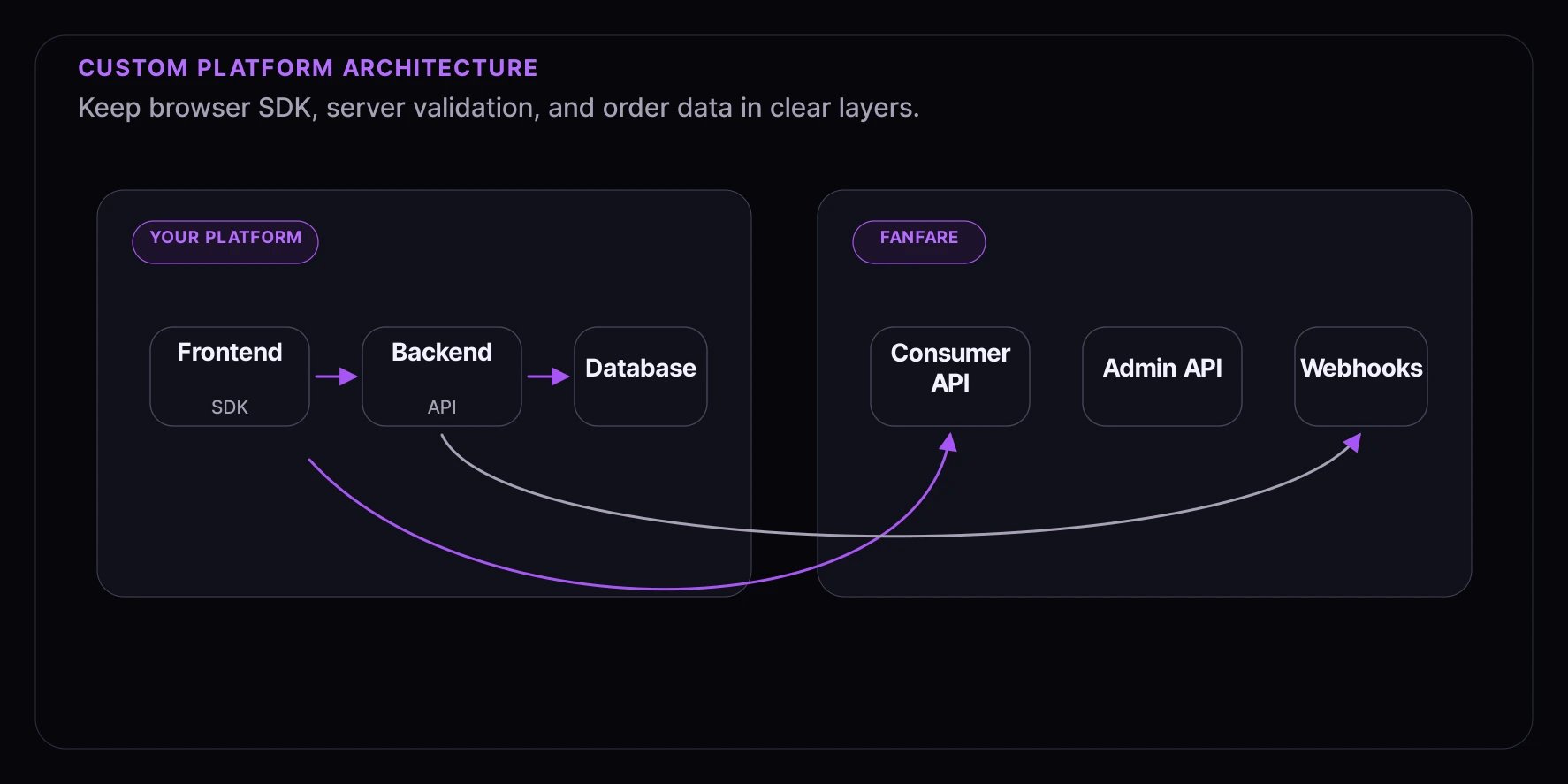
Step 1: Backend Configuration
Environment Setup
// config/fanfare.ts
export const fanfareConfig = {
  organizationId: process.env.FANFARE_ORGANIZATION_ID!,
  secretKey: process.env.FANFARE_SECRET_KEY!,
  publicKey: process.env.FANFARE_PUBLIC_KEY!,
  baseUrl: "https://api.fanfare.io",
  webhookSecret: process.env.FANFARE_WEBHOOK_SECRET!,
};

// Validate configuration on startup
export function validateConfig() {
  const required = ["organizationId", "secretKey", "publicKey"];
  const missing = required.filter((key) => !fanfareConfig[key as keyof typeof fanfareConfig]);

  if (missing.length > 0) {
    throw new Error(`Missing Fanfare configuration: ${missing.join(", ")}`);
  }
}
Fanfare API Client
// services/fanfare-api.ts
import { fanfareConfig } from "../config/fanfare";

interface FanfareRequestOptions {
  method: "GET" | "POST" | "PUT" | "DELETE";
  path: string;
  body?: Record<string, unknown>;
  isPublic?: boolean;
}

export class FanfareAPI {
  private baseUrl: string;
  private organizationId: string;
  private secretKey: string;

  constructor() {
    this.baseUrl = fanfareConfig.baseUrl;
    this.organizationId = fanfareConfig.organizationId;
    this.secretKey = fanfareConfig.secretKey;
  }

  async request<T>(options: FanfareRequestOptions): Promise<T> {
    const { method, path, body, isPublic } = options;

    const headers: Record<string, string> = {
      "Content-Type": "application/json",
      "X-Organization-Id": this.organizationId,
    };

    if (!isPublic) {
      headers["X-Secret-Key"] = this.secretKey;
    }

    const response = await fetch(`${this.baseUrl}${path}`, {
      method,
      headers,
      body: body ? JSON.stringify(body) : undefined,
    });

    if (!response.ok) {
      const error = await response.json().catch(() => ({ message: "Unknown error" }));
      throw new FanfareAPIError(response.status, error.message, error.code);
    }

    return response.json();
  }

  // Experience Methods
  async getExperience(experienceId: string) {
    return this.request<Experience>({
      method: "GET",
      path: `/v1/experiences/${experienceId}`,
      isPublic: true,
    });
  }

  // Admission Methods
  async validateAdmission(params: ValidateAdmissionParams) {
    return this.request<ValidationResult>({
      method: "POST",
      path: `/v1/admission/validate`,
      body: params,
    });
  }

  async completeAdmission(params: CompleteAdmissionParams) {
    const endpoints: Record<string, string> = {
      queue: `/v1/queues/${params.distributionId}/complete`,
      draw: `/v1/draws/${params.distributionId}/complete`,
      auction: `/v1/auctions/${params.distributionId}/complete`,
      timed_release: `/v1/timed-releases/${params.distributionId}/complete`,
    };

    const endpoint = endpoints[params.distributionType];
    if (!endpoint) {
      throw new Error(`Unknown distribution type: ${params.distributionType}`);
    }

    return this.request<void>({
      method: "POST",
      path: endpoint,
      body: {
        consumerId: params.consumerId,
        metadata: params.metadata,
      },
    });
  }
}

export class FanfareAPIError extends Error {
  constructor(
    public status: number,
    message: string,
    public code?: string
  ) {
    super(message);
    this.name = "FanfareAPIError";
  }
}

// Types
interface Experience {
  id: string;
  name: string;
  type: "queue" | "draw" | "auction" | "timed_release";
  status: "draft" | "scheduled" | "active" | "ended";
  config: Record<string, unknown>;
}

interface ValidateAdmissionParams {
  token: string;
  consumerId: string;
  distributionId: string;
  distributionType: string;
}

interface ValidationResult {
  valid: boolean;
  expiresAt?: string;
  error?: string;
}

interface CompleteAdmissionParams {
  distributionId: string;
  distributionType: "queue" | "draw" | "auction" | "timed_release";
  consumerId: string;
  metadata?: Record<string, unknown>;
}

export const fanfareAPI = new FanfareAPI();
Step 2: Database Schema
Store Fanfare-related data with your orders:// db/schema/fanfare.ts (Drizzle ORM example)
import { pgTable, text, timestamp, jsonb, boolean } from "drizzle-orm/pg-core";
export const fanfareAdmissions = pgTable("fanfare_admissions", {
id: text("id").primaryKey(),
consumerId: text("consumer_id").notNull(),
experienceId: text("experience_id").notNull(),
distributionId: text("distribution_id").notNull(),
distributionType: text("distribution_type").notNull(),
token: text("token").notNull(),
expiresAt: timestamp("expires_at").notNull(),
status: text("status").notNull().default("active"), // active, used, expired
orderId: text("order_id"),
createdAt: timestamp("created_at").defaultNow(),
usedAt: timestamp("used_at"),
});
export const fanfareOrders = pgTable("fanfare_orders", {
orderId: text("order_id").primaryKey(),
admissionId: text("admission_id").notNull(),
experienceId: text("experience_id").notNull(),
consumerId: text("consumer_id").notNull(),
fanfareCompleted: boolean("fanfare_completed").default(false),
fanfareCompletedAt: timestamp("fanfare_completed_at"),
metadata: jsonb("metadata"),
createdAt: timestamp("created_at").defaultNow(),
});
Step 3: Frontend Integration
HTML/JavaScript (Vanilla)
<!-- product-page.html -->
<!DOCTYPE html>
<html>
  <head>
    <title>Product Page</title>
    <link rel="stylesheet" href="/css/fanfare.css" />
  </head>
  <body>
    <div class="product-details">
      <h1>Limited Edition Product</h1>

      <!-- Fanfare Experience Container -->
      <div id="fanfare-container" data-experience-id="exp_abc123" data-product-id="prod_xyz789"></div>

      <!-- Add to Cart (initially hidden/disabled) -->
      <form id="add-to-cart-form" class="hidden">
        <input type="hidden" name="product_id" value="prod_xyz789" />
        <input type="hidden" name="fanfare_admission" id="fanfare-admission" />
        <button type="submit">Add to Cart</button>
      </form>
    </div>

    <script type="module" src="/js/fanfare-integration.js"></script>
  </body>
</html>
// js/fanfare-integration.js
import initFanfare from "@fanfare-io/fanfare-sdk-core";

(function () {
  "use strict";

  const config = {
    organizationId: window.FANFARE_ORG_ID,
    publishableKey: window.FANFARE_PUBLISHABLE_KEY,
  };

  document.addEventListener("DOMContentLoaded", init);

  async function init() {
    const container = document.getElementById("fanfare-container");
    if (!container) return;

    const experienceId = container.dataset.experienceId;
    const productId = container.dataset.productId;

    const fanfare = await initFanfare({
      organizationId: config.organizationId,
      publishableKey: config.publishableKey,
    });

    const journey = fanfare.journeys.get(experienceId);

    journey.view$.listen(function (view) {
      renderState(container, view, productId);
    });

    const initialView = journey.view$.get();
    if (initialView.journeyStage === "ready") {
      void initialView.start();
    }

    container._fanfareJourney = journey;
  }

  function renderState(container, view, productId) {
    if (!view || view.journeyStage === "routing") {
      renderLoading(container);
      return;
    }

    if (view.journeyStage === "ready") {
      renderNotStarted(container, view);
      return;
    }

    if (view.journeyStage === "gated") {
      renderGated(container, view);
      return;
    }

    const phase = view.sequence.phase;

    switch (phase) {
      case "scheduled":
      case "participating":
        renderWaiting(container, view);
        break;

      case "granted":
        renderAdmitted(container, view, productId);
        break;

      case "enterable":
        renderEnterable(container, view);
        break;

      case "ended":
      case "unavailable":
      default:
        renderDefault(container, phase);
    }
  }

  function renderNotStarted(container, view) {
    container.innerHTML =
      '<div class="fanfare-not-started">' +
      "<p>Experience not yet started.</p>" +
      '<button id="fanfare-start">Start</button>' +
      "</div>";
    document.getElementById("fanfare-start")?.addEventListener("click", () => view.start());
  }

  function renderLoading(container) {
    container.innerHTML =
      '<div class="fanfare-loading">' + '<div class="spinner"></div>' + "<p>Connecting to experience...</p>" + "</div>";
  }

  function renderGated(container, view) {
    container.innerHTML =
      '<div class="fanfare-gated">' + "<p>Complete the required step to continue.</p>" + "</div>";
  }

  function renderEnterable(container, view) {
    container.innerHTML =
      '<div class="fanfare-enterable">' +
      "<p>Access is available.</p>" +
      '<button id="fanfare-enter">Enter</button>' +
      "</div>";
    if ("enter" in view.sequence) {
      document.getElementById("fanfare-enter")?.addEventListener("click", () => view.sequence.enter());
    }
  }

  function renderWaiting(container, view) {
    container.innerHTML =
      '<div class="fanfare-waiting">' +
      '<p class="waiting-message">Please keep this page open.</p>' +
      "</div>";
  }

  function renderAdmitted(container, view, productId) {
    const token = view.sequence.grant.token;
    const expiresAt = view.sequence.grant.expiresAt;

    storeAdmission({
      token: token,
      expiresAt: expiresAt,
    });

    container.innerHTML =
      '<div class="fanfare-admitted">' +
      '<div class="success-icon">✓</div>' +
      "<h3>You're In!</h3>" +
      "<p>Complete your purchase before time runs out.</p>" +
      '<div class="admission-timer">' +
      '<span id="admission-countdown"></span>' +
      "</div>" +
      "</div>";

    showAddToCartForm(token);

    if (expiresAt) {
      startAdmissionCountdown(new Date(expiresAt), function () {
        container.innerHTML =
          '<div class="fanfare-expired">' +
          "<h3>Access Expired</h3>" +
          "<p>Your checkout window has ended.</p>" +
          '<button onclick="location.reload()">Try Again</button>' +
          "</div>";
        hideAddToCartForm();
      });
    }
  }

  function renderDefault(container, stage) {
    container.innerHTML = '<div class="fanfare-status">' + "<p>Status: " + stage + "</p>" + "</div>";
  }

  // Helper functions
  function storeAdmission(admission) {
    // Store in hidden form field
    var input = document.getElementById("fanfare-admission");
    if (input) {
      input.value = JSON.stringify(admission);
    }

    // Also store in session storage for page refresh
    sessionStorage.setItem("fanfare_admission", JSON.stringify(admission));
  }

  function showAddToCartForm(token) {
    var form = document.getElementById("add-to-cart-form");
    if (form) {
      form.classList.remove("hidden");
    }
  }

  function hideAddToCartForm() {
    var form = document.getElementById("add-to-cart-form");
    if (form) {
      form.classList.add("hidden");
    }
  }

  function formatWaitTime(seconds) {
    if (!seconds) return "Calculating...";

    var minutes = Math.floor(seconds / 60);
    if (minutes < 1) return "Less than a minute";
    if (minutes === 1) return "About 1 minute";
    if (minutes < 60) return minutes + " minutes";

    var hours = Math.floor(minutes / 60);
    var remainingMins = minutes % 60;
    return hours + "h " + remainingMins + "m";
  }

  function startCountdown(targetDate) {
    var countdownEl = document.getElementById("countdown");
    if (!countdownEl) return;

    function update() {
      var now = new Date().getTime();
      var distance = targetDate.getTime() - now;

      if (distance < 0) {
        countdownEl.innerHTML = "Starting now...";
        location.reload();
        return;
      }

      var days = Math.floor(distance / (1000 * 60 * 60 * 24));
      var hours = Math.floor((distance % (1000 * 60 * 60 * 24)) / (1000 * 60 * 60));
      var minutes = Math.floor((distance % (1000 * 60 * 60)) / (1000 * 60));
      var seconds = Math.floor((distance % (1000 * 60)) / 1000);

      var parts = [];
      if (days > 0) parts.push(days + "d");
      if (hours > 0) parts.push(hours + "h");
      if (minutes > 0) parts.push(minutes + "m");
      parts.push(seconds + "s");

      countdownEl.innerHTML = parts.join(" ");

      setTimeout(update, 1000);
    }

    update();
  }

  function startAdmissionCountdown(expiresAt, onExpire) {
    var countdownEl = document.getElementById("admission-countdown");
    if (!countdownEl) return;

    function update() {
      var now = new Date().getTime();
      var distance = expiresAt.getTime() - now;

      if (distance <= 0) {
        onExpire();
        return;
      }

      var minutes = Math.floor(distance / (1000 * 60));
      var seconds = Math.floor((distance % (1000 * 60)) / 1000);

      countdownEl.innerHTML = minutes + ":" + seconds.toString().padStart(2, "0");

      setTimeout(update, 1000);
    }

    update();
  }
})();
React Integration
// components/FanfareExperience.tsx
import { useExperienceJourney } from "@fanfare-io/fanfare-sdk-react";
import { useEffect } from "react";

interface FanfareExperienceProps {
  experienceId: string;
  productId: string;
  onAdmitted: (admission: AdmissionData) => void;
  onExpired: () => void;
}

interface AdmissionData {
  token: string;
  expiresAt?: number;
}

export function FanfareExperience({ experienceId, productId, onAdmitted, onExpired }: FanfareExperienceProps) {
  const { view, error } = useExperienceJourney(experienceId, {
    autoStart: true,
  });

  useEffect(() => {
    if (view?.journeyStage === "routed" && view.sequence.phase === "granted") {
      onAdmitted({
        token: view.sequence.grant.token,
        expiresAt: view.sequence.grant.expiresAt,
      });
    }
  }, [view, onAdmitted]);

  if (error) {
    return <ErrorState message={error} />;
  }

  if (!view || view.journeyStage === "routing") {
    return <LoadingState />;
  }

  if (view.journeyStage === "ready") {
    return <StartState onStart={() => view.start()} />;
  }

  if (view.journeyStage === "gated") {
    return <GatedState />;
  }

  if (view.sequence.phase === "enterable" && "enter" in view.sequence) {
    return <EnterableState onEnter={() => view.sequence.enter()} />;
  }

  if (view.sequence.phase === "participating" && view.sequence.mechanism === "queue") {
    return <WaitingState />;
  }

  if (view.sequence.phase === "granted") {
    return <AdmittedState expiresAt={view.sequence.grant.expiresAt} onExpired={onExpired} />;
  }

  return <div>Status: {view.sequence.phase}</div>;
}

function StartState({ onStart }: { onStart: () => void }) {
  return (
    <div className="fanfare-not-started">
      <p>Experience ready.</p>
      <button onClick={onStart}>Start</button>
    </div>
  );
}

function GatedState() {
  return (
    <div className="fanfare-gated">
      <p>Complete the required step to continue.</p>
    </div>
  );
}

function EnterableState({ onEnter }: { onEnter: () => void }) {
  return (
    <div className="fanfare-enterable">
      <p>Access is available.</p>
      <button onClick={onEnter}>Enter</button>
    </div>
  );
}

function LoadingState() {
  return (
    <div className="fanfare-loading">
      <div className="spinner" />
      <p>Connecting to experience...</p>
    </div>
  );
}

function WaitingState() {
  return (
    <div className="fanfare-waiting">
      <p className="waiting-message">Please keep this page open.</p>
    </div>
  );
}

function AdmittedState({ expiresAt, onExpired }: { expiresAt?: number; onExpired: () => void }) {
  const [timeRemaining, setTimeRemaining] = useState("");

  useEffect(() => {
    if (!expiresAt) return;

    const interval = setInterval(() => {
      const distance = expiresAt - Date.now();
      if (distance <= 0) {
        onExpired();
        return;
      }

      const minutes = Math.floor(distance / (1000 * 60));
      const seconds = Math.floor((distance % (1000 * 60)) / 1000);

      setTimeRemaining(`${minutes}:${seconds.toString().padStart(2, "0")}`);
    }, 1000);

    return () => clearInterval(interval);
  }, [expiresAt, onExpired]);

  return (
    <div className="fanfare-admitted">
      <div className="success-icon">✓</div>
      <h3>You're In!</h3>
      <p>Complete your purchase before time runs out.</p>
      <div className="admission-timer">{timeRemaining}</div>
    </div>
  );
}

function ErrorState({ message }: { message?: string }) {
  return (
    <div className="fanfare-error">
      <h3>Something went wrong</h3>
      <p>{message || "Please try again."}</p>
    </div>
  );
}

function formatWaitTime(seconds?: number): string {
  if (!seconds) return "Calculating...";

  const minutes = Math.floor(seconds / 60);
  if (minutes < 1) return "Less than a minute";
  if (minutes === 1) return "About 1 minute";
  if (minutes < 60) return `${minutes} minutes`;

  const hours = Math.floor(minutes / 60);
  const remainingMins = minutes % 60;
  return `${hours}h ${remainingMins}m`;
}
Step 4: Server-Side Validation
Validation Middleware
// middleware/fanfare-validation.ts
import { Request, Response, NextFunction } from "express";
import { fanfareAPI } from "../services/fanfare-api";

interface FanfareAdmission {
  token: string;
  consumerId: string;
  experienceId: string;
  distributionId: string;
  distributionType: string;
  expiresAt: number;
}

export async function validateFanfareAdmission(req: Request, res: Response, next: NextFunction) {
  const admissionData = req.body.fanfareAdmission;

  if (!admissionData) {
    // No Fanfare admission required for this item
    return next();
  }

  let admission: FanfareAdmission;
  try {
    admission = typeof admissionData === "string" ? JSON.parse(admissionData) : admissionData;
  } catch {
    return res.status(400).json({
      error: "INVALID_ADMISSION_DATA",
      message: "Invalid admission data format",
    });
  }

  // Check expiration locally first
  if (admission.expiresAt < Date.now()) {
    return res.status(403).json({
      error: "ADMISSION_EXPIRED",
      message: "Your access has expired. Please rejoin the experience.",
    });
  }

  // Validate with Fanfare API
  try {
    const result = await fanfareAPI.validateAdmission({
      token: admission.token,
      consumerId: admission.consumerId,
      distributionId: admission.distributionId,
      distributionType: admission.distributionType,
    });

    if (!result.valid) {
      return res.status(403).json({
        error: "ADMISSION_INVALID",
        message: result.error || "Your access is no longer valid.",
      });
    }

    // Attach validated admission to request
    req.fanfareAdmission = admission;
    next();
  } catch (error) {
    console.error("Fanfare validation error:", error);

    // Allow checkout to proceed on validation errors
    // The order will be validated again at completion
    req.fanfareAdmission = admission;
    next();
  }
}

// Extend Express Request type
declare global {
  namespace Express {
    interface Request {
      fanfareAdmission?: FanfareAdmission;
    }
  }
}
Checkout API Endpoint
// routes/checkout.ts
import express from "express";
import { validateFanfareAdmission } from "../middleware/fanfare-validation";
import { fanfareAPI } from "../services/fanfare-api";
import { db } from "../db";
import { orders, fanfareOrders } from "../db/schema";

const router = express.Router();

router.post("/create-order", validateFanfareAdmission, async (req, res) => {
  try {
    const { items, shippingAddress, paymentMethod } = req.body;
    const fanfareAdmission = req.fanfareAdmission;

    // Create order in database
    const order = await db.transaction(async (tx) => {
      // Create main order
      const [newOrder] = await tx
        .insert(orders)
        .values({
          customerId: req.user?.id,
          items,
          shippingAddress,
          paymentMethod,
          status: "pending",
          totalAmount: calculateTotal(items),
        })
        .returning();

      // If Fanfare admission present, store it
      if (fanfareAdmission) {
        await tx.insert(fanfareOrders).values({
          orderId: newOrder.id,
          admissionId: fanfareAdmission.token,
          experienceId: fanfareAdmission.experienceId,
          consumerId: fanfareAdmission.consumerId,
          fanfareCompleted: false,
          metadata: {
            distributionId: fanfareAdmission.distributionId,
            distributionType: fanfareAdmission.distributionType,
          },
        });
      }

      return newOrder;
    });

    res.json({
      orderId: order.id,
      status: order.status,
    });
  } catch (error) {
    console.error("Order creation failed:", error);
    res.status(500).json({
      error: "ORDER_FAILED",
      message: "Failed to create order",
    });
  }
});

// After payment is confirmed
router.post("/complete-order/:orderId", async (req, res) => {
  const { orderId } = req.params;

  try {
    // Get order with Fanfare data
    const fanfareOrder = await db.query.fanfareOrders.findFirst({
      where: eq(fanfareOrders.orderId, orderId),
    });

    if (fanfareOrder && !fanfareOrder.fanfareCompleted) {
      // Complete the Fanfare admission
      await fanfareAPI.completeAdmission({
        distributionId: fanfareOrder.metadata.distributionId,
        distributionType: fanfareOrder.metadata.distributionType,
        consumerId: fanfareOrder.consumerId,
        metadata: {
          orderId,
          platform: "custom",
          completedAt: new Date().toISOString(),
        },
      });

      // Mark as completed
      await db
        .update(fanfareOrders)
        .set({
          fanfareCompleted: true,
          fanfareCompletedAt: new Date(),
        })
        .where(eq(fanfareOrders.orderId, orderId));
    }

    // Update main order status
    await db.update(orders).set({ status: "completed" }).where(eq(orders.id, orderId));

    res.json({ success: true });
  } catch (error) {
    console.error("Order completion failed:", error);
    res.status(500).json({
      error: "COMPLETION_FAILED",
      message: "Failed to complete order",
    });
  }
});

function calculateTotal(items: Array<{ price: string; quantity: number }>): string {
  return sumMoney(items.map((item) => multiplyMoney(item.price, item.quantity)));
}

export default router;
Step 5: Webhook Handler
// routes/webhooks/fanfare.ts
import express from "express";
import crypto from "crypto";
import { fanfareConfig } from "../../config/fanfare";
import { db } from "../../db";
import { fanfareAdmissions, fanfareOrders } from "../../db/schema";
import { eq } from "drizzle-orm";

const router = express.Router();

// Verify webhook signature
function verifySignature(payload: string, signature: string): boolean {
  const expected = crypto.createHmac("sha256", fanfareConfig.webhookSecret).update(payload).digest("hex");

  return crypto.timingSafeEqual(Buffer.from(signature), Buffer.from(expected));
}

router.post("/", express.raw({ type: "application/json" }), async (req, res) => {
  const signature = req.headers["x-fanfare-signature"] as string;
  const payload = req.body.toString();

  if (!signature || !verifySignature(payload, signature)) {
    return res.status(401).json({ error: "Invalid signature" });
  }

  const event = JSON.parse(payload);

  try {
    switch (event.type) {
      case "admission.created":
        await handleAdmissionCreated(event.data);
        break;

      case "admission.expired":
        await handleAdmissionExpired(event.data);
        break;

      case "admission.completed":
        await handleAdmissionCompleted(event.data);
        break;

      case "experience.started":
        await handleExperienceStarted(event.data);
        break;

      case "experience.ended":
        await handleExperienceEnded(event.data);
        break;

      default:
        console.log("Unhandled Fanfare event:", event.type);
    }

    res.json({ received: true });
  } catch (error) {
    console.error("Webhook handler error:", error);
    res.status(500).json({ error: "Handler failed" });
  }
});

async function handleAdmissionCreated(data: AdmissionEvent) {
  // Track admission for analytics
  await db.insert(fanfareAdmissions).values({
    id: data.admissionId,
    consumerId: data.consumerId,
    experienceId: data.experienceId,
    distributionId: data.distributionId,
    distributionType: data.distributionType,
    token: data.token,
    expiresAt: new Date(data.expiresAt),
    status: "active",
  });
}

async function handleAdmissionExpired(data: AdmissionEvent) {
  await db.update(fanfareAdmissions).set({ status: "expired" }).where(eq(fanfareAdmissions.id, data.admissionId));

  // Optionally notify customer
  // await sendAdmissionExpiredEmail(data.consumerId);
}

async function handleAdmissionCompleted(data: AdmissionEvent) {
  await db
    .update(fanfareAdmissions)
    .set({
      status: "used",
      usedAt: new Date(),
    })
    .where(eq(fanfareAdmissions.id, data.admissionId));
}

async function handleExperienceStarted(data: ExperienceEvent) {
  console.log("Experience started:", data.experienceId);
  // Update any scheduled notifications or status displays
}

async function handleExperienceEnded(data: ExperienceEvent) {
  console.log("Experience ended:", data.experienceId);
  // Clean up any related resources
}

interface AdmissionEvent {
  admissionId: string;
  consumerId: string;
  experienceId: string;
  distributionId: string;
  distributionType: string;
  token: string;
  expiresAt: string;
}

interface ExperienceEvent {
  experienceId: string;
  status: string;
}

export default router;
Step 6: Product Configuration API
// routes/admin/fanfare-products.ts
import express from "express";
import { db } from "../../db";
import { products } from "../../db/schema";
import { eq } from "drizzle-orm";

const router = express.Router();

// Link product to Fanfare experience
router.post("/:productId/fanfare", async (req, res) => {
  const { productId } = req.params;
  const { experienceId, enabled } = req.body;

  await db
    .update(products)
    .set({
      fanfareEnabled: enabled,
      fanfareExperienceId: experienceId,
    })
    .where(eq(products.id, productId));

  res.json({ success: true });
});

// Get Fanfare configuration for product
router.get("/:productId/fanfare", async (req, res) => {
  const { productId } = req.params;

  const product = await db.query.products.findFirst({
    where: eq(products.id, productId),
    columns: {
      fanfareEnabled: true,
      fanfareExperienceId: true,
    },
  });

  res.json(product || { fanfareEnabled: false });
});

export default router;
CSS Styles
/* css/fanfare.css */
.fanfare-container {
  padding: 24px;
  border: 1px solid #e0e0e0;
  border-radius: 8px;
  background: #fafafa;
  margin: 20px 0;
}

.fanfare-loading {
  text-align: center;
  padding: 40px;
}

.fanfare-loading .spinner {
  width: 40px;
  height: 40px;
  border: 3px solid #e0e0e0;
  border-top-color: #0066cc;
  border-radius: 50%;
  animation: spin 1s linear infinite;
  margin: 0 auto 16px;
}

@keyframes spin {
  to {
    transform: rotate(360deg);
  }
}

.fanfare-waiting {
  text-align: center;
}

.fanfare-waiting .queue-position {
  margin-bottom: 20px;
}

.fanfare-waiting .queue-position strong {
  display: block;
  font-size: 3rem;
  color: #0066cc;
}

.fanfare-admitted {
  text-align: center;
  background: #e8f5e9;
  padding: 24px;
  border-radius: 8px;
}

.fanfare-admitted .success-icon {
  width: 60px;
  height: 60px;
  background: #4caf50;
  color: white;
  border-radius: 50%;
  display: flex;
  align-items: center;
  justify-content: center;
  font-size: 32px;
  margin: 0 auto 16px;
}

.fanfare-admitted .admission-timer {
  font-size: 2rem;
  font-weight: bold;
  color: #e65100;
  margin-top: 16px;
}

.fanfare-expired,
.fanfare-error {
  text-align: center;
  padding: 24px;
  background: #ffebee;
  border-radius: 8px;
}

.fanfare-not-started .countdown {
  font-size: 2rem;
  font-weight: bold;
  color: #333;
  margin-top: 12px;
}

.hidden {
  display: none !important;
}
Best Practices
1. Handle Network Failures Gracefully
async function safeCompleteAdmission(params: CompleteAdmissionParams, maxRetries = 3) {
  for (let attempt = 1; attempt <= maxRetries; attempt++) {
    try {
      await fanfareAPI.completeAdmission(params);
      return;
    } catch (error) {
      if (attempt === maxRetries) {
        // Queue for later retry
        await queueFailedCompletion(params);
        console.error("Failed to complete admission, queued for retry");
      } else {
        await sleep(1000 * attempt); // Exponential backoff
      }
    }
  }
}
2. Implement Idempotency
async function completeAdmissionIdempotent(orderId: string, params: CompleteAdmissionParams) {
  // Check if already completed
  const existing = await db.query.fanfareOrders.findFirst({
    where: and(eq(fanfareOrders.orderId, orderId), eq(fanfareOrders.fanfareCompleted, true)),
  });

  if (existing) {
    console.log("Admission already completed for order:", orderId);
    return;
  }

  await fanfareAPI.completeAdmission(params);

  await db
    .update(fanfareOrders)
    .set({
      fanfareCompleted: true,
      fanfareCompletedAt: new Date(),
    })
    .where(eq(fanfareOrders.orderId, orderId));
}
3. Monitor Integration Health
// Health check endpoint
router.get("/health/fanfare", async (req, res) => {
  try {
    const response = await fetch(`${fanfareConfig.baseUrl}/health`, {
      headers: { "X-Organization-Id": fanfareConfig.organizationId },
      timeout: 5000,
    });

    if (response.ok) {
      res.json({ status: "healthy" });
    } else {
      res.status(503).json({ status: "degraded" });
    }
  } catch {
    res.status(503).json({ status: "unavailable" });
  }
});
Troubleshooting
SDK Not Loading
- Check if script tag is present in page source
- Verify no CSP (Content Security Policy) blocks — see Content Security Policy for the directives the widget needs
- Check browser console for network errors
Validation Failures
// Debug validation issues
try {
  const result = await fanfareAPI.validateAdmission(params);
  console.log("Validation result:", result);
} catch (error) {
  if (error instanceof FanfareAPIError) {
    console.log("Status:", error.status);
    console.log("Code:", error.code);
    console.log("Message:", error.message);
  }
}
Webhook Not Receiving Events
- Verify webhook URL is publicly accessible
- Check webhook secret is configured correctly
- Test with webhook debugging tools
- Review server logs for signature mismatches
What’s Next
- Webhooks Guide - Deep dive into webhook handling
- Error Handling - Comprehensive error management
- Real-time Updates - Live status updates