JWT Tokens Guide
Learn how to implement server-side authentication using JWT tokens for secure backend-to-backend communication with Fanfare.Overview
JWT (JSON Web Token) authentication allows your backend to securely authenticate consumers with Fanfare without client-side credential exposure. This is the recommended approach for production applications with existing user accounts. What you’ll learn:- Understanding Fanfare’s JWT authentication flow
- Implementing server-side token exchange
- Validating admission tokens
- Securing your integration
Prerequisites
- Fanfare account with API credentials including secret key
- Backend server (Node.js, Python, Go, etc.)
- Basic understanding of JWT and authentication concepts
When to Use JWT Authentication
Use JWT authentication when:- Your application has existing user accounts
- You need server-to-server authentication
- You want to validate admission tokens before checkout
- You require enhanced security for high-value transactions
Authentication Architecture
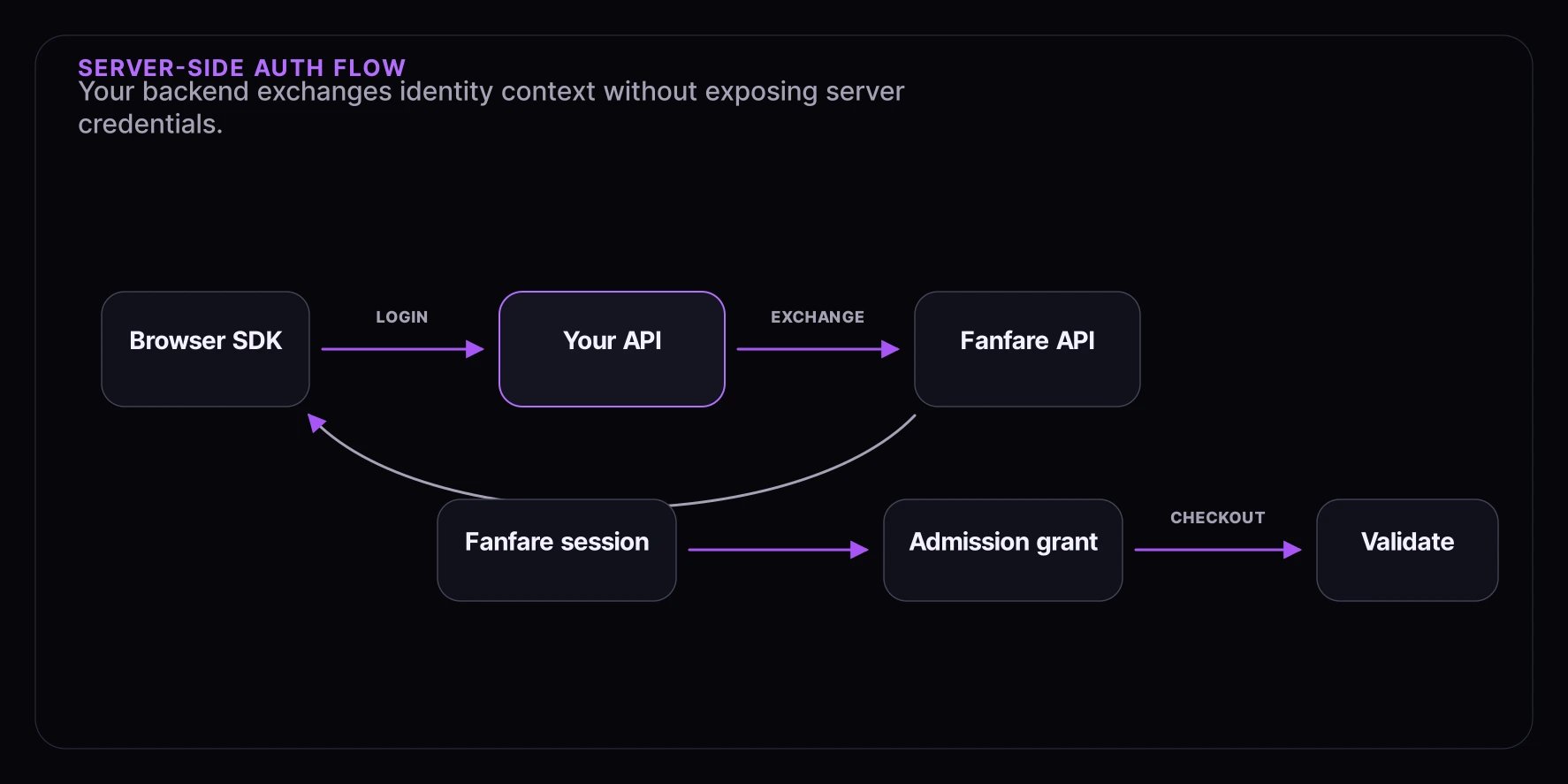
Copy
┌─────────────────────────────────────────────────────────────────────┐
│ Your Infrastructure │
│ │
│ ┌─────────────┐ ┌─────────────┐ ┌─────────────┐ │
│ │ Browser │ │ Your API │ │ Checkout │ │
│ │ (SDK) │ │ Server │ │ Server │ │
│ └─────────────┘ └─────────────┘ └─────────────┘ │
│ │ │ │ │
└─────────│───────────────────│───────────────────│────────────────────┘
│ │ │
│ 1. User logs in │ │
│─────────────────►│ │
│ │ │
│ │ 2. Exchange Code │
│ │──────────────────►│─────┐
│ │ │ │ Fanfare API
│ │◄──────────────────│◄────┘
│ │ │
│ 3. Exchange Code │ │
│◄─────────────────│ │
│ │ │
│ 4. exchangeExternal() │
│───────────────────────────────────────│─────┐
│ │ │ │ Fanfare API
│◄──────────────────────────────────────│◄────┘
│ (Fanfare Session) │
│ │ │
│ 5. User Admitted │ │
│───────────────────────────────────────│─────┐
│ │ │ │ Experience
│◄──────────────────────────────────────│◄────┘
│ (Admission Token) │
│ │ │
│ 6. Checkout with Token │
│───────────────────┼──────────────────►│
│ │ │
│ │ 7. Validate Token │
│ │◄──────────────────│
│ │ │─────┐
│ │──────────────────►│ │ Fanfare API
│ │◄──────────────────│◄────┘
│ │ (Valid/Invalid) │
Step 1: External Authentication Endpoint
Create a backend endpoint to generate exchange codes:Node.js/Express
Copy
// routes/fanfare-auth.ts
import express from "express";
const router = express.Router();
// Environment variables
const FANFARE_API_URL = process.env.FANFARE_API_URL || "https://api.fanfare.io";
const FANFARE_ORG_ID = process.env.FANFARE_ORG_ID!;
const FANFARE_SECRET_KEY = process.env.FANFARE_SECRET_KEY!;
interface ExternalAuthPayload {
provider: string;
issuer: string;
subject: string;
claims?: Record<string, unknown>;
}
// POST /api/fanfare/authorize
router.post("/authorize", async (req, res) => {
try {
// 1. Verify the user is authenticated in YOUR system
const user = req.user; // From your auth middleware
if (!user) {
return res.status(401).json({ error: "Unauthorized" });
}
// 2. Create external auth payload
const payload: ExternalAuthPayload = {
provider: "your-platform", // Unique identifier for your platform
issuer: "https://your-domain.com", // Your domain
subject: user.id, // User's unique ID in your system
claims: {
email: user.email,
name: user.name,
// Add any other relevant user data
tier: user.subscriptionTier,
createdAt: user.createdAt,
},
};
// 3. Request exchange code from Fanfare
const response = await fetch(`${FANFARE_API_URL}/auth/external/authorize`, {
method: "POST",
headers: {
"Content-Type": "application/json",
"X-Organization-Id": FANFARE_ORG_ID,
"X-Secret-Key": FANFARE_SECRET_KEY, // Server-side only!
},
body: JSON.stringify(payload),
});
if (!response.ok) {
const error = await response.json();
console.error("Fanfare auth error:", error);
return res.status(500).json({ error: "Authentication failed" });
}
const { exchangeCode, expiresAt } = await response.json();
// 4. Return exchange code to client
// The code expires in 60 seconds
res.json({ exchangeCode, expiresAt });
} catch (error) {
console.error("External auth error:", error);
res.status(500).json({ error: "Internal server error" });
}
});
export default router;
Python/FastAPI
Copy
# routes/fanfare_auth.py
from fastapi import APIRouter, Depends, HTTPException
from pydantic import BaseModel
import httpx
import os
router = APIRouter()
FANFARE_API_URL = os.getenv("FANFARE_API_URL", "https://api.fanfare.io")
FANFARE_ORG_ID = os.getenv("FANFARE_ORG_ID")
FANFARE_SECRET_KEY = os.getenv("FANFARE_SECRET_KEY")
class AuthResponse(BaseModel):
exchangeCode: str
expiresAt: str
@router.post("/authorize", response_model=AuthResponse)
async def authorize_fanfare(user: User = Depends(get_current_user)):
"""Generate Fanfare exchange code for authenticated user."""
payload = {
"provider": "your-platform",
"issuer": "https://your-domain.com",
"subject": str(user.id),
"claims": {
"email": user.email,
"name": user.name,
}
}
async with httpx.AsyncClient() as client:
response = await client.post(
f"{FANFARE_API_URL}/auth/external/authorize",
json=payload,
headers={
"Content-Type": "application/json",
"X-Organization-Id": FANFARE_ORG_ID,
"X-Secret-Key": FANFARE_SECRET_KEY,
}
)
if response.status_code != 200:
raise HTTPException(status_code=500, detail="Fanfare auth failed")
return response.json()
Step 2: Client-Side Exchange
Exchange the code in the browser:Copy
import { useFanfare, useFanfareAuth } from "@waitify-io/fanfare-sdk-react";
import { useEffect } from "react";
interface User {
id: string;
email: string;
}
function useFanfareExternalAuth(user: User | null) {
const fanfare = useFanfare();
const { isAuthenticated, session } = useFanfareAuth();
useEffect(() => {
async function authenticate() {
if (!user || isAuthenticated) return;
try {
// 1. Get exchange code from your backend
const response = await fetch("/api/fanfare/authorize", {
method: "POST",
credentials: "include", // Include auth cookies
});
if (!response.ok) {
throw new Error("Failed to get exchange code");
}
const { exchangeCode } = await response.json();
// 2. Exchange for Fanfare session
await fanfare.auth.exchangeExternal({ exchangeCode });
console.log("Fanfare authentication successful");
} catch (error) {
console.error("Fanfare auth failed:", error);
}
}
authenticate();
}, [user, isAuthenticated, fanfare]);
return { isAuthenticated, session };
}
Step 3: Token Validation Endpoint
Validate admission tokens during checkout:Node.js/Express
Copy
// routes/validate-admission.ts
import express from "express";
const router = express.Router();
interface ValidationRequest {
queueId?: string;
drawId?: string;
consumerId: string;
token: string;
}
// POST /api/validate-admission
router.post("/validate-admission", async (req, res) => {
try {
const { queueId, drawId, consumerId, token } = req.body as ValidationRequest;
// Determine endpoint based on distribution type
let endpoint: string;
if (queueId) {
endpoint = `${FANFARE_API_URL}/queues/${queueId}/validate`;
} else if (drawId) {
endpoint = `${FANFARE_API_URL}/draws/${drawId}/validate`;
} else {
return res.status(400).json({ error: "queueId or drawId required" });
}
// Validate with Fanfare
const response = await fetch(endpoint, {
method: "POST",
headers: {
"Content-Type": "application/json",
"X-Organization-Id": FANFARE_ORG_ID,
"X-Secret-Key": FANFARE_SECRET_KEY,
},
body: JSON.stringify({ consumerId, token }),
});
if (!response.ok) {
const error = await response.json();
return res.status(403).json({
valid: false,
error: error.error || "Token validation failed",
});
}
const isValid = await response.json();
if (!isValid) {
return res.status(403).json({
valid: false,
error: "Invalid or expired admission token",
});
}
// Token is valid - allow checkout to proceed
res.json({ valid: true });
} catch (error) {
console.error("Validation error:", error);
res.status(500).json({ error: "Validation failed" });
}
});
export default router;
Step 4: Secure Checkout Flow
Validate admission before processing checkout:Copy
// routes/checkout.ts
import express from "express";
const router = express.Router();
interface CheckoutRequest {
admissionToken: string;
consumerId: string;
experienceId: string;
experienceType: "queue" | "draw" | "auction";
distributionId: string;
cart: CartItem[];
}
router.post("/checkout", async (req, res) => {
const { admissionToken, consumerId, experienceType, distributionId, cart } = req.body as CheckoutRequest;
// 1. Validate admission token with Fanfare
const validationResult = await validateAdmission({
type: experienceType,
distributionId,
consumerId,
token: admissionToken,
});
if (!validationResult.valid) {
return res.status(403).json({
error: "Invalid admission",
message: "Your access has expired or is invalid",
code: "ADMISSION_INVALID",
});
}
// 2. Process the order
try {
const order = await processOrder({
consumerId,
cart,
admissionToken,
});
// 3. Complete the admission (marks it as used)
await completeAdmission({
type: experienceType,
distributionId,
consumerId,
});
res.json({
success: true,
orderId: order.id,
});
} catch (error) {
res.status(500).json({
error: "Checkout failed",
message: error instanceof Error ? error.message : "Unknown error",
});
}
});
async function validateAdmission(params: { type: string; distributionId: string; consumerId: string; token: string }) {
const endpoint =
params.type === "queue"
? `/queues/${params.distributionId}/validate`
: params.type === "draw"
? `/draws/${params.distributionId}/validate`
: `/auctions/${params.distributionId}/validate`;
const response = await fetch(`${FANFARE_API_URL}${endpoint}`, {
method: "POST",
headers: {
"Content-Type": "application/json",
"X-Organization-Id": FANFARE_ORG_ID,
"X-Secret-Key": FANFARE_SECRET_KEY,
},
body: JSON.stringify({
consumerId: params.consumerId,
token: params.token,
}),
});
if (!response.ok) {
return { valid: false };
}
return { valid: await response.json() };
}
async function completeAdmission(params: { type: string; distributionId: string; consumerId: string }) {
const endpoint =
params.type === "queue"
? `/queues/${params.distributionId}/complete`
: params.type === "draw"
? `/draws/${params.distributionId}/complete`
: `/auctions/${params.distributionId}/complete`;
await fetch(`${FANFARE_API_URL}${endpoint}`, {
method: "POST",
headers: {
"Content-Type": "application/json",
"X-Organization-Id": FANFARE_ORG_ID,
"X-Secret-Key": FANFARE_SECRET_KEY,
},
body: JSON.stringify({
consumerId: params.consumerId,
}),
});
}
export default router;
Step 5: JWT Token Structure
Understanding the tokens Fanfare uses:Access Token Payload
Copy
interface AccessTokenPayload {
consumerId: string;
organizationId: string;
sessionId: string;
email?: string;
phone?: string;
isGuest?: boolean;
iat: number; // Issued at
exp: number; // Expiration
iss: string; // Issuer: "consumer-app"
}
Admission Token Payload
Copy
interface AdmissionTokenPayload {
consumerId: string;
distributionId: string;
distributionType: "queue" | "draw" | "auction";
position?: number; // For queues
admittedAt: string;
expiresAt: string;
fingerprint?: string;
}
Step 6: Security Best Practices
Protect Your Secret Key
Copy
// ❌ Don't do this
const response = await fetch("/api/fanfare", {
headers: {
"X-Secret-Key": "sk_live_xxx", // NEVER expose in client code
},
});
// ✅ Do this - server-side only
// Your backend handles all secret key operations
const response = await fetch("/your-backend/api/fanfare/authorize");
Validate Token Origin
Copy
// Verify the admission originated from expected experience
async function validateAdmissionContext(token: string, expectedExperienceId: string) {
const decoded = decodeAdmissionToken(token);
if (decoded.experienceId !== expectedExperienceId) {
throw new Error("Token does not match expected experience");
}
return decoded;
}
Implement Rate Limiting
Copy
import rateLimit from "express-rate-limit";
const authLimiter = rateLimit({
windowMs: 60 * 1000, // 1 minute
max: 10, // 10 requests per minute
message: { error: "Too many auth requests" },
});
router.post("/authorize", authLimiter, async (req, res) => {
// ... handler
});
Validate Claims
Copy
function validateExternalClaims(claims: Record<string, unknown>) {
// Ensure claims don't exceed size limit
const claimsJson = JSON.stringify(claims);
if (claimsJson.length > 10000) {
throw new Error("Claims too large");
}
// Sanitize sensitive data
const sanitized = { ...claims };
delete sanitized.password;
delete sanitized.ssn;
delete sanitized.creditCard;
return sanitized;
}
Step 7: Error Handling
Handle common authentication errors:Copy
async function handleFanfareAuth(user: User) {
try {
const { exchangeCode } = await fetch("/api/fanfare/authorize", {
method: "POST",
credentials: "include",
}).then((r) => r.json());
await fanfare.auth.exchangeExternal({ exchangeCode });
} catch (error) {
if (error instanceof Error) {
switch (error.message) {
case "exchange_code_expired":
// Code expired (60 second TTL)
// Retry with new code
return handleFanfareAuth(user);
case "invalid_exchange_code":
// Code already used or invalid
console.error("Invalid exchange code");
break;
case "consumer_conflict":
// External identity already linked to different consumer
showConflictResolution();
break;
default:
console.error("Auth error:", error.message);
}
}
}
}
Complete Integration Example
Backend (Node.js)
Copy
// app.ts
import express from "express";
import fanfareAuthRouter from "./routes/fanfare-auth";
import checkoutRouter from "./routes/checkout";
const app = express();
app.use(express.json());
app.use("/api/fanfare", fanfareAuthRouter);
app.use("/api", checkoutRouter);
app.listen(3000);
Frontend (React)
Copy
// App.tsx
function App() {
const { user } = useYourAuth();
return (
<FanfareProvider organizationId="org_xxx" publishableKey="pk_live_xxx">
<FanfareAuthSync user={user} />
<YourApp />
</FanfareProvider>
);
}
function FanfareAuthSync({ user }: { user: User | null }) {
useFanfareExternalAuth(user);
return null;
}
Troubleshooting
Exchange Code Expired
- Codes expire after 60 seconds
- Generate new code immediately before exchange
- Check for network latency issues
Secret Key Errors
- Verify key has
sk_prefix (notpk_) - Check key permissions in dashboard
- Ensure key is for correct environment
Token Validation Fails
- Verify consumer ID matches
- Check token hasn’t expired
- Ensure fingerprint matches (if enabled)
What’s Next
- Checkout Integration - Complete checkout flows
- Webhooks - Server-side event handling
- Error Handling - Robust error management