
Order Completion Guide

Learn how to properly complete the Fanfare admission cycle after a successful order, including webhook handling and order status updates.

Overview

After a consumer completes checkout, you need to notify Fanfare that the admission was used. This enables accurate analytics, prevents reuse, and triggers any configured webhooks. What you’ll learn:
  • Completing admissions after successful orders
  • Handling order webhooks from your platform
  • Syncing order status with Fanfare
  • Implementing retry logic
Complexity: Intermediate Time to complete: 25 minutes

Prerequisites

  • Payment Processing guide completed
  • Understanding of webhooks
  • Backend server for processing

The Completion Flow
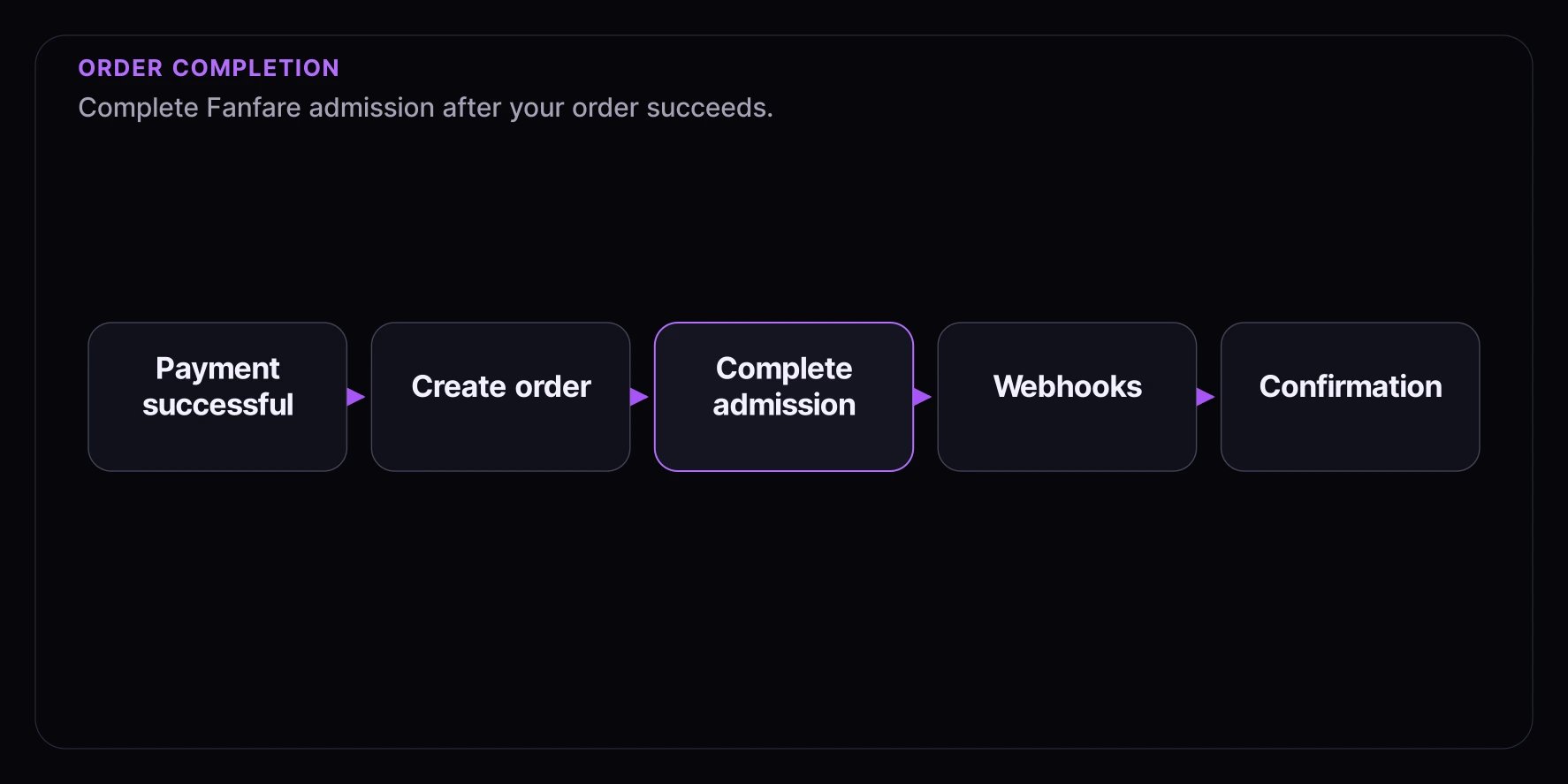
Payment Successful


┌──────────────────┐
│  Create Order    │
│  in Your System  │
└──────────────────┘


┌──────────────────┐
│ Complete Fanfare │
│    Admission     │
└──────────────────┘


┌──────────────────┐
│ Fanfare Triggers │
│    Webhooks      │
└──────────────────┘


┌──────────────────┐
│ Send Customer    │
│  Confirmation    │
└──────────────────┘

Step 1: Complete Admission API

Call the Fanfare API to mark an admission as completed:
// services/fanfare.service.ts
const FANFARE_API_URL = process.env.FANFARE_API_URL || "https://api.fanfare.io";
const FANFARE_ORG_ID = process.env.FANFARE_ORG_ID!;
const FANFARE_SECRET_KEY = process.env.FANFARE_SECRET_KEY!;

interface CompleteAdmissionParams {
  distributionId: string;
  distributionType: "queue" | "draw" | "auction" | "timed_release";
  consumerId: string;
  orderId?: string;
  orderAmount?: number;
}

export async function completeAdmission(params: CompleteAdmissionParams) {
  const { distributionId, distributionType, consumerId, orderId, orderAmount } = params;

  const endpoints: Record<string, string> = {
    queue: `/queues/${distributionId}/complete`,
    draw: `/draws/${distributionId}/complete`,
    auction: `/auctions/${distributionId}/complete`,
    timed_release: `/timed-releases/${distributionId}/complete`,
  };

  const endpoint = endpoints[distributionType];
  if (!endpoint) {
    throw new Error(`Unknown distribution type: ${distributionType}`);
  }

  const response = await fetch(`${FANFARE_API_URL}${endpoint}`, {
    method: "POST",
    headers: {
      "Content-Type": "application/json",
      "X-Organization-Id": FANFARE_ORG_ID,
      "X-Secret-Key": FANFARE_SECRET_KEY,
    },
    body: JSON.stringify({
      consumerId,
      metadata: {
        orderId,
        orderAmount,
        completedAt: new Date().toISOString(),
      },
    }),
  });

  if (!response.ok) {
    const error = await response.json();
    throw new Error(`Failed to complete admission: ${error.message}`);
  }

  return response.json();
}

Step 2: Integration with Order Creation

Call completion after successful order:
// services/order.service.ts
import { completeAdmission } from "./fanfare.service";

interface CreateOrderParams {
  consumerId: string;
  admissionToken: string;
  distributionId: string;
  distributionType: "queue" | "draw" | "auction" | "timed_release";
  items: OrderItem[];
  paymentId: string;
  totalAmount: number;
}

export async function createOrder(params: CreateOrderParams) {
  const { consumerId, admissionToken, distributionId, distributionType, items, paymentId, totalAmount } = params;

  // 1. Create order in database
  const order = await db
    .insert(orders)
    .values({
      consumerId,
      admissionToken,
      distributionId,
      distributionType,
      items,
      paymentId,
      totalAmount,
      status: "pending",
      createdAt: new Date(),
    })
    .returning();

  // 2. Update order status
  await db.update(orders).set({ status: "confirmed" }).where(eq(orders.id, order[0].id));

  // 3. Complete Fanfare admission
  try {
    await completeAdmission({
      distributionId,
      distributionType,
      consumerId,
      orderId: order[0].id,
      orderAmount: totalAmount,
    });

    // Mark as synced with Fanfare
    await db.update(orders).set({ fanfareSynced: true, fanfareSyncedAt: new Date() }).where(eq(orders.id, order[0].id));
  } catch (error) {
    // Log error but don't fail order
    console.error("Failed to sync with Fanfare:", error);

    // Queue for retry
    await queueFanfareSync(order[0].id);
  }

  return order[0];
}

Step 3: Retry Logic for Failed Completions

Handle cases where completion fails:
// workers/fanfare-sync.worker.ts
import { completeAdmission } from "../services/fanfare.service";

interface SyncJob {
  orderId: string;
  attempts: number;
  lastAttempt?: Date;
}

const MAX_ATTEMPTS = 5;
const RETRY_DELAYS = [1000, 5000, 30000, 120000, 600000]; // 1s, 5s, 30s, 2m, 10m

export async function processFanfareSyncQueue() {
  // Get pending sync jobs
  const pendingJobs = await db
    .select()
    .from(fanfareSyncQueue)
    .where(
      and(
        lt(fanfareSyncQueue.attempts, MAX_ATTEMPTS),
        or(isNull(fanfareSyncQueue.nextAttempt), lt(fanfareSyncQueue.nextAttempt, new Date()))
      )
    )
    .limit(10);

  for (const job of pendingJobs) {
    await processJob(job);
  }
}

async function processJob(job: SyncJob) {
  try {
    // Get order details
    const order = await db.select().from(orders).where(eq(orders.id, job.orderId)).limit(1);

    if (!order[0]) {
      // Order doesn't exist, remove job
      await db.delete(fanfareSyncQueue).where(eq(fanfareSyncQueue.orderId, job.orderId));
      return;
    }

    // Attempt completion
    await completeAdmission({
      distributionId: order[0].distributionId,
      distributionType: order[0].distributionType,
      consumerId: order[0].consumerId,
      orderId: order[0].id,
      orderAmount: order[0].totalAmount,
    });

    // Success - update order and remove job
    await db.update(orders).set({ fanfareSynced: true, fanfareSyncedAt: new Date() }).where(eq(orders.id, job.orderId));

    await db.delete(fanfareSyncQueue).where(eq(fanfareSyncQueue.orderId, job.orderId));

    console.log(`Fanfare sync successful for order ${job.orderId}`);
  } catch (error) {
    // Update job for retry
    const nextAttempt = new Date(Date.now() + RETRY_DELAYS[job.attempts] || 600000);

    await db
      .update(fanfareSyncQueue)
      .set({
        attempts: job.attempts + 1,
        lastAttempt: new Date(),
        nextAttempt,
        lastError: error instanceof Error ? error.message : "Unknown error",
      })
      .where(eq(fanfareSyncQueue.orderId, job.orderId));

    console.error(`Fanfare sync failed for order ${job.orderId}, will retry at ${nextAttempt}`);
  }
}

// Run every minute
setInterval(processFanfareSyncQueue, 60000);

Step 4: Handle Platform Webhooks

If using Shopify, WooCommerce, or similar platforms, handle their order webhooks:

Shopify Order Webhook

// routes/webhooks/shopify.ts
import express from "express";
import crypto from "crypto";

const router = express.Router();
const SHOPIFY_WEBHOOK_SECRET = process.env.SHOPIFY_WEBHOOK_SECRET!;

// Verify Shopify webhook signature
function verifyShopifyWebhook(req: express.Request): boolean {
  const hmac = req.headers["x-shopify-hmac-sha256"] as string;
  const body = (req as any).rawBody;

  const hash = crypto.createHmac("sha256", SHOPIFY_WEBHOOK_SECRET).update(body, "utf8").digest("base64");

  return hmac === hash;
}

router.post("/orders/paid", express.raw({ type: "application/json" }), async (req, res) => {
  // Verify signature
  if (!verifyShopifyWebhook(req)) {
    return res.status(401).send("Invalid signature");
  }

  const order = JSON.parse(req.body.toString());

  // Extract Fanfare data from order notes or metafields
  const fanfareData = extractFanfareData(order);

  if (fanfareData) {
    try {
      await completeAdmission({
        distributionId: fanfareData.distributionId,
        distributionType: fanfareData.distributionType,
        consumerId: fanfareData.consumerId,
        orderId: order.id.toString(),
        orderAmount: parseFloat(order.total_price),
      });

      console.log(`Completed admission for Shopify order ${order.id}`);
    } catch (error) {
      console.error("Failed to complete admission:", error);
      // Queue for retry
      await queueFanfareSync({
        orderId: order.id.toString(),
        ...fanfareData,
      });
    }
  }

  res.status(200).send("OK");
});

function extractFanfareData(order: any) {
  // Look for Fanfare data in note attributes
  const noteAttributes = order.note_attributes || [];

  const distributionId = noteAttributes.find((a: any) => a.name === "fanfare_distribution_id")?.value;
  const distributionType = noteAttributes.find((a: any) => a.name === "fanfare_distribution_type")?.value;
  const consumerId = noteAttributes.find((a: any) => a.name === "fanfare_consumer_id")?.value;

  if (!distributionId || !distributionType || !consumerId) {
    return null;
  }

  return { distributionId, distributionType, consumerId };
}

export default router;

WooCommerce Order Webhook

// routes/webhooks/woocommerce.ts
import express from "express";
import crypto from "crypto";

const router = express.Router();
const WC_WEBHOOK_SECRET = process.env.WC_WEBHOOK_SECRET!;

router.post("/orders/completed", express.json(), async (req, res) => {
  // Verify signature
  const signature = req.headers["x-wc-webhook-signature"] as string;
  const payload = JSON.stringify(req.body);

  const expectedSignature = crypto.createHmac("sha256", WC_WEBHOOK_SECRET).update(payload).digest("base64");

  if (signature !== expectedSignature) {
    return res.status(401).send("Invalid signature");
  }

  const order = req.body;

  // Extract Fanfare data from order meta
  const meta = order.meta_data || [];
  const fanfareData = {
    distributionId: meta.find((m: any) => m.key === "_fanfare_distribution_id")?.value,
    distributionType: meta.find((m: any) => m.key === "_fanfare_distribution_type")?.value,
    consumerId: meta.find((m: any) => m.key === "_fanfare_consumer_id")?.value,
  };

  if (fanfareData.distributionId && fanfareData.consumerId) {
    await completeAdmission({
      ...fanfareData,
      orderId: order.id.toString(),
      orderAmount: parseFloat(order.total),
    });
  }

  res.status(200).send("OK");
});

export default router;

Step 5: Order Status Tracking

Track order status for analytics and debugging:
// services/order-tracking.service.ts
interface OrderEvent {
  orderId: string;
  event: string;
  timestamp: Date;
  data?: Record<string, unknown>;
}

export async function trackOrderEvent(event: OrderEvent) {
  await db.insert(orderEvents).values({
    orderId: event.orderId,
    event: event.event,
    timestamp: event.timestamp,
    data: event.data,
  });

  // Also send to analytics
  analytics.track(event.event, {
    orderId: event.orderId,
    ...event.data,
  });
}

// Usage
await trackOrderEvent({
  orderId: order.id,
  event: "order_created",
  timestamp: new Date(),
  data: { consumerId, distributionType, amount: totalAmount },
});

await trackOrderEvent({
  orderId: order.id,
  event: "fanfare_admission_completed",
  timestamp: new Date(),
  data: { distributionId },
});

Step 6: Handle Order Cancellations/Refunds

When an order is cancelled or refunded:
// services/order.service.ts
export async function cancelOrder(orderId: string, reason: string) {
  const order = await getOrder(orderId);

  // Update order status
  await db
    .update(orders)
    .set({ status: "cancelled", cancelledAt: new Date(), cancelReason: reason })
    .where(eq(orders.id, orderId));

  // Note: Fanfare admissions are one-time use
  // A cancelled order doesn't "restore" the admission
  // The consumer would need to re-enter the experience

  // Track the cancellation
  await trackOrderEvent({
    orderId,
    event: "order_cancelled",
    timestamp: new Date(),
    data: { reason, consumerId: order.consumerId },
  });

  // Send cancellation notification
  await sendOrderCancellation(order);
}

Best Practices

1. Complete Admission Asynchronously

Don’t block the order confirmation on Fanfare completion:
// Good - async completion
const order = await createOrder(params);
res.json({ orderId: order.id }); // Return immediately

// Complete in background
completeAdmission(params).catch(console.error);

2. Implement Idempotency

Ensure completion can be called multiple times safely:
async function completeAdmissionIdempotent(params: CompleteAdmissionParams) {
  // Check if already completed
  const existing = await db
    .select()
    .from(completedAdmissions)
    .where(
      and(
        eq(completedAdmissions.distributionId, params.distributionId),
        eq(completedAdmissions.consumerId, params.consumerId)
      )
    );

  if (existing.length > 0) {
    console.log("Admission already completed");
    return existing[0];
  }

  // Proceed with completion
  return completeAdmission(params);
}

3. Monitor Sync Status

Create alerts for failed syncs:
// Monitor unsynced orders
async function checkUnsyncedOrders() {
  const unsynced = await db
    .select()
    .from(orders)
    .where(
      and(
        eq(orders.fanfareSynced, false),
        lt(orders.createdAt, new Date(Date.now() - 30 * 60 * 1000)) // 30+ minutes old
      )
    );

  if (unsynced.length > 0) {
    await sendAlert({
      type: "fanfare_sync_delayed",
      count: unsynced.length,
      oldestOrder: unsynced[0].id,
    });
  }
}

4. Include Order Metadata

Pass relevant data to Fanfare for analytics:
await completeAdmission({
  distributionId,
  distributionType,
  consumerId,
  orderId: order.id,
  orderAmount: order.totalAmount,
  metadata: {
    platform: "your-platform",
    itemCount: order.items.length,
    currency: order.currency,
  },
});

Troubleshooting

Admission Already Completed

// Handle gracefully
try {
  await completeAdmission(params);
} catch (error) {
  if (error.message.includes("already completed")) {
    // This is fine - idempotent operation
    console.log("Admission was already completed");
  } else {
    throw error;
  }
}

Consumer ID Mismatch

Ensure the consumer ID matches what was used during admission:
  • Store consumer ID with the admission token
  • Validate before checkout
  • Don’t allow different consumers to use the same admission

What’s Next