

Where you choose
During sign-up, the How will you sell? step lets you choose Fanfare checkout or External checkout. Afterward, you can view or change this setting under Settings → Organization → Basic Information on the Checkout processor card (Fanfare or External). When you install the Fanfare app in Shopify, it sets this to External automatically for Shopify checkout.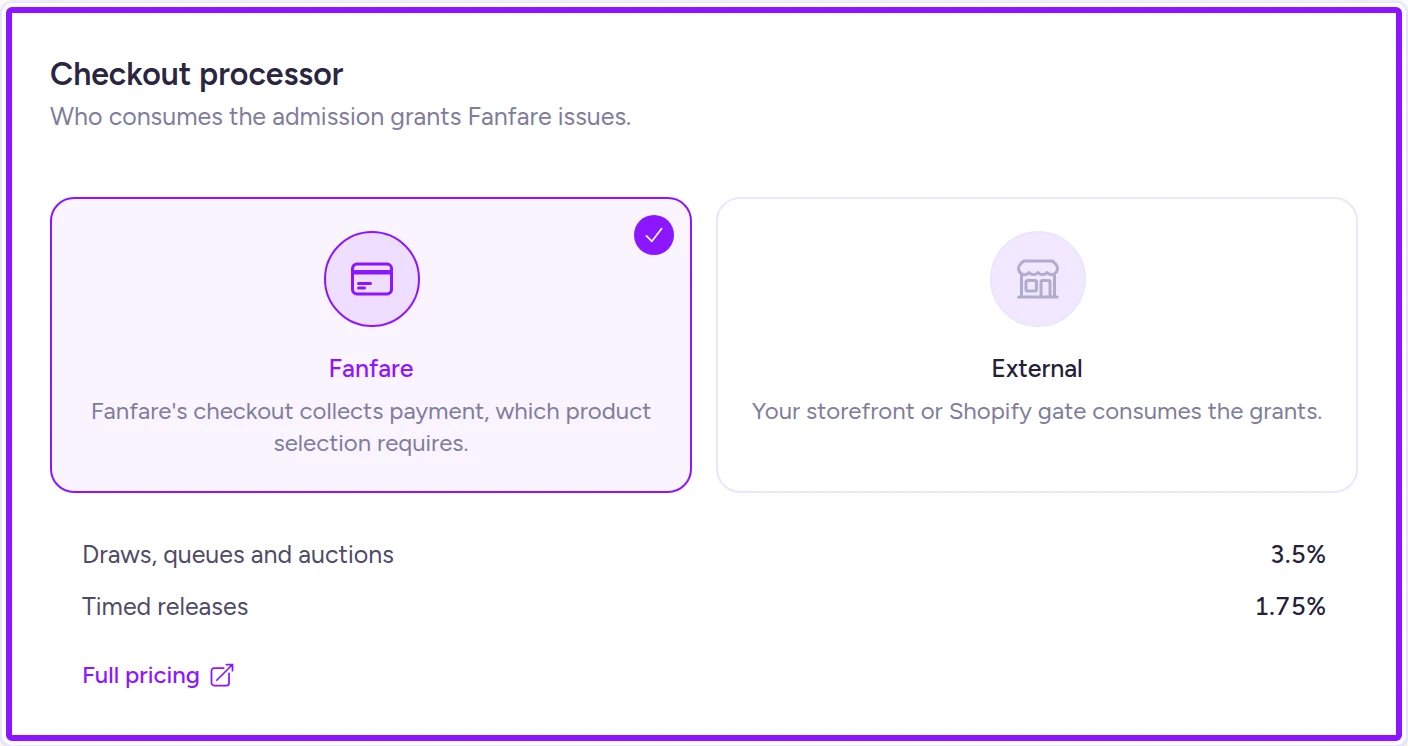
Manage your checkout setup from the Checkout processor card in Organization settings.
Comparing the three options
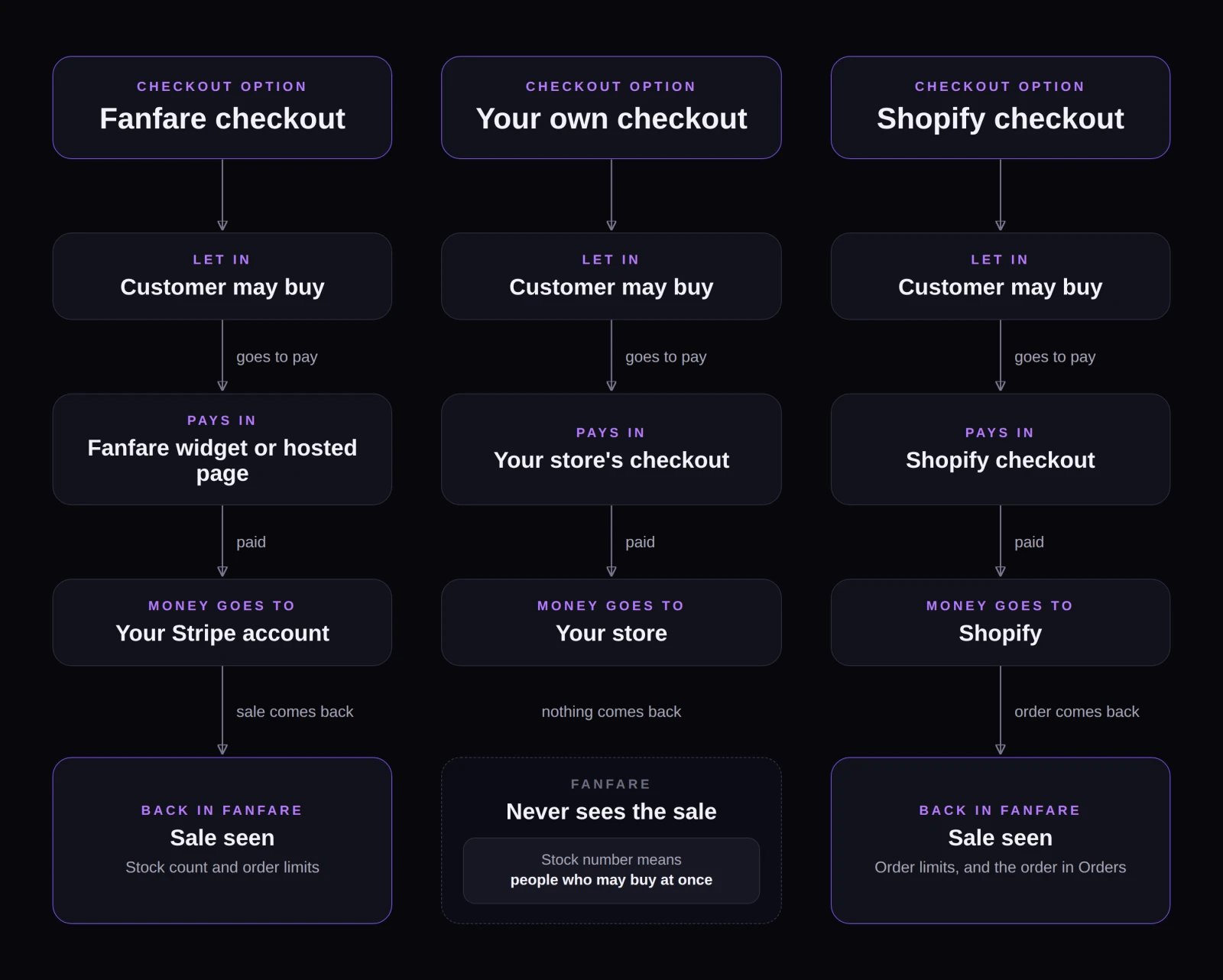
How payment flow, order visibility, and inventory tracking compare across the three checkout options.
Fanfare checkout
Customers complete payment right inside your Fanfare widget or hosted page, with payouts going directly to your connected Stripe account (Stripe’s standard processing fees apply separately from Fanfare’s take rate). Because Fanfare records every order, it can manage your stock, enforce per-customer order limits, support multi-product selection, run auctions, and pre-authorize cards on entry. You can cancel and refund orders from Orders (see Orders and refunds); refunds don’t return Fanfare’s fee. Fanfare checkout has two requirements:- US & USD only — Your organization must be based in the US and sell in US dollars.
- Stripe connected — Connect your Stripe account before creating experiences.
Your own checkout
Fanfare controls who gets in and sends admitted shoppers to your store’s checkout to pay. Because Fanfare doesn’t collect payment or receive order confirmations from external checkouts, four rules apply:- Stock: Products you create are Not managed—Fanfare doesn’t track remaining inventory. See Stock.
- Product selection: Each sequence can offer only one product and variant. Customer Picks and Mystery Box aren’t available.
- Order limits: Fanfare can’t enforce per-customer order limits on external sales, so enforce them in your store.
- Auctions: Unavailable, since external checkouts can’t enforce a dynamic winning bid (the auction option shows “Needs a checkout that charges the winning bid”).
How stock numbers work on your own checkout
On Fanfare checkout, a sequence’s stock count tracks total units sold. On your own checkout, Fanfare doesn’t see completed orders—so that number instead caps how many shoppers can hold an active checkout spot at the same time. When a shopper’s payment window expires, their spot returns to the pool whether or not they bought, meaning more shoppers than your stock number can pass through over the course of a drop.Shopify checkout
With the Fanfare app in Shopify, shoppers pay in Shopify checkout and Shopify manages your inventory. Completed Shopify orders sync back into Fanfare’s Orders so per-customer order limits are enforced automatically, while refunds stay in Shopify—see Orders with Shopify checkout. Fanfare’s per-order fee is billed through Shopify app usage charges.Payment timing is configured per distribution
Choosing whether shoppers pay after admission/winning or pre-authorize a card on entry—as well as whether entry is automatic—is configured on each distribution rather than here. See Admission and payment and What your customers see. Card pre-authorization is available only on Fanfare checkout; external and Shopify checkouts skip payment collection in Fanfare.Switching checkout processors
Only organization admins can change Checkout processor in the standalone Fanfare admin. Switching isn’t allowed while any queue, draw, auction, or timed release is Scheduled or Live—including ended drops whose winners are still inside a payment window, or open-ended queues and timed releases until you Deactivate or delete them. Moving from Fanfare to External is also blocked if you have any Fanfare-managed products, sequences using multi-product selection the new checkout can’t support, or auctions it can’t charge for. Shoppers already admitted keep the checkout they started with. See Organization settings for the checklist before switching.Example: Fanfare checkout vs. your own checkout
Northbound Supply Co., a US brand selling in USD on Fanfare checkout with Stripe connected, runs its “Eternal Bloom No. 1 Auction” for a single numbered silk bomber. Bidders place bids inside the experience, the winner checks out there, the order appears in Orders, and Fanfare applies Northbound’s standard take rate. If Northbound instead used its own non-Shopify checkout, it wouldn’t be able to run that auction (no checkout to charge the winning bid), wouldn’t be able to offer product or variant choice inside Fanfare for its “Phantom Stitch Anorak Drop”, and setting a sequence stock of50 would limit concurrent checkout spots to 50 shoppers rather than capping sales at 50 jackets.
On Shopify
- Shopify checkout only: Fanfare checkout isn’t available in the Shopify app yet—keep Checkout processor set to External so shoppers pay in Shopify checkout.
- Checkout protection: Complete storefront setup before launching so Shopify checkout enforces your drop rules. See Checkout protection.
- Auctions: Require Shopify Plus, Fanfare checkout rules enabled, Fanfare’s latest Shopify permissions approved, and a store currency matching your Fanfare organization’s currency. Without all four, auctions remain unavailable regardless of your Fanfare plan. See Checkout protection.
- Take rates: If your organization has separate agreed rates for Shopify checkout and Fanfare checkout, Settings → Payments lists both.
Related
Payments and fees
Connect Stripe, check your plan’s take rates, and see what connecting locks.
Organization settings
Switch your checkout processor and review prerequisites.
Admission and payment
Pay-on-win, card pre-authorization, payment windows, and automatic entry.
Stock
Compare Fanfare-managed, Shopify-managed, and Not managed inventory.
Add and gate sequences
Configure product selection and per-customer order limits.
Checkout protection
Protect Shopify checkout during your drops.