

Choosing who manages stock
Every product has a Stock management mode set when you create it:
Keep three rules in mind when setting up products:
- The choice is permanent: Once a product is created, you can’t switch its Stock management mode. See Add products.
- How checkout shapes your options: Fanfare-managed requires Fanfare checkout. Organizations using an external checkout create Not managed products in the admin (where the product-level quantity and When sold out settings don’t cap sales), while products synced from Shopify are Shopify-managed (you can’t select Shopify-managed manually in the admin). See Checkout options and Manage stock.
- Don’t mix Fanfare-managed and Shopify-managed products: One experience can’t combine both, though Not managed products can appear alongside either.
How units move through a drop
Every Fanfare-managed unit progresses through five stages:- Supply — Opening stock entered at product creation, plus every receipt, adjustment, write-off, and return recorded since.
- Allocated — Units reserved from Supply for a specific experience, size by size.
- Assigned to a sequence — Each sequence gets its own slice of the experience’s allocation. Units reserved for the experience but not yet given to a sequence stay Unassigned.
- In checkout — Held exclusively for a customer during their payment window. See Admission and the payment window.
- Sold — Payment captured.
Per-sequence stock limits
Each sequence sets the maximum number of units it can sell for every size it offers. Configure these on the sequence’s Stock card with Edit allocations—see Allocate stock to a drop. For Fanfare-managed products, sequence limits draw directly from the experience’s allocation so sequences can never collectively exceed what the experience holds. For products Fanfare doesn’t manage, default starting limits depend on your checkout and distribution type (see Allocate stock to a drop). No limit is available only for products Fanfare doesn’t manage, and never on a Dutch auction sequence—sizes set to No limit never sell out, though Fanfare still tracks Sold and In checkout counts.What changes once a drop opens
Live stock counting begins about 10 minutes before a sequence opens. Each size on its Stock card moves from Not counting yet → Preparing → Ready → Selling, exposing live Sold, In checkout, and Remaining counts. Once counting begins:- Experience-level allocations lock while the experience is live.
- You can top up, not trim directly: On a counting sequence, you can raise a size’s limit using the experience’s Unassigned units, but you can’t lower it directly. To move units out of a live sequence—either to another sequence in the same experience or back to Unassigned—use Move units. See Change things mid-drop.
- Draws stay in sync: Moving units into or out of a sequence with an active draw raises or lowers its Winner count by the same number, and you can’t set a draw’s Winner count higher than the units available across its sizes. See Draw.
A single sequence supports up to 256 size combinations (product-and-size pairs, or 256 products for a Mystery Box). Above 256, Fanfare blocks new entries and auction bids while the sequence is counting and displays a warning on the Stock card—remove products or sizes to bring it back within the limit.
Handling over-allocated stock
If a write-off or downward stock adjustment pushes Supply below Allocated, the affected size becomes over-allocated: Available displays Over-allocated by [count] and a warning banner appears in Stock by SKU. Fanfare resolves the shortfall in a strict order:- Live experiences return spare units first (newest first): Fanfare reclaims Unassigned units from live experiences first, then uncommitted units from live sequences (whether counting or not). Note that an Ended experience still counts as live while entrants or active checkouts remain.
- Active checkouts stay protected: Units currently In checkout stay with those shoppers. If On hand drops below those checkouts, the uncovered units are flagged as At risk.
- Upcoming distributions pause if any shortfall remains: Even a 1-unit shortfall puts every distribution selling that size that hasn’t started counting on hold (Held: stock)—even inside a live experience where an earlier distribution is already selling.
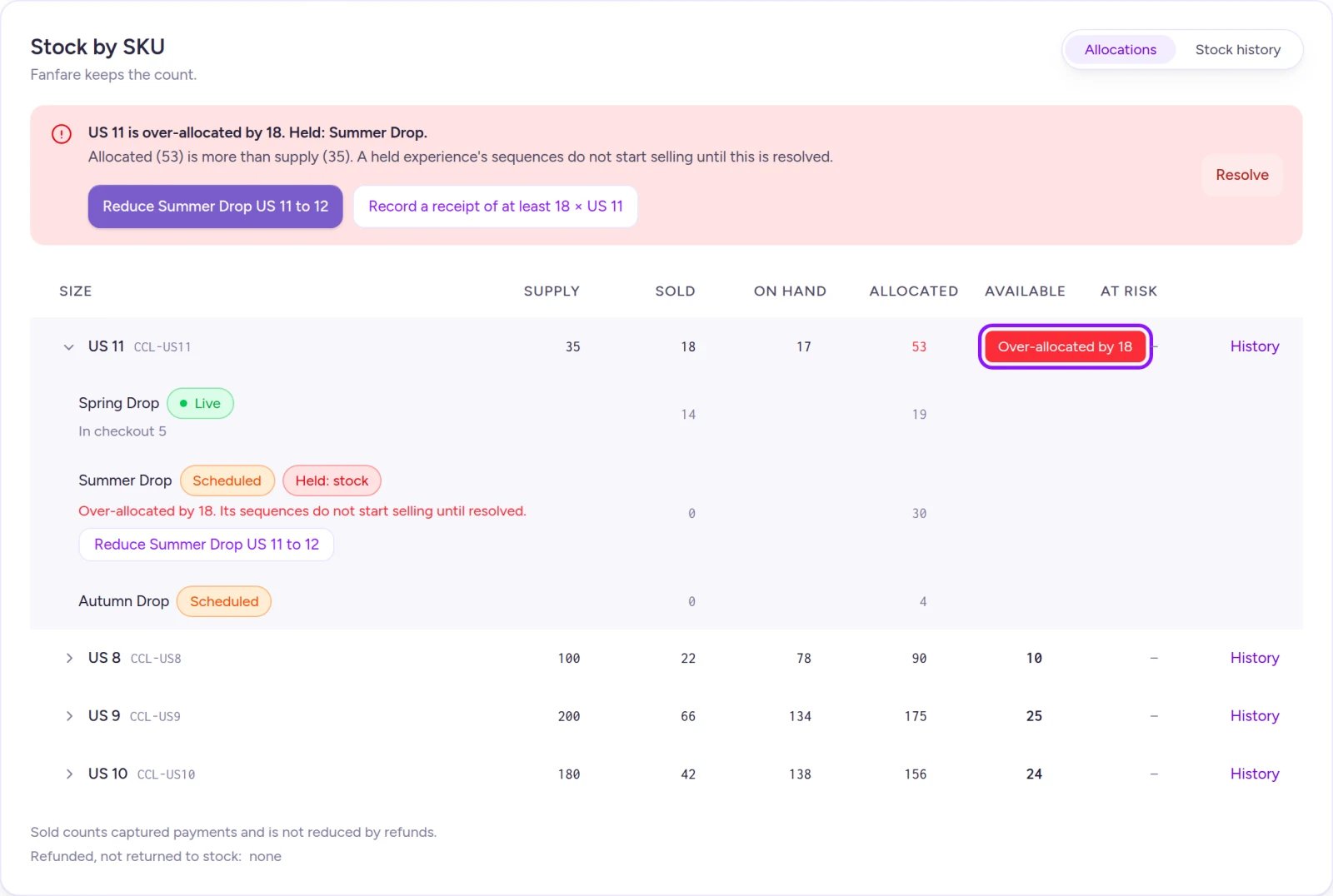
A negative Available count means the size is over-allocated and upcoming distributions are held until resolved.
Releasing unsold stock after a drop
Once every distribution in a sequence has ended or been deactivated and no customers remain in checkout, Fanfare automatically releases the sequence: its allocations shrink to match what sold, and leftover units return to the experience’s Unassigned pool. Once at least one sequence is released and no other sequence still holds active Fanfare-managed units, the experience’s Allocated count shrinks to what sold—putting all unsold units straight back into Available for your next drop. Releasing doesn’t log a stock adjustment, so Supply stays unchanged. Once a sequence shows Released, it’s final: its stock can’t be edited and no units can be moved into it.Refunds don’t restock automatically
Issuing a refund never reduces Sold and doesn’t automatically add the unit back to Supply. To restock a refunded Fanfare-managed unit, check the return-to-stock option when issuing the refund or select Return to stock on the order afterward. See Orders and refunds.Example: a mid-drop write-off
Suppose Northbound Supply Co. has 200 Fanfare-managed Phantom Stitch Anoraks in size M. Phantom Stitch Anorak Drop is allocated 150 units—50 to Inner Circle Early Access (a queue from 10:00 to 11:00) and 100 to Public Draw (opening at 11:00), with0 Unassigned.
By 10:30, the queue has sold 20 units and 5 shoppers are currently in checkout:
At 10:30, your warehouse discovers 80 damaged jackets and you record an 80-unit write-off. Supply drops to 120—30 units short of the 150 allocated:
- Live experience gives back first: There are no Unassigned units, so Inner Circle Early Access returns its 25 remaining uncommitted units. Its allocation drops to
25and Remaining drops to0. - Active checkouts keep their holds: The 5 units In checkout remain untouched. On hand is still
100(120 − 20), which easily covers them, so At risk stays0. - Upcoming draw is held: Total Allocated is now
125(25 + 100) against Supply of120, leaving Available at−5. Because Public Draw hasn’t started counting yet, it switches to Held: stock and won’t start selling at 11:00 until the 5-unit gap closes.
On Shopify
Products in the Fanfare app in Shopify sync directly from your Shopify catalog:- Shopify-managed (default): When your organization uses external/Shopify checkout (the default when installing the app), synced products are Shopify-managed—Shopify owns the inventory count and you update stock in Shopify admin. See Products from Shopify.
- Fanfare-managed (if using Fanfare checkout): Products imported while connected to Fanfare checkout can use Fanfare-managed stock. Because Fanfare tracks that inventory independently from Shopify, set those units aside for your drop and take them off sale in Shopify yourself. See Manage stock.
Related
Manage stock
Choose stock management modes, adjust stock, inspect stock history, and resolve over-allocations.
Allocate stock to a drop
Reserve units for an experience and split allocations across sequences.
Change things mid-drop
Move units between sequences while a drop is live.
Checkout options
See how inventory counts behave on each checkout processor.