

How locking works
Experiences go live automatically on their distributions’ schedules—there’s no manual publish button (see Experiences). Locks follow those same schedules, with most starting when a distribution opens:- Standard distributions count as opened 30 seconds before their Opens time.
- Queues count as opened 5 minutes 30 seconds before Opens, because their waiting room opens 5 minutes early.
A queue’s locks start about 5 minutes 30 seconds before Opens, not at Opens. Finalize payment collection and other pre-open settings before the waiting room opens.
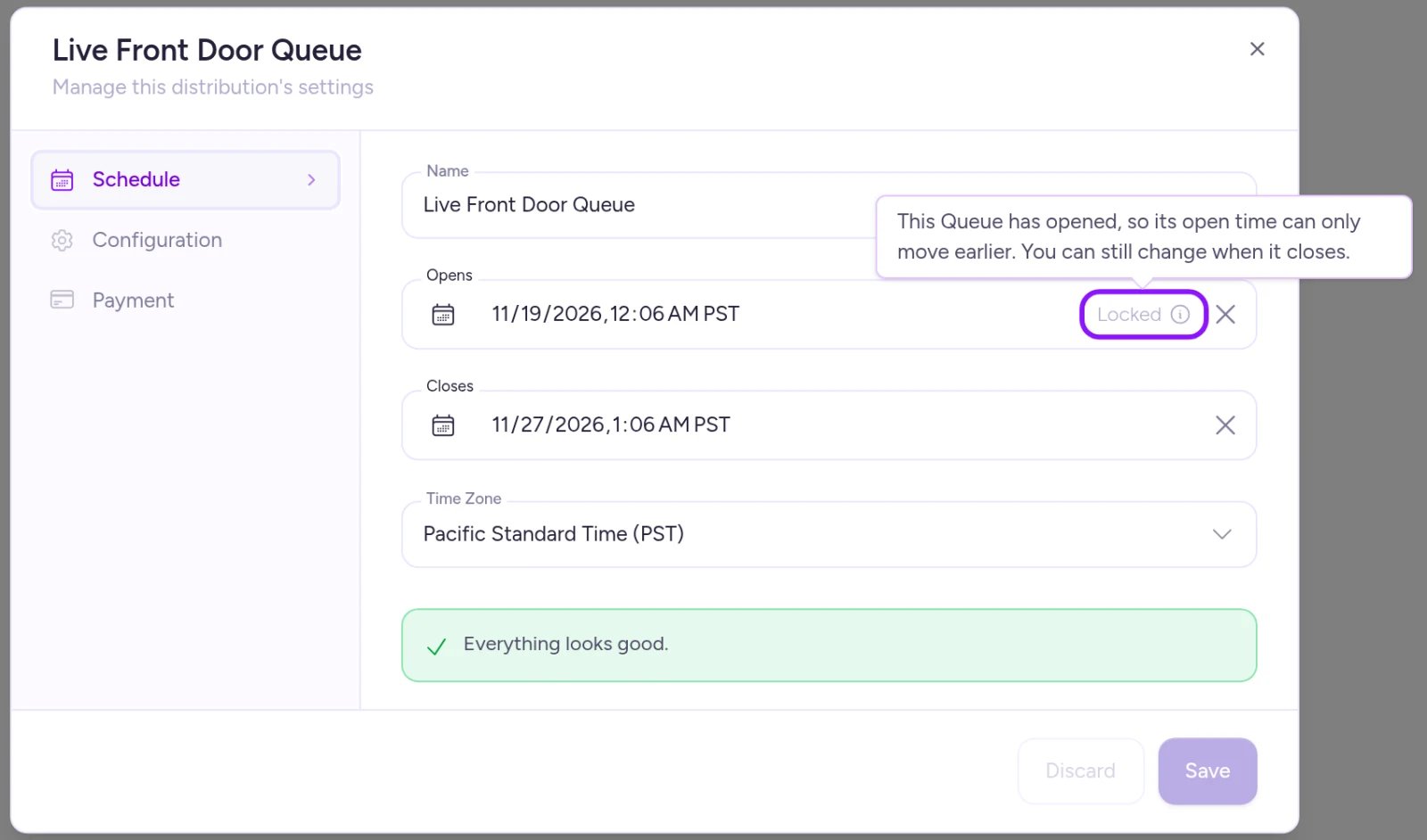
Once a queue has opened, Opens can only move earlier while Closes stays editable.
What locks at each stage
In the table below, “Once it opens” refers to the moment the distribution counts as opened (30 seconds before Opens, or 5 minutes 30 seconds before Opens for queues).
Three locks deserve a closer look:
Payment collection. How a queue or draw collects payment—and its Authorization amount for card holds—locks as soon as the distribution opens so customers’ entry terms stay consistent. To change payment collection after opening, you’ll need to deactivate the distribution and create a new one. See Set up a queue and Set up a draw.
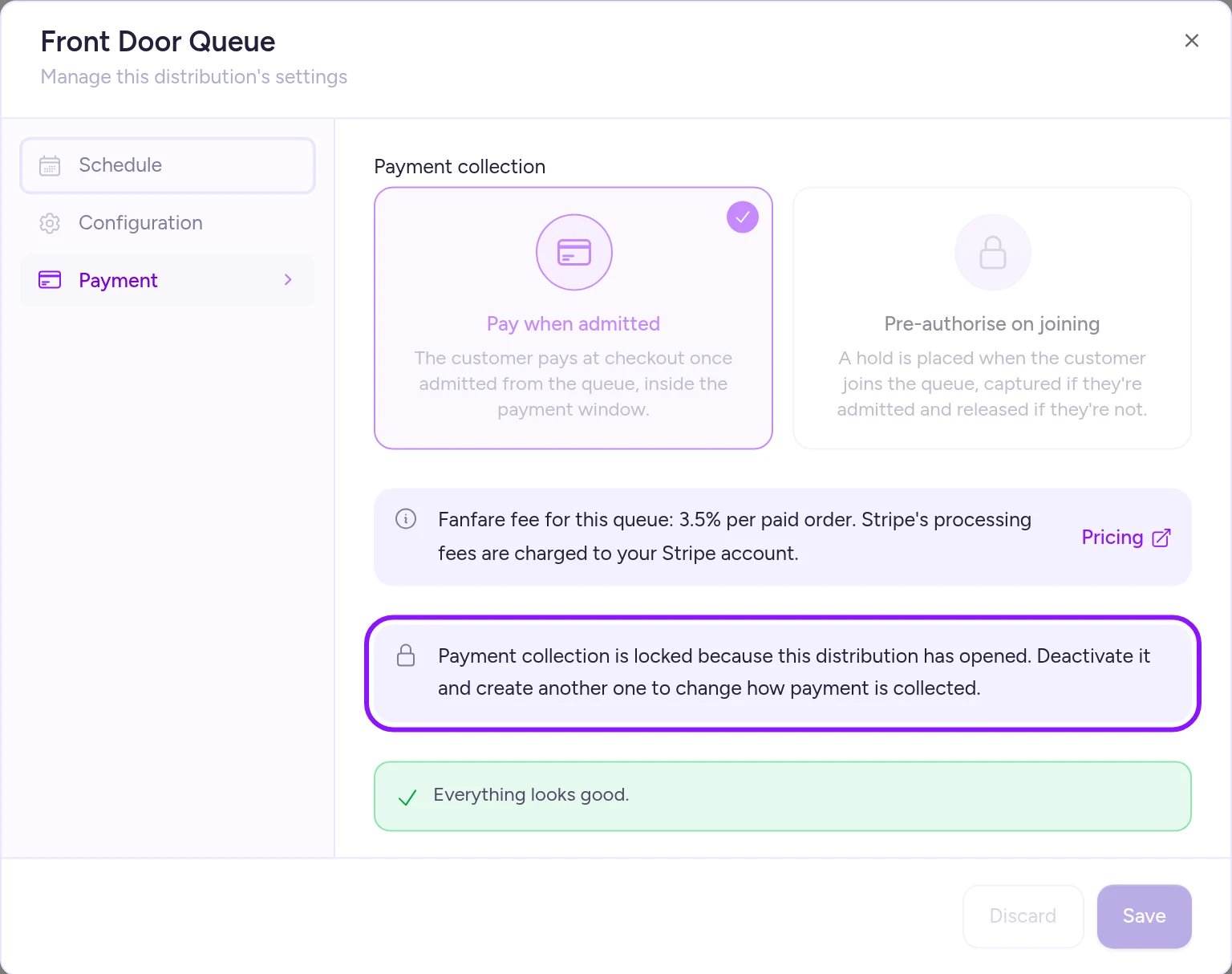
Once a queue opens, its payment collection setting locks.
What stays editable while live
Most day-of controls stay flexible while a drop is running:- Queue Admit rate
- Guest access and automatic entry
- Loyalty bias (Bias toward loyal consumers)
- Closes time
- Timed-release settings (apart from moving Opens later)
- Auction auto-extend
- Draw winner count (until entry closes)
How to change a locked setting
Temporary locks lift automatically once their condition clears—such as appointment slot settings when no bookings remain, or hosted page publishing after the freeze window ends. Permanently locked settings can’t be unlocked. To make a change, Deactivate the distribution, sequence, or experience and create a new one with the settings you want. Once deactivated, a distribution becomes read-only (note that certain auction states can’t be deactivated—see Stop a drop). To delete a scheduled or live distribution, deactivate it first. Deleting preserves your orders, entries, and customer records (though deletion may require a short wait after deactivation—see Stop a drop). Changing your Fanfare plan never stops a live drop from serving customers; see Plans and what they unlock.Example: live queue and upcoming draw
In Northbound Supply Co.’s “Phantom Stitch Anorak Drop”, the Inner Circle Queue is live and the Public Draw opens in two days:- Public Draw: Still editable—you can switch payment collection to Pre-authorise on entry (with Stripe connected) anytime until 30 seconds before it opens.
- Inner Circle Queue: You can still adjust Admit rate and Closes, while payment collection is locked. Changing payment collection now would require deactivating the queue—which would remove spots from admitted shoppers who haven’t started checkout and mark the entire experience’s public page as ended, including the upcoming Public Draw.
On Shopify
Locks work the same way in the Fanfare app in Shopify, with three differences:- No appointments: Appointments aren’t available in the Shopify app, so appointment lock rules don’t apply.
- No Fanfare payment collection: Shoppers pay in Shopify checkout, so there’s no Fanfare payment collection or Authorization amount to lock.
- Deactivation permissions: Every Shopify staff member with access to the Fanfare app counts as an organization admin and can deactivate drops. See Stop a drop.
Related
Change things mid-drop
Pause a queue and adjust live drop settings safely.
Stop a drop
Understand what happens when you deactivate or delete a drop.
Stock
When stock counting starts and how units move between sequences.
Things that cannot be undone
Every irreversible action in Fanfare in one checklist.