

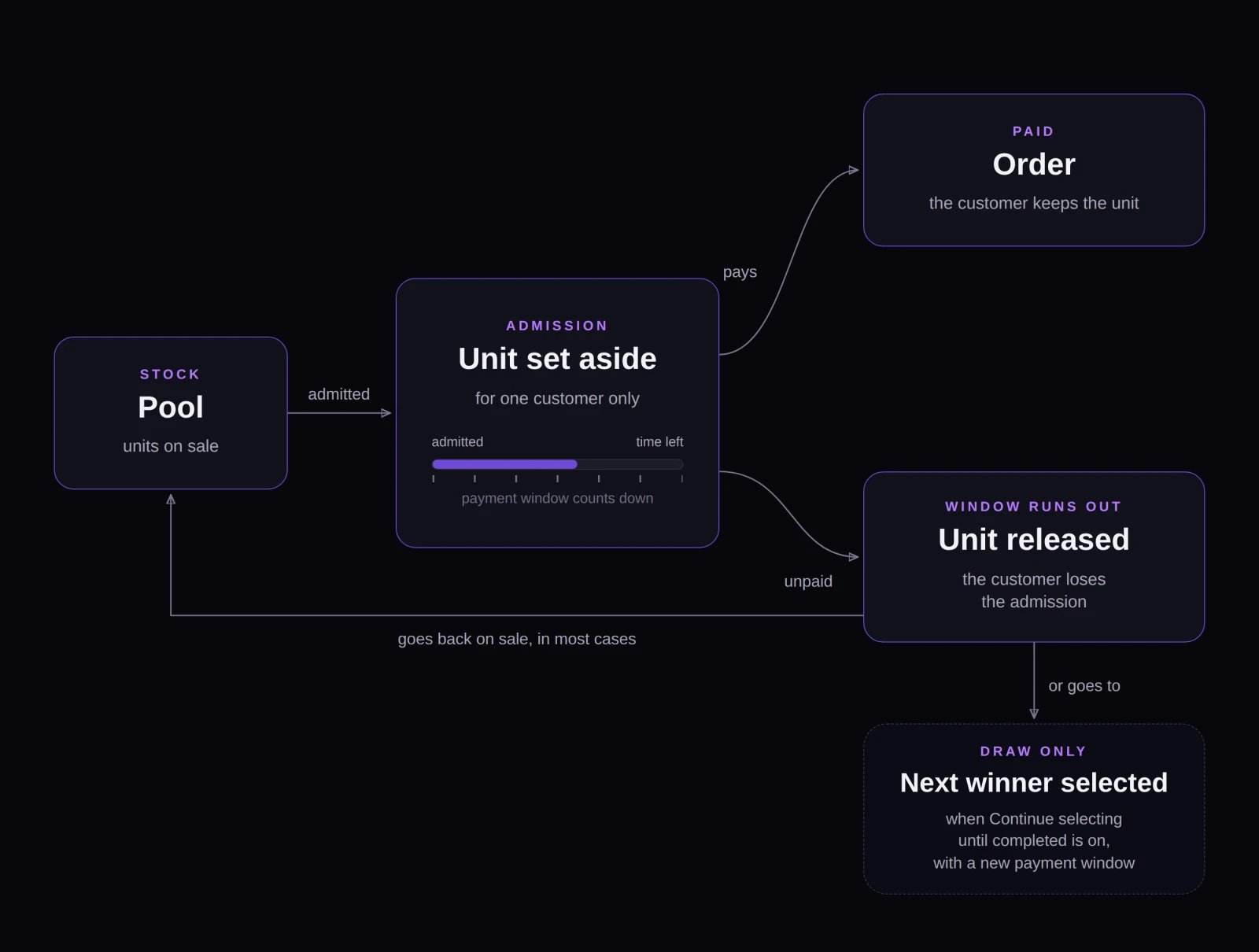
An admission grants a timed right to buy one unit: it ends in an order or, if the window expires, releases the unit.
When each distribution grants an admission
Each release format grants admissions at a different point:- Queue: When the shopper reaches the front and is let in at the queue’s Admit rate.
- Draw: When the entrant is selected as a winner.
- Auction: When the bidder wins—at settlement in an English auction, or the moment they accept the current price in a Dutch auction.
- Timed release: The moment the shopper enters. When the sequence counts stock, each entry holds a unit—see Timed release.
- Appointment: Never. Appointments book a time slot and don’t take payment.
Payment window lengths
A few timing rules to keep in mind:
- Clearing Admission expiration on a draw: If you edit an existing draw and clear the Admission expiration field, Fanfare resets the window to 30 minutes (not 60 minutes). Enter
3600to keep a 60-minute window. See Set up a draw. - Changing a draw’s window mid-selection: Updating Admission expiration while winners are being selected applies only to winners picked afterward. Winners already selected keep their original deadline.
- Short windows on Customer Picks draws: If winners need to pick a product or size, give them at least 5 minutes—the draw editor warns you if you enter a shorter window, though you can still save.
- Auctions near close: An auction winner always gets a full 30 minutes from their win, even if that deadline extends past the auction’s Closes time.
During the payment window
While the timer runs, Fanfare holds the unit for that customer whenever Fanfare counts the sequence’s stock. If you use an external store checkout, that hold exists only inside Fanfare’s count, not in your store’s inventory—see Checkout options and Stock. Customers see a live countdown of their remaining time. On Fanfare checkout, the countdown pauses while their bank confirms payment (such as 3D Secure verification). Once a shopper submits payment through Fanfare checkout, their order appears in Orders as Draft (it can’t be canceled while in Draft). Shoppers who haven’t attempted payment don’t have an order yet. See Orders and refunds.When a payment window expires
If a customer doesn’t pay before their deadline, they lose the admission and the held unit is released. What happens next depends on the distribution type:
Signed-in customers receive notifications when their payment window opens (or when they win a draw or auction, with their checkout link and deadline) and again if it expires. Guests don’t receive notifications—so a guest who closes the page can miss their window without realizing it. See Customers and identity and What your customers see.
Payment collection: pay after vs. pre-authorize
For queues and draws using Fanfare checkout, you choose when to collect payment under Payment collection:
Auctions and timed releases always collect payment after winning or entering, and appointments never charge.
- Pay after admission: Shoppers enter without a card and complete checkout during their payment window.
- Pre-authorize: Fanfare places a hold on the shopper’s card when they join the queue or enter the draw. If they’re admitted or selected as a winner, Fanfare captures the hold and creates their order automatically—no checkout step required. If they aren’t selected, the hold is released automatically.
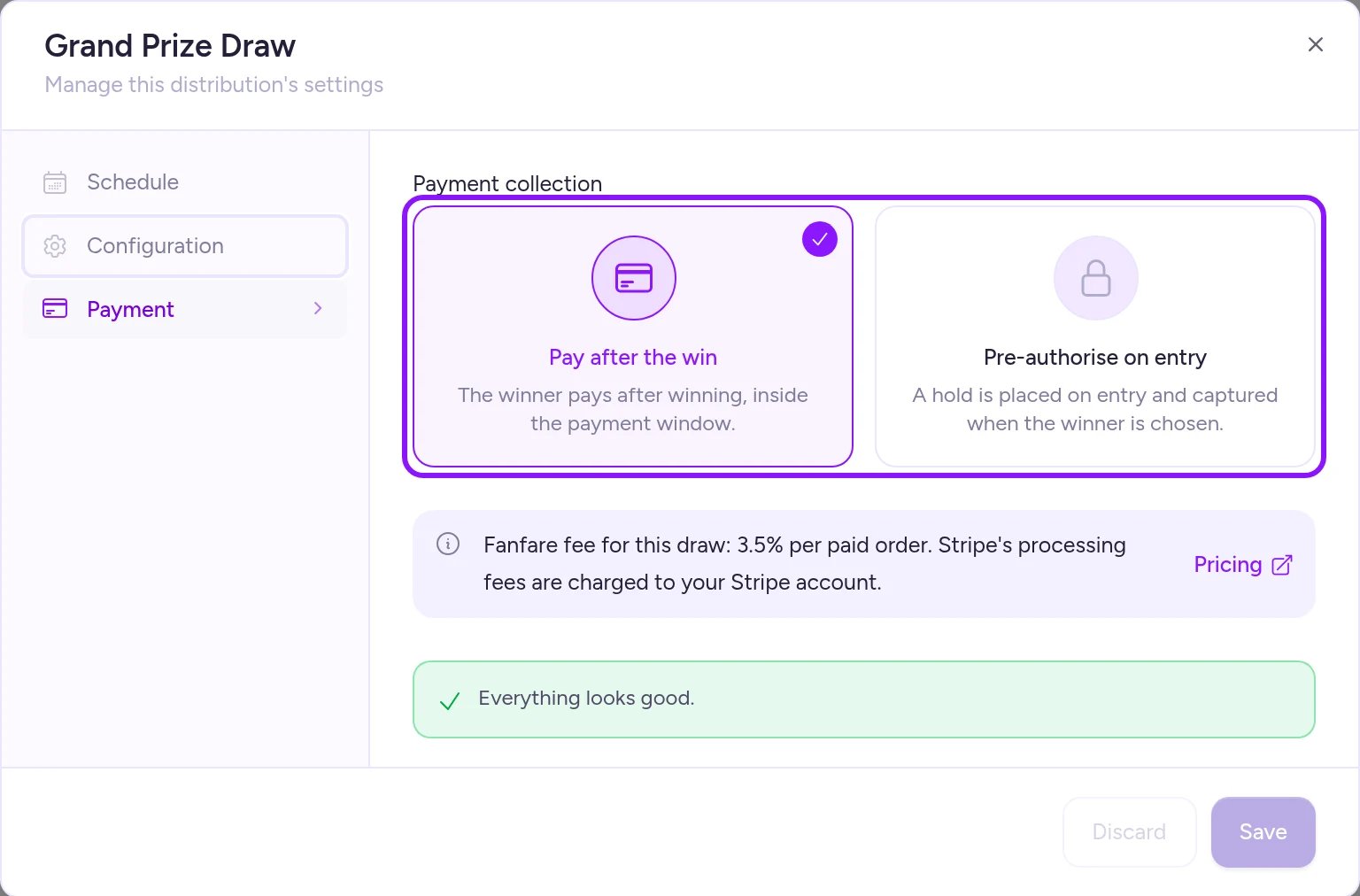
Pre-authorization is available only with Fanfare checkout and a connected payment provider.
Pre-authorization rules and limits
Because pre-authorization places a real card hold up front, three constraints apply:- One uniform price: Authorization amount is a single amount in your organization’s currency. Every product and variant offered in the drop must cost that exact amount.
- No product selection in pre-authorized queues: A queue can’t pre-authorize while customers still choose between multiple products or variants. Either run the drop as a draw, or limit the sequence to a single product and variant.
- 7-day card hold limit: Card holds expire after about 7 days from the moment a shopper enters.
Keep pre-authorized schedules under 6 days. Plan the gap from when entry opens to the final selection (or Closes on a queue), plus the payment window, to stay under six days:
- If a hold placed at opening would expire before the first draw selection (or a queue’s Closes time) plus the payment window, Fanfare blocks the schedule until you shorten it.
- On draws where entry stays open after the first draw time, holds can survive the first selection but expire before later rounds. Fanfare warns you when saving, and shows the earliest entry date whose holds will still be live at selection. If an early entrant’s hold has already expired when they’re picked, their allocation is released (and reassigned only if Continue selecting until completed is on).
Automatic entry
By default, visitors select a button to join a queue, draw, or timed release. Turning on Automatic entry (off by default) automatically enters every eligible visitor who reaches the distribution—even if they leave right away. A few distribution-specific rules still apply when Automatic entry is on:- Queues: Everyone waiting when Opens hits is still randomized.
- Pre-authorized drops: Shoppers are still prompted to authorize their card before entry completes.
- Timed releases with tracked stock: Shoppers still select Enter themselves whenever the sequence counts a stock limit that can sell out. See Timed release.
- Auctions: Always require an explicit bid.
On Shopify
The Fanfare app in Shopify routes shoppers to Shopify’s checkout—Fanfare checkout (Stripe under Settings → Payments) is marked “Coming soon.” Because Shopify handles payment directly, Fanfare collects no payment and Payment collection isn’t shown. In Shopify checkout, a customer’s reservation expires at their payment deadline: Shopify checkout blocks late purchases, and Fanfare releases the held unit after a brief buffer. Auction winners must check out the reserved item at quantity1, at its winning price, with no discounts applied. See Checkout protection.
Related
Checkout options
Compare Fanfare checkout, your external checkout, and Shopify checkout.
What locks, and when
See when payment collection and other drop settings lock.
Set up a draw
Configure admission expiration, payment collection, and winner selection step by step.
What your customers see
Preview the payment countdown, notifications, and expiration screens.