

Plan pricing and take rates
- When take rates apply: Fanfare charges a percentage fee on orders paid through Fanfare checkout or Shopify checkout. Orders completed on your own external store checkout carry no Fanfare per-order fee, and appointments never take payment, so they carry no fee on any plan.
- Enterprise plans: Select Contact sales on the Billing page to discuss custom pricing and rates for your organization. Enterprise organizations pay Pro’s rates until agreed rates are recorded.
- Custom checkout rates: If you have a negotiated rate with Fanfare, it overrides the standard plan take rate across every plan and stays in place across plan changes (so upgrading doesn’t lower a custom rate).
Features by plan
Each plan includes everything in the tier below it. You can compare plans anytime on the Billing page under Plans and take rates.
Core drop tools work the same on every plan, including Starter:
- Email announcements
- Products and locations
- Sequences, order limits, and waitlists
- Orders and refunds
- Brand colors and fonts, plus Google Analytics
- Live controls and Deactivate
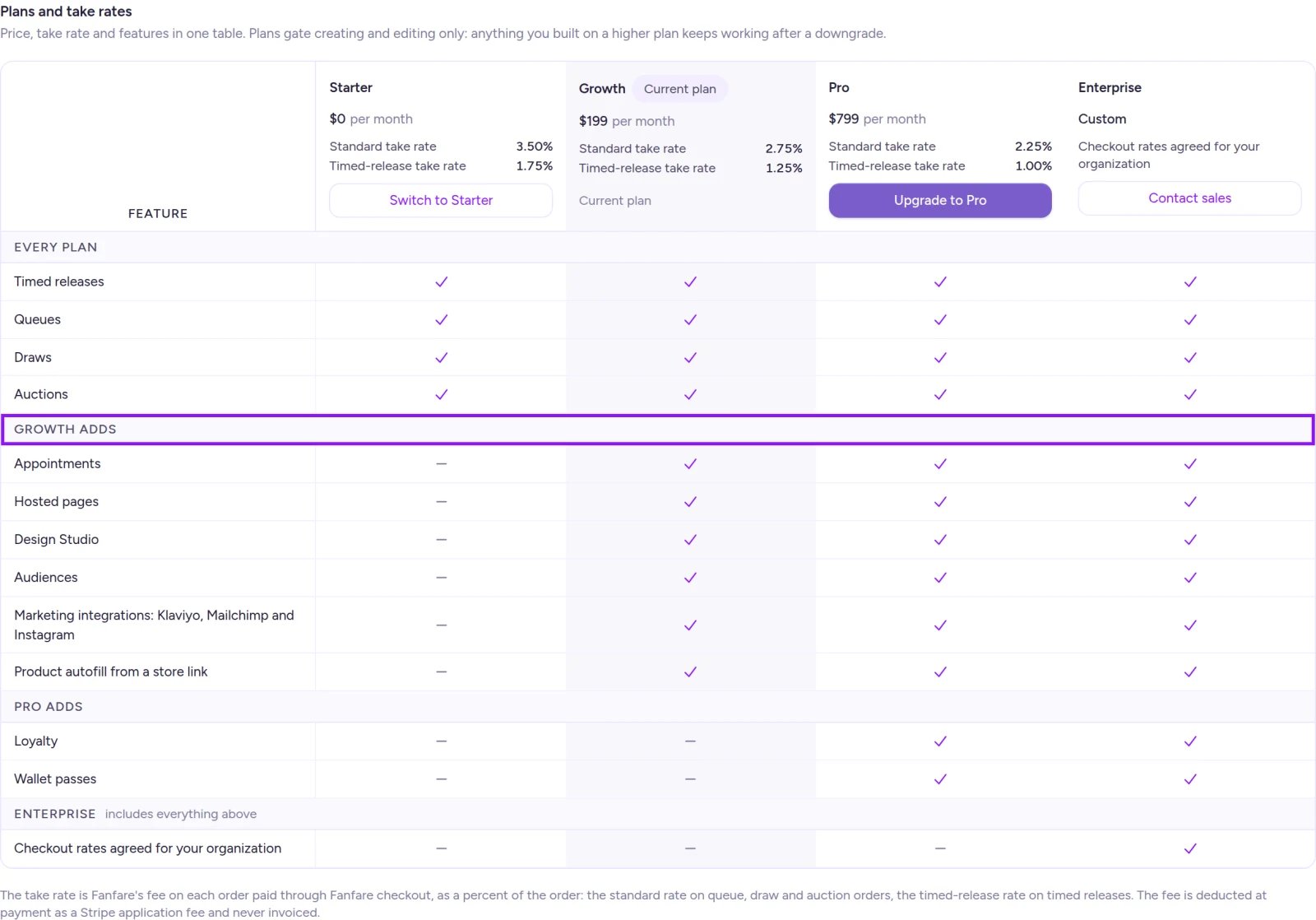
Compare monthly pricing, take rates, and features on the Billing page.
What happens when you downgrade
Plan checks apply only when you create or edit features—never to customers entering a drop. After moving to a lower plan:- Live hosted pages stay published and accessible.
- Audiences continue gating access to the sequences they’re attached to, and rule-based audiences with a refresh schedule keep updating on schedule (manual Refresh now requires Growth or above).
- Loyalty programs and wallet passes keep working for customers who already have them.
- Existing appointments keep running and remain editable.
- Archive hosted pages (organization admins only).
- Delete audiences once they’re no longer gating an active or upcoming experience.
- Edit, pause, or deactivate live distributions.
- Disconnect integrations and turn off Loyalty (turning Loyalty back on requires Pro).
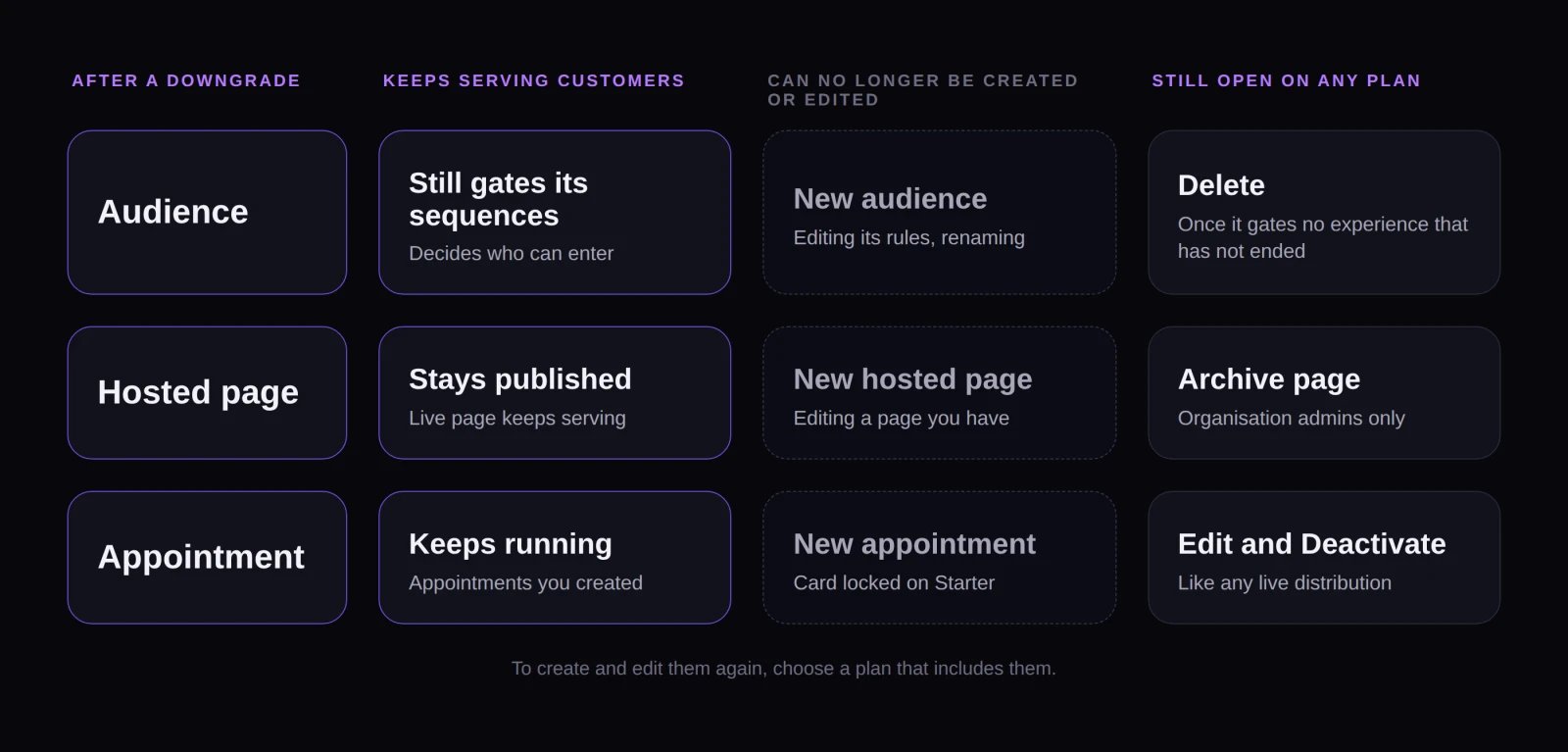
After a downgrade, live experiences keep serving customers while creating and editing higher-tier features is locked.
How subscription status affects your plan
If you schedule cancellation for the end of your billing period, you keep your paid plan until that date.
How plan limits appear in the admin
- Upgrade prompts: Features outside your plan display an “Available on [Plan]” badge with a direct link to the Billing page.
- Experience wizard: Higher-tier drop types appear disabled in the wizard with an upgrade link when hovered.
- Disabled forms: On a plan that doesn’t include them, forms for higher-tier features like audiences, Loyalty, and marketing integrations remain visible for reference, with saving disabled until you upgrade.
If Auction shows “Needs a checkout that charges the winning bid”, that restriction comes from your checkout configuration rather than your plan—upgrading won’t unlock it. See Checkout options.
Free trial
New organizations created at admin.fanfare.io automatically start with a 5-day free trial of Growth—no credit card required. See Billing and usage for what happens when your trial ends.Example: canceling mid-drop
Suppose Northbound Supply Co. is on Growth and running an experience with two sequences: an early-access queue gated to their “Inner Circle” audience, followed by a public draw. Mid-way through the queue, they cancel their subscription immediately:- Customer traffic continues uninterrupted: The queue keeps admitting shoppers, and the “Inner Circle” audience still controls who can enter.
- Take rates update for new checkouts: Customers starting checkout from that point forward are charged Starter’s take rate, while checkouts already underway keep Growth’s rate.
- Live controls still work: The team can still edit either distribution or stop them with Deactivate.
- Audience edits lock: Editing the “Inner Circle” audience requires upgrading back to Growth, and it can’t be deleted until it’s removed from the active sequence or the drop ends.
On Shopify
Plan features and downgrade rules work the same in the Shopify app, with a few billing differences:- Billed through Shopify: You choose and manage your plan on Shopify’s plan page (which Billing opens directly), and take-rate fees appear as Shopify usage charges.
- Subscription lapses: If your Shopify subscription ends, the app prompts you to select a plan—including Starter—before reopening, while your live drops continue serving customers in the background.
- Appointments: Not available in the Shopify app on any plan.
- Custom rates: If your organization has custom pricing, Shopify checkout orders can carry their own agreed rate separate from Fanfare checkout.
Related
Billing and usage
Change or cancel your plan, manage your trial, and resolve failed payments.
Payments and fees
How take rates are deducted and where to view your current rate.
Checkout options
Compare Fanfare checkout, external checkout, and Shopify checkout.
Install and choose a plan
Manage your Fanfare plan and usage billing through Shopify.