

The template library and hosted pages are available on Growth and above. Brand settings are available on every plan.
The layers
Customers interact with your entry widget and—if you publish one—your hosted page. Automated emails sent during the drop are listed under the experience’s Design → Emails section and use built-in layouts styled with your brand.
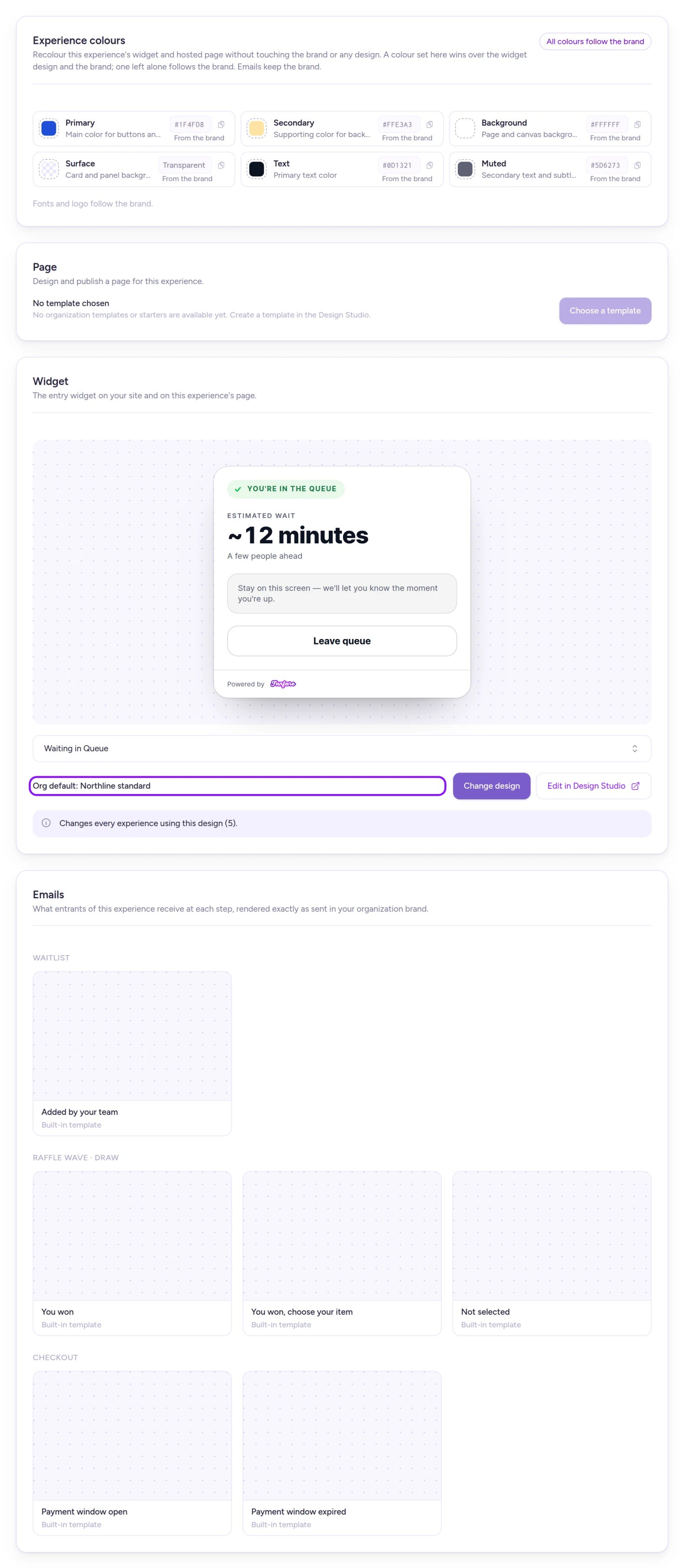
Each experience's Design tab shows the design layers shaping what customers see.
Hosted page vs. entry widget
- Entry widget — The interactive component where shoppers join a queue, enter a draw, place bids, book appointments, or buy in a timed release. The same widget design renders whether you embed it on your own site or run it on a hosted page.
- Hosted page — A full standalone drop page hosted by Fanfare for a single experience. It’s optional—you can run drops using only the embedded widget on your website. See Build and publish the hosted page and Run it on your own site.
Copied vs. linked layers
Whether an edit updates a live drop depends on how that layer attaches to an experience:- Copied when used — Page templates and announcement templates (email, SMS, and social). Applying a page template creates an independent copy for that experience, and composing an announcement snapshots the template. Editing or unpublishing the template later affects only new pages and messages created afterward.
- Linked live — Your brand, widget designs, and wallet pass designs. Every experience or pass referencing them reflects the latest saved version automatically.
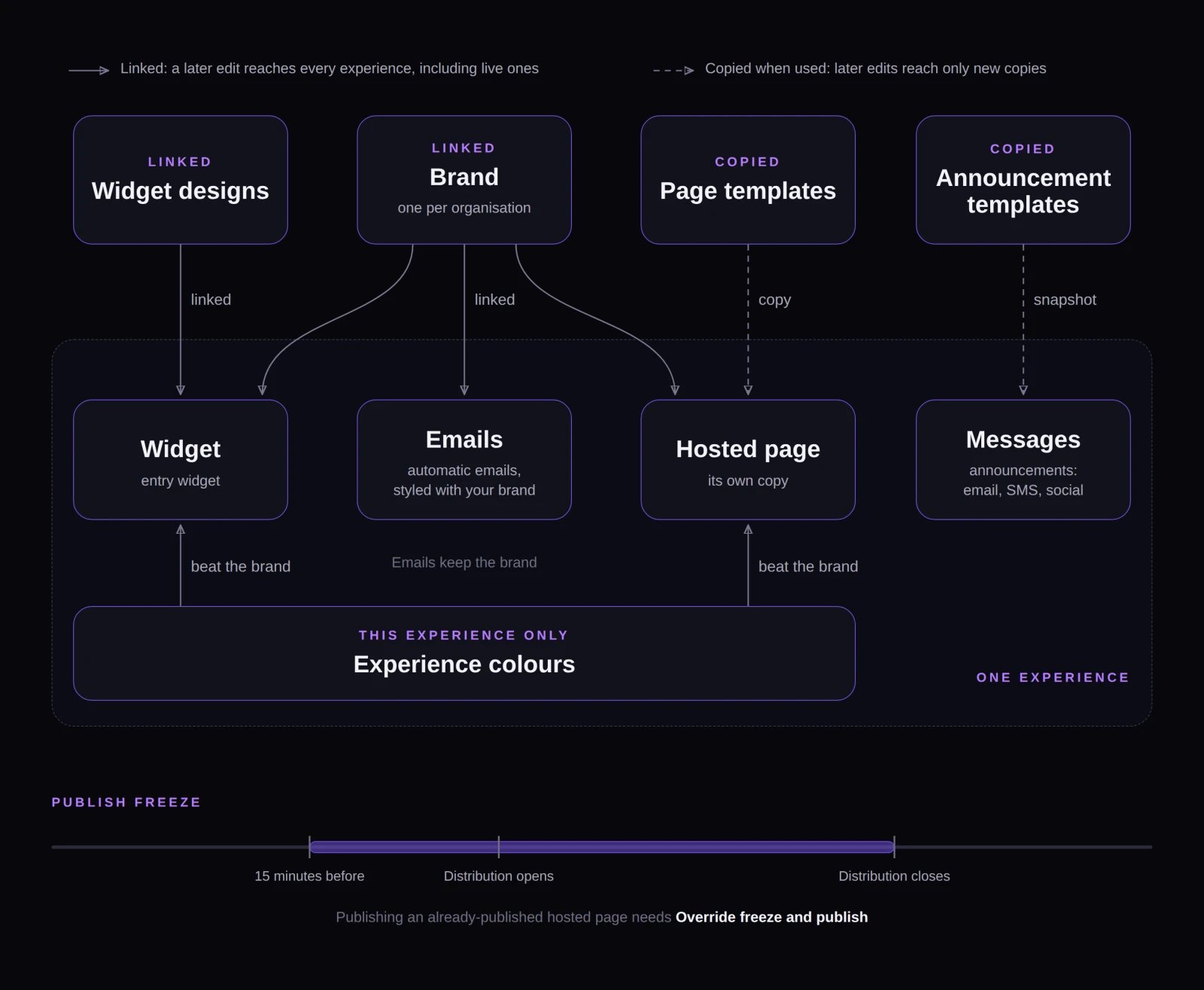
Linked layers update every experience on save; copied layers apply only to pages and announcements created afterward.
How Fanfare chooses a widget design
For each experience, Fanfare selects the widget design in this order:- The design chosen specifically for that experience, as long as it’s Live.
- Otherwise, your organization’s default widget design.
- Otherwise, the built-in Kinetic style.
Color and font priority
On the entry widget, colors cascade from lowest to highest priority:- Built-in widget style defaults
- Brand colors
- Widget design colors
- Experience colours
Changes that go live without publishing
Hosted page layout and copy changes stay in draft until you publish, with four exceptions that update live experiences as soon as they’re saved:- Brand edits — Brand settings auto-save as you edit. Hosted pages update within about a minute, and widgets and future emails pick up changes automatically (emails already sent aren’t affected). See Set your brand.
- Experience colours — Apply immediately to that experience’s widget and hosted page. See Set your brand.
- Widget design updates — Saving a Live widget design, selecting Change design or Reset to org default, or changing/clearing the organization default immediately restyles every affected widget on both hosted pages and embedded sites. See Templates and widget designs.
- Linked fields on published pages — Fields bound to source data (product name, description, and image; experience name and schedule; organization name, logo, address, and support email) sync automatically when the source updates, sometimes after a brief delay. See Build and publish the hosted page.
The publish freeze
To prevent accidental page edits while shoppers are entering, Fanfare freezes publishing on an already-published hosted page starting 15 minutes before any distribution in the experience opens until it closes:- A distribution with no close time freezes publishing until 30 minutes after it opens.
- A distribution with a close time but no open time freezes publishing until it closes.
- Deleted distributions never trigger a freeze.
- Your first publish is never frozen, and you can still save drafts during a freeze.
Draft, Live, and Default templates
- Only Live templates appear when selecting designs for an experience.
- Publish a template before selecting Make default.
- You can’t unpublish or delete a default template until you Clear default—and you can’t unpublish or delete a widget design or wallet pass design while any experience or loyalty audience still uses it.
Plans and downgrades
If you downgrade to a lower plan, existing designs and published hosted pages keep serving customers normally—you just can’t edit, publish, clone, or set defaults on templates. On Starter, the template library is unavailable, so you won’t be able to unpublish, delete, or Clear default on existing templates. Wallet pass designs require Pro or above; moving from Pro to Growth still lets you unpublish, delete, and Clear default on existing wallet pass designs.Example: making changes during a live queue
Suppose Northbound Supply Co.’s “Phantom Stitch Anorak Drop” has a published hosted page made from a template, and its “Inner Circle Early Access” queue is open—putting the experience inside its publish freeze:On Shopify
Design Studio and the experience Design tab work the same way in the Fanfare app in Shopify. On your Shopify storefront, the widget’s colors, fonts, and wording come from Design Studio rather than the Shopify theme editor—if you haven’t set a brand font, the widget inherits your theme’s font. In the Shopify app, any staff member with app access can save, publish (including overriding a publish freeze), and archive hosted pages; in the standalone Fanfare admin, those actions require an organization admin. See Build and publish the hosted page.Related
Set your brand
Configure your logo, colors, and fonts across every experience.
Templates and widget designs
Create, publish, and set default templates in Design Studio.
Build and publish the hosted page
Customize your drop page, publish updates, and override a freeze.
Run it on your own site
Embed the Fanfare widget on your own website.
Announcements
Create email, SMS, and social announcements from templates.