

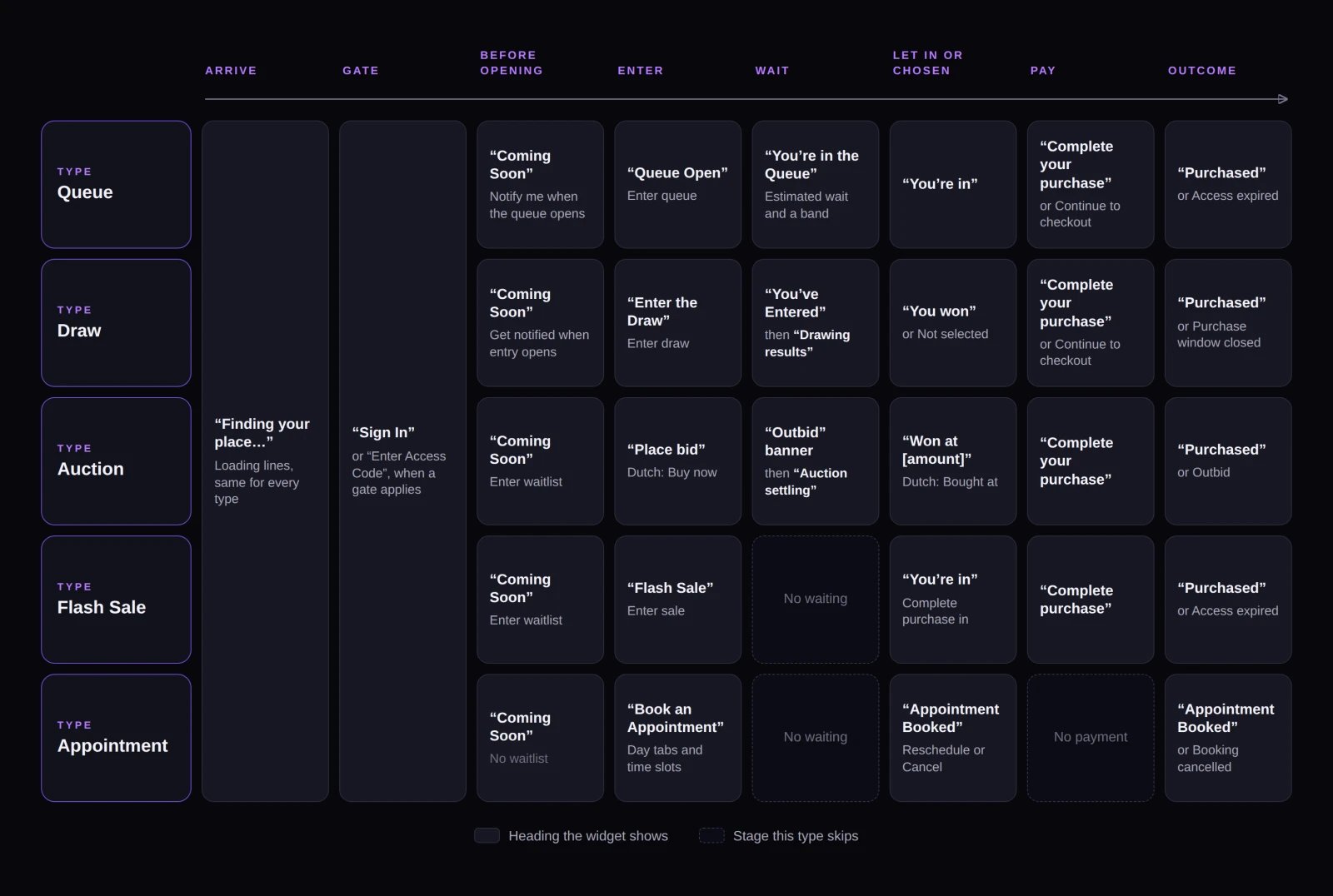
Every customer moves through the same stages, with each distribution type skipping the ones it doesn't need.
Arriving
On hosted pages and Shopify, the widget starts automatically. On custom embeds, customers see a Welcome screen with Get started unless your developer initializes the widget automatically. The widget updates in real time without page refreshes. If a customer’s connection drops, a status bar shows “Live updates paused — reconnecting…” until the connection returns. When Automatic entry is enabled on a distribution, the widget enters the customer automatically—unless they first need to authorize a card hold, pick a product/size, or enter a Flash Sale with counted stock.Gates
Before Fanfare places a customer into a drop, they may pass through one or more gates (see Sequences and routing):- Sign-in: Prompts for an email address or phone number and sends a 6-digit verification code (valid for 5 minutes, with a Resend code option). If your organization runs SMS marketing, phone sign-ins ask whether they want drop texts before sending the code—declining doesn’t block entry.
- Guest entry: Continue as guest appears on the sign-in screen only when the sequence has no audience and every open or upcoming distribution has Allow guest access turned on. Guests see a reminder to keep the page open because they won’t receive emails or texts.
- Access code: Prompts for the sequence’s shared code (case-insensitive).
- Verification: Some customers may be asked to complete a Verification Required check before continuing.
When a customer can’t get in
- Access unavailable: Shown when an audience excludes the signed-in customer (“This experience is for members of a specific group.”) or when no sequence accepts them (“This experience isn’t available to you.”).
- No current access window: Shown when their assigned sequence has no open or upcoming distribution.
- After close (signed out): Visitors who aren’t signed in see “Entered? Sign in to see your result.”
Before doors open
Before a drop opens, customers see Coming Soon with a live countdown in their own local time zone, plus a waitlist button (Notify me when the queue opens, Get notified when entry opens, or Enter waitlist). Joining a waitlist requires sign-in, so signed-out visitors and guests see Sign in to get notified instead. Appointments don’t have waitlists. For queues, the waiting room opens 5 minutes before the scheduled open time so customers can line up early. Wait estimates appear once the queue actually opens.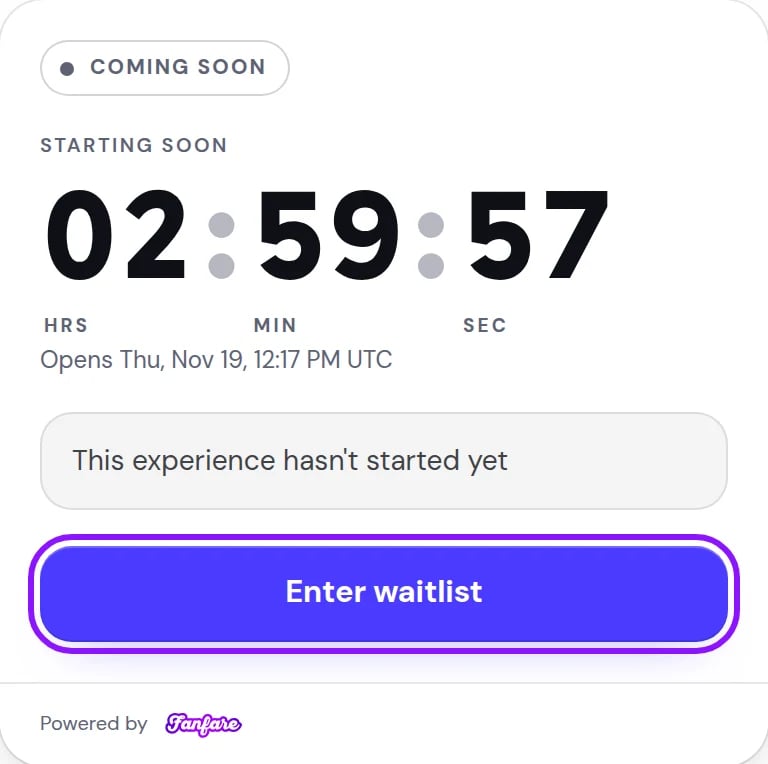
Customers arriving before launch see a local-time countdown and a waitlist sign-up button.
Stage by stage
Note that customers see timed releases labeled as Flash Sale.
When a sequence uses Customer Picks, customers see Choose your item either on entry or once admitted. With Mystery Box, admitted customers see “You got [product name]!”
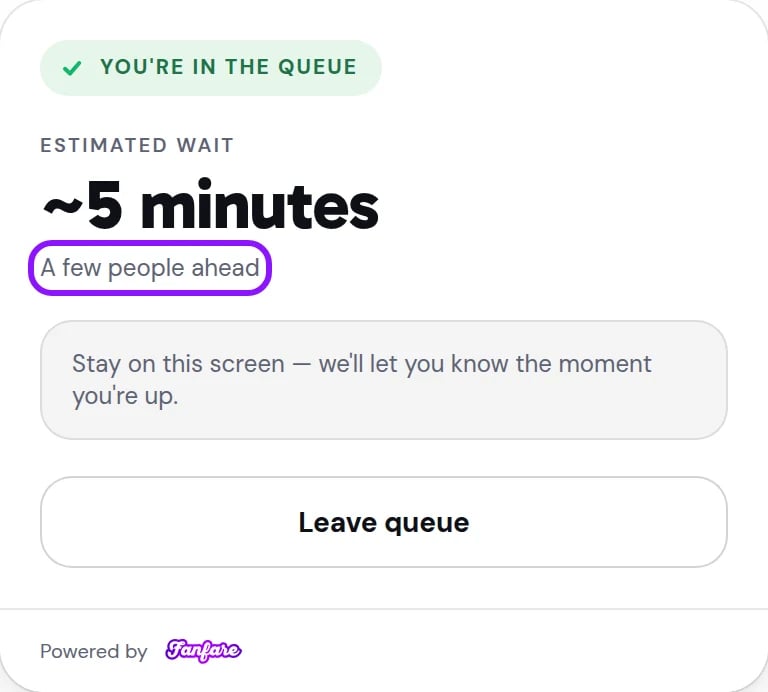
Queued shoppers see an estimated wait and a relative band rather than a raw position number.
Paying
Every admitted customer or winner gets a limited payment window to complete their purchase (see Admission and the payment window):- Fanfare checkout: Shows Complete your purchase with a Your checkout time countdown. If the customer’s bank requires confirmation (such as 3DS), the countdown pauses while they verify. Completed purchases display a Purchased receipt.
- Pre-authorization: On queues with Pre-authorise on joining or draws with Pre-authorise on entry, customers authorize a card hold before entering (“Only charged if you get a spot”).
- External checkout: The widget keeps the Your checkout time countdown visible and hands customers off via Continue to checkout. If time runs out before payment finishes, the widget shows the expired screen below.
How it ends
Customers who cancel their own appointment see Booking cancelled and can pick a new slot when rebooking is offered.
When you change things mid-drop
See Change things mid-drop and Stop a drop for the admin side of these states:- Paused queue: Shoppers keep their place in line (with no wait estimate until you resume), and new shoppers can still join. Note that “Entry is paused. Your place in line is saved.” means the queue is waiting on held stock or stock that isn’t ready yet—not that you manually paused it (see Troubleshooting a live drop).
- Queue sells out while people wait: Shows “Everything claimed” (“Right now · you keep your place”). If stock frees up or you move units in, the line resumes automatically.
- Deactivated drop: Trying to interact with a deactivated distribution shows “This has been ended early and is no longer available.” Deactivating anything in an experience marks the entire hosted page as canceled (before close) or ended (after close). Customers still waiting in a deactivated queue, or entered in a deactivated draw that hadn’t run yet, are removed; on your own site the widget shows them Not selected. Booked appointment customers see Cancelled.
- Deleted experience: Custom embeds show Ended, and hosted pages display the ended page.
Other prompts customers may see
- Access code upgrade: Customers placed in an open sequence see “Have an access code?” if a higher-priority open sequence is gated by a code. Entering an invalid code keeps them in their current sequence.
- Loyalty fairness badge: “Fairness provided by Fanfair” appears whenever Bias toward loyal consumers is enabled and entry is open. (In queues, loyalty weighting only orders people who joined before Opens; see Loyalty and Fanfair.)
Automated messages Fanfare sends
Each notification sends over one channel—your organization’s default (email or SMS), falling back to the other if the customer lacks that contact method or opted out of texts. Only signed-in customers receive messages.
The “opens soon” alert uses your distribution name verbatim—give distributions clean, customer-facing names (Invites, waitlist and access-code sends).
Customers who join a waitlist themselves don’t receive a confirmation email or text—only customers you add manually in the admin do.
Example: three shoppers at the same drop
Suppose Northbound Supply Co. runs Phantom Stitch Anorak Drop with two sequences:- Inner Circle Early Access (live queue, gated to the Inner Circle audience)
- Public Draw (scheduled draw, open to everyone, guest access off)
On Shopify
On Shopify, customers interact with the exact same widget directly on your product page (Storefront setup), while checkout protection blocks anyone from buying protected products outside the drop. Once admitted, the widget adds the item to the customer’s cart and sends them to Shopify checkout. Shopify checkout doesn’t display Fanfare’s countdown timer—if a customer’s payment window expires before they pay, checkout protection blocks the purchase. Appointments aren’t offered on Shopify.Related
Sequences and routing
See how Fanfare routes customers across sequences and applies gates.
Admission and the payment window
Understand checkout timers and payment collection modes.
Customers and identity
Compare signed-in customers and guest entry.
Brand, templates and designs
Customize how your hosted pages and widgets look.