

How it works
Set Opens, Closes, and Time zone (defaults to your experience’s time zone), plus optional Allow guest access (off by default; unavailable when gated by an audience) and Automatic entry (off by default). There’s no payment collection step to configure. See Set up a timed release for step-by-step setup. Before Opens, customers see a “Coming Soon” countdown and can join the sequence waitlist via “Enter waitlist” (signed-out visitors see “Sign in to get notified”). See Waitlists. Once the sale opens, shoppers pick their item or size (if applicable) and click Enter sale to claim a spot.Entering holds a unit
On a stock-counted sequence, clicking Enter sale reserves one unit of the shopper’s chosen item immediately while they check out. That hold remains in place until:- They complete payment and purchase the unit, or
- Their 30-minute checkout window expires and the unit returns to available stock.
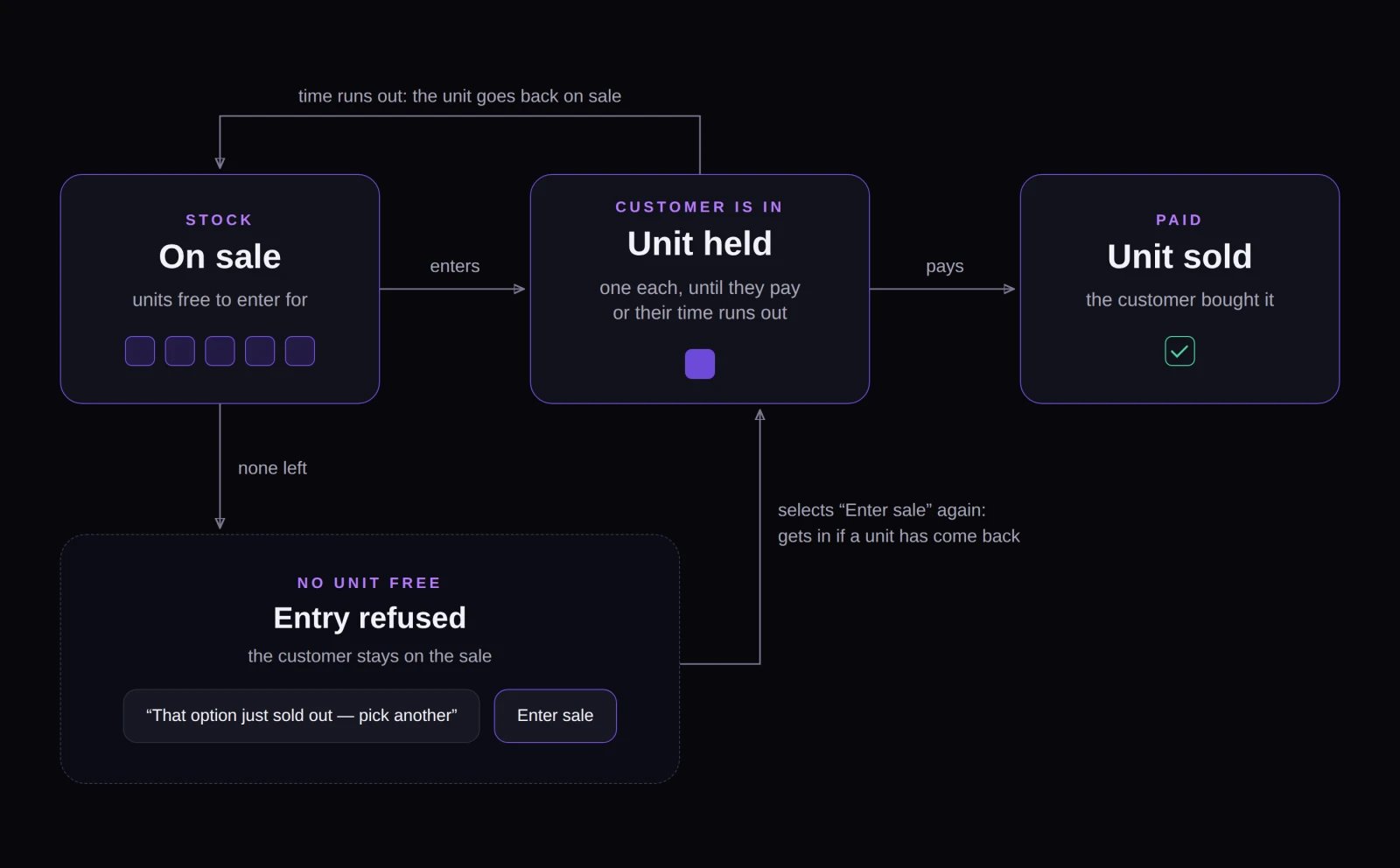
On a stock-counted sequence, entering a timed release holds one unit until the shopper pays or their checkout window expires.
Automatic entry on counted sequences
When Automatic entry is on, Fanfare normally admits shoppers automatically as soon as they reach the drop. On a timed release whose sequence counts a size that can run out, automatic entry isn’t active—shoppers click Enter sale themselves (your toggle setting is still saved). If no size has a stock cap and there’s no item selector, automatic entry works as expected.Not compatible with Mystery Box
Timed releases can’t run on a sequence using Mystery Box product selection. You can’t add a timed release to a Mystery Box sequence—or switch a sequence with a timed release to Mystery Box—without seeing “Timed release can’t be combined with Mystery Box products”. See Sequences and routing.Payment and take rate
Customers always pay at checkout after entering—there are no card pre-authorizations on timed releases. Every admitted shopper gets a fixed 30-minute payment window (not configurable). If their window expires while the release is still open, they see “Access expired” and can return to click Enter sale again. See Admission and the payment window for more on checkout windows. Orders paid through Fanfare checkout or Shopify checkout use the lower Timed-release take rate—see Payments and fees.Good to know
- Guest shoppers: When Allow guest access is enabled, guests don’t receive emails or texts and can only return to their session from the same browser. See Customers and identity.
- Loyalty points: Entering a timed release doesn’t award participation points, though completed purchases still earn purchase points as usual. See Loyalty and Fanfair.
- No overlapping windows: Distributions in one sequence can’t overlap. Use separate sequences to run timed releases simultaneously for different audiences. See Distributions.
- Customer-visible names: Your distribution name appears in default waitlist “opens soon” emails, so give it a clear public title. See Waitlists.
- Minimal locking: Beyond standard schedule rules, timed releases have no extra settings that lock after opening. See What locks, and when.
Lifecycle and deactivation
A timed release moves from Scheduled to Live at Opens, and to Ended at Closes with no settling phase. Choosing Deactivate ends the release immediately (showing Ended early if stopped before Closes). Admitted shoppers who haven’t started checkout lose their hold, while shoppers already checking out can finish paying within their 30-minute window. Paid orders stay intact, and deactivation can’t be undone. See Stop a drop.What your customers see
- Before opening: “Coming Soon” with a countdown and “Enter waitlist” for signed-in shoppers.
- While live: “Flash Sale” with a “Window closes in” countdown, optional item selector, and Enter sale.
- Admitted: “You’re in” with a “Your checkout time” countdown and Continue to checkout.
- Sold out: “That option just sold out — pick another” alongside Enter sale while live; “Ended” once the release closes.
- Window expired: “Access expired” (they can click Enter sale again while the release remains open).
Example: running a timed release
Northbound Supply Co. launches the KaiZen Relic through a Sneaker Club Release sequence gated to their Sneaker Club audience (so guest access is off). The timed release runs for four hours with 300 pairs counted in stock:- At Opens, Sneaker Club members sign in and click Enter sale. The first 300 shoppers immediately hold one pair each and see “You’re in” with their 30-minute checkout countdown.
- Shopper 301 clicks Enter sale moments later. All 300 pairs are currently held, so they see “That option just sold out — pick another” and stay on the page.
- One of the first 300 shoppers lets their checkout window expire without paying, automatically releasing their pair back into stock.
- Shopper 301 clicks Enter sale again, claims the returned pair, and completes checkout.
- Four hours later, the release closes and remaining visitors see “Ended”.
Related
Set up a timed release
Step-by-step instructions and settings for adding a timed release.
Distributions
Compare all five distribution types and how their schedules work.
Stock
Understand counted stock, holds, and unlimited sizes.
What your customers see
Preview every customer screen and notification.